
Written by: Chief Operating Officer
Anastasiia SokolinskaUpdated: 13.08.2026
15 min read
A step-by-step migration guide for QA engineers and automation architects, covering readiness assessment, phased migration strategy, code translations, and common pitfalls to avoid.
For nearly two decades, Selenium was the undisputed standard for browser test automation. It was flexible, battle-tested, and supported by an enormous ecosystem. But the web has changed — and Selenium hasn't kept pace.
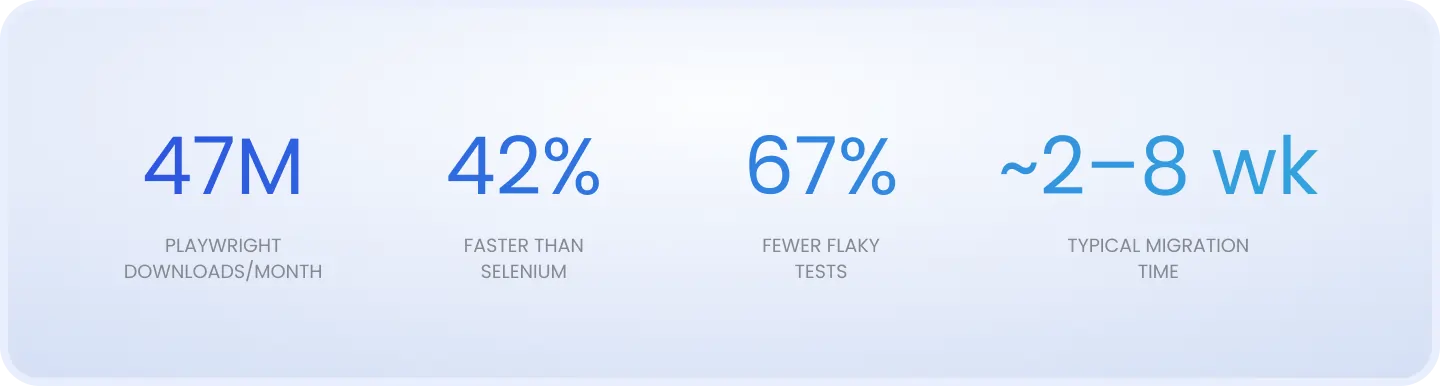
The evidence is hard to ignore. According to TestGuild's 2026 survey, Playwright has overtaken Selenium as the most widely used automation testing tool, with 47 million npm downloads per month as of early 2026. GitHub metrics tell the same story: Playwright has accumulated over 74,000 stars compared to Selenium's 32,000, and more repositories now depend on Playwright than Selenium.
But raw adoption numbers aren't the real argument for migrating. The real argument is maintenance cost. Selenium teams routinely spend more engineering time managing waits, retrying flaky tests, and wrestling with WebDriver version conflicts than they do improving test coverage. CI pipelines that used to take 12 minutes stretch to 50. Engineers rerun failures twice before trusting the result.
This guide is not a debate about which framework is 'better.' It's a practical, phased approach to migration for teams that have already decided to move — written from the experience of having done it across multiple client environments.
Need help with the migration?
What actually changes when you move to Playwright
Playwright isn't just 'a newer Selenium.' The two frameworks take fundamentally different approaches to browser automation. Understanding the architecture shift is essential before writing a single line of migration code.
Architecture: WebSocket vs. WebDriver
Selenium uses the WebDriver protocol — your test script sends HTTP commands to a driver executable (ChromeDriver, GeckoDriver), which then translates them into browser instructions. Every action adds network round-trip latency, and the driver version must match the installed browser version precisely.
Playwright communicates directly with the browser over a persistent WebSocket connection using the Chrome DevTools Protocol (CDP). There's no middleman. One benchmark recorded Playwright completing page navigation in 1.8 seconds vs. Selenium's 2.7 seconds — a 35% difference — on identical test suites.
Auto-waiting vs. explicit waits
This is where teams feel the most immediate relief. In Selenium, you write explicit waits for almost every interaction:
// Selenium — you manage the wait manually
WebDriverWait wait = new WebDriverWait(driver, Duration.ofSeconds(10));
WebElement btn = wait.until(
  ExpectedConditions.elementToBeClickable(
    By.id("submit-btn")
  )
);
btn.click();
In Playwright, auto-waiting is built into every action. The framework checks that an element is visible, stable, enabled, and in the viewport before interacting with it — automatically:
// Playwright — auto-wait is built in
await page.getByRole('button', { name: 'Submit' }).click();
The result: fewer flaky tests, less boilerplate, and faster tests overall.
Browser contexts vs. Browser instances
Selenium typically launches a fresh browser instance for each test — expensive in both time and memory. Playwright uses browser contexts: lightweight, isolated sessions that share a single browser process. You can run dozens of isolated parallel tests from a single Chromium instance, dramatically reducing resource consumption.
The locator API shift
Playwright's locator API encourages accessibility-first element selection, which is both more resilient to DOM changes and better for accessibility testing:
driver.findElement(By.id("email"))
page.locator('#email') or page.getByLabel('Email')
By.xpath("//button[text()='Login']")
page.getByRole('button', { name: 'Login' })
By.className("submit-btn")
page.locator('.submit-btn') or page.getByText('Submit')
By.cssSelector(".form input")
page.locator('.form input')
ExpectedConditions.visibilityOf(el)
Built-in — no equivalent needed
Language support: The honest picture
Most Playwright guides push you toward TypeScript. That's fair — the TS ecosystem is where Playwright is most mature and most documented. But Playwright also officially supports Python, Java, and .NET (C#). If your team works in Java or Python and the thought of switching languages is a hard block, migration is still feasible — just know that some advanced features and community resources will be thinner outside of the TypeScript path.
Skip the trial and error – our engineers have done this before
Before you start: Assess your migration readiness
The biggest migration mistakes happen before a single line of code is touched. Teams that skip the readiness assessment phase (or a short QA consulting review) end up maintaining two broken frameworks simultaneously for months. A structured self-assessment across three dimensions prevents this.
The three-dimension readiness framework
1. Codebase complexity
Audit your Selenium suite honestly. Key questions:
Clean Page Object Model (POM): Methods are isolated, no driver logic leaking into tests. Migration will be relatively mechanical.
Mixed/legacy architecture: Page objects with direct driver references, XPath strings duplicated across 30 files, shared mutable state between tests. Migration requires refactoring, not just translation.
Spaghetti tests: Test logic, waits, and business logic all tangled together. Recommend treating migration as a rewrite opportunity.
2. Team skill gap
How comfortable is the team with JavaScript/TypeScript async/await patterns?
Does anyone have prior Playwright experience, even on side projects?
Is there a dedicated migration owner — one person accountable for the transition?
3. CI/CD pipeline readiness
Is the CI pipeline containerized? (Makes parallel Playwright/Selenium runs much easier.)
Can you add a second test job without impacting release gating?
Are browser binaries pinned, or does your CI pull latest?
Effort estimation by suite size and architecture
Small (< 100 tests)
1–2 weeks
2–3 weeks
3–5 weeks
Medium (100–500 tests)
2–4 weeks
4–7 weeks
6–10 weeks
Large (500+ tests)
4–8 weeks
8–14 weeks
12–20 weeks
Note: these estimates assume a dedicated migration owner and treat code translation and infrastructure setup as separate phases. Add 30–50% if the team is also carrying full sprint commitments during migration.
When NOT to migrate: Migration isn't always the right call. Consider staying on Selenium if: (1) Your test suite requires Internet Explorer coverage — Playwright does not support IE. (2) Your organization is in a heavily regulated industry (aerospace, medical device, nuclear) with a frozen, certified toolchain that cannot be changed without re-certification. (3) Your Selenium suite is built on a deeply customized Java grid infrastructure that would require complete replacement. In these cases, a hybrid approach — Playwright for new features, Selenium for legacy regression — is more pragmatic than a full migration.
Your team builds the product. We'll build the test infrastructure.
Step-by-step migration process
The cardinal rule of any Selenium-to-Playwright migration: never replace, always add first. Playwright should live alongside Selenium until coverage has been verified feature by feature. Here's the five-phase approach we recommend.
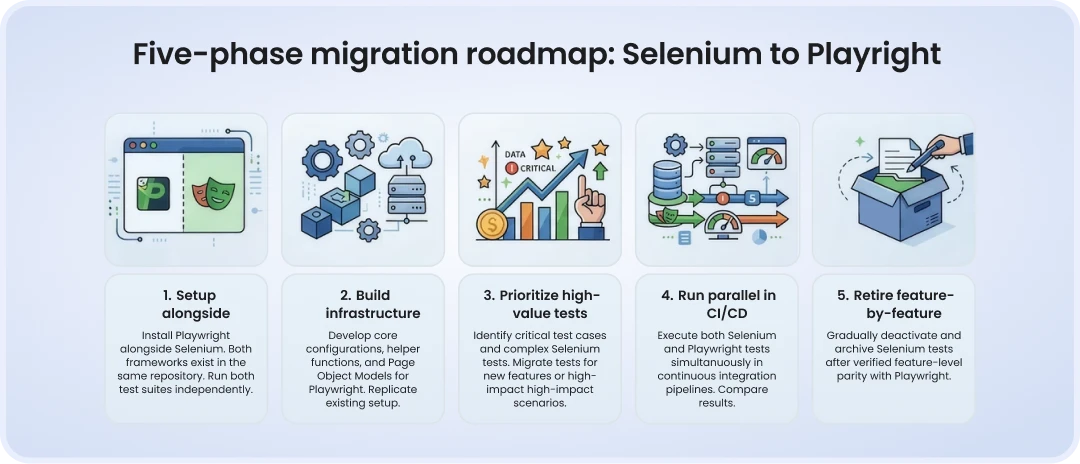
Key principle: Don't migrate tests one by one from day one. Build your Playwright infrastructure — page objects, fixtures, shared utilities — before touching a single test. Teams that skip this step end up rebuilding the foundation mid-migration, which is significantly more painful.
Phase 1: Set up Playwright alongside Selenium
Install Playwright as a separate dependency. It should not touch your existing Selenium configuration.
npm init playwright@latest
# or for Java:
# Add to pom.xml: com.microsoft.playwright:playwright:1.x.x
Create a separate folder structure — never mix Playwright and Selenium code:
/src
  /selenium       ← existing suite, untouched
    /pages
    /tests
  /playwright     ← new Playwright suite
    /pages        ← PW_ prefix during transition
    /tests
    /fixtures
Prefix all Playwright page objects with PW_ during the transition (e.g., PW_LoginPage). When debugging at 2am, you'll instantly know which version of a page object is in use.
Phase 2: Build infrastructure before migrating tests
Your first migration task is not to port tests — it's to build a solid Playwright foundation:
Fixtures: Authentication flows, shared test data, browser context setup.
Page objects: Start with your 5–10 highest-value pages (login, core navigation, checkout). Build these from scratch using Playwright patterns — do not translate Selenium page objects line-by-line.
Utilities: Network interception helpers, screenshot-on-failure wrappers, test data factories.
Only once this foundation is solid should you begin translating tests.
Phase 3: Prioritize high-value tests first
Start migrating your critical user flows — login, core onboarding, checkout, key CRUD operations. These are the tests that give you the most confidence signal and the most value if Playwright's stability improvements kick in.
Stop writing new Selenium tests immediately. From day one of the migration, all new test coverage goes into Playwright. This naturally accelerates the migration as the product grows.
Phase 4: Run both frameworks in CI in parallel
This is the phase most teams rush. Don't. Run Selenium and Playwright as separate CI jobs for the duration of the migration:
# .github/workflows/tests.yml
jobs:
  selenium-tests:
    runs-on: ubuntu-latest
    steps:
      - uses: actions/checkout@v4
      - name: Run Selenium suite
        run: mvn test -Dtest=SeleniumSuite

  playwright-tests:
    runs-on: ubuntu-latest
    steps:
      - uses: actions/checkout@v4
      - uses: actions/setup-node@v4
        with: { node-version: 20 }
      - run: npm ci
      - run: npx playwright install --with-deps
      - run: npx playwright test
      - uses: actions/upload-artifact@v4
        if: failure()
        with:
          name: playwright-report
          path: playwright-report/
Compare coverage reports weekly. Budget 4–8 weeks of dual maintenance — teams that retire Selenium before Playwright coverage is verified almost always regret it.
Phase 5: Retire Selenium feature by feature
Only retire a Selenium test once Playwright coverage for that specific feature has reached 100% and has run successfully through at least 2–3 full CI cycles. Never retire by percentage of the total suite — retire by feature.
Bring us your Selenium suite. We'll bring the Playwright expertise.
Key code translations: Selenium patterns → Playwright equivalents
1. Login test: Full before/after
WebDriver driver = new ChromeDriver();
driver.get("https://app.example.com/login");
WebDriverWait wait = new WebDriverWait(driver, Duration.ofSeconds(10));
WebElement email = wait.until(EC.visibilityOfElementLocated(
By.id("email")));
email.sendKeys("user@example.com");
driver.findElement(By.id("password"))
.sendKeys("password123");
wait.until(EC.elementToBeClickable(
By.cssSelector(".btn-login"))).click();
wait.until(EC.urlContains("/dashboard"));
driver.quit();
import { test, expect } from '@playwright/test';
test('user can log in', async ({ page }) => {
await page.goto('/login');
await page.getByLabel('Email')
.fill('user@example.com');
await page.getByLabel('Password')
.fill('password123');
await page.getByRole('button', { name: 'Log in' }).click();
await expect(page).toHaveURL(/.*dashboard/);
});
2. Waits: Stop translating, start trusting
The most common migration mistake is translating WebDriverWait calls into page.waitForSelector() calls. Don't. Playwright's auto-wait handles the vast majority of timing issues:
WebDriverWait + ExpectedConditions
Delete entirely. Let Playwright auto-wait.
Thread.sleep(2000)
Delete entirely. Use auto-wait or page.waitForResponse().
implicitlyWait(Duration)
Not needed. Remove from setup.
waitForPageLoad strategy
Use await page.waitForLoadState('networkidle') only if truly needed.
FluentWait with polling
Replace with expect().toBeVisible({ timeout: X }).
3. Page Object Model refactoring
Playwright page objects use async factory patterns instead of constructor injection. The 40-line Selenium class typically becomes a 25-line Playwright class:
// Playwright Page Object — LoginPage.ts
import { Page, Locator } from '@playwright/test';

export class LoginPage {
  readonly page: Page;
  readonly emailInput: Locator;
  readonly passwordInput: Locator;
  readonly loginButton: Locator;

  constructor(page: Page) {
    this.page = page;
    this.emailInput = page.getByLabel('Email');
    this.passwordInput = page.getByLabel('Password');
    this.loginButton = page.getByRole('button', { name: 'Log in' });
  }

  async login(email: string, password: string) {
    await this.emailInput.fill(email);
    await this.passwordInput.fill(password);
    await this.loginButton.click();
  }
}
4. Network interception (Selenium has no equivalent)
One of Playwright's most powerful capabilities unavailable in Selenium — native network interception:
// Mock an API response in Playwright
await page.route('**/api/users', route =>
  route.fulfill({
    status: 200,
    body: JSON.stringify({ users: mockData }),
  })
);
5. Handling iFrames, Shadow DOM, and File Uploads
iFrames
driver.switchTo()
.frame(element)
const frame = page.frameLocator(
'#iframe-id'); frame.getByRole(...)
Shadow DOM
js executor workaround
page.locator('my-component >> [slot=input]') — natively supported
File upload
sendKeys('/path/to/file')
page.setInputFiles(
'input[type=file]',
'path/to/file')
Common migration mistakes and how to avoid them
Rushing the parallel phase. Retiring Selenium before Playwright coverage is verified by feature is the number one cause of failed migrations. Teams that skip this step typically spend weeks trying to identify which failures are genuine bugs vs. migration gaps.
Translating waits instead of removing them. If you convert every WebDriverWait to a waitForSelector, you carry Selenium's flakiness problems into Playwright. Trust auto-wait by default and only add explicit waits when you have a specific, documented reason.
Migrating tests before the infrastructure is ready. The correct sequence is: foundation first (fixtures, page objects, utilities), then tests. Reversing this order means rebuilding the foundation mid-migration — the most common source of wasted time.
Skipping team onboarding. Playwright introduces different patterns. Without shared guidelines, engineers write tests in different styles, which creates long-term maintenance debt. Run a structured training session — or pair programming sessions — in the first two weeks.
Underestimating the people problem. QA engineers who spent years building complex Selenium frameworks have significant expertise invested in that work. Telling them it's being replaced creates friction. Address it directly: the skills transfer (test design, debugging, CI thinking) even if the syntax doesn't.
Tip from the field: Prefix Playwright page objects with PW_ during the entire transition period (e.g., PW_LoginPage.ts). It sounds trivial, but when two frameworks are running simultaneously and something breaks at 2am, you will immediately know which version of a page object is in play.
What to expect after migration: Performance and stability benchmarks
The performance gains from a successful Selenium-to-Playwright migration are real — but they depend heavily on what was making your Selenium suite slow in the first place. Here's what independent benchmarks consistently show:
Test execution speed (avg)
Baseline
42% faster
Benchmark: TestDino, 300+ test suites
Flaky test rate
Baseline
67% fewer
Reduced by auto-wait and context isolation
Memory/CPU usage
Baseline
20–30% lower
Browser context sharing vs new instances
Page navigation time
2.7 sec
1.8 sec
35% faster (WebSocket vs WebDriver HTTP)
Parallel test efficiency
~72% at scale
~92% at scale
Native contexts vs Selenium Grid overhead
Debugging time
Baseline
35% faster
Built-in trace viewer vs external Allure setup
One client in the fintech space that DeviQA supported through this migration reduced their nightly regression suite runtime from 48 minutes to 19 minutes — a 60% reduction — primarily by removing explicit waits and switching from Selenium Grid to Playwright's native parallel execution.
Important caveat: if your primary bottleneck is slow backend responses or complex test data setup, switching frameworks won't fix that. Playwright eliminates framework overhead — it doesn't speed up your application under test.
Conclusion: Migration is a process, not a rewrite
A Selenium-to-Playwright migration done right is a phased, infrastructure-first process that takes weeks, not days — and it's worth every hour of that investment. The teams that succeed are not the ones that move fastest. They're the ones that:
Assess their codebase complexity and team readiness honestly before starting
Build Playwright infrastructure before migrating a single test
Run Selenium and Playwright in parallel until feature-level coverage is verified
Stop writing new Selenium tests from day one of the migration
Address the human side — communicate the 'why' early, invest in training, and retire Selenium test-by-test rather than in one big cut
Three signals that tell you it's time: your CI runs have grown by more than 30% in the past year without a corresponding increase in coverage; your flaky test rate is above 10%; your QA engineers are spending more time on test maintenance than on writing new coverage.
If any of those describe your team, the migration window is now — the longer you stay on Selenium, the larger the maintenance debt compounds.
Planning a Selenium to Playwright migration? DeviQA's test automation engineers have guided migrations across fintech, SaaS, and healthcare clients — from initial readiness assessment through full Selenium retirement. We know where migrations stall and how to prevent it.
Book a strategic QA consultation
Frequently asked questions about migrating Selenium to Playwright
Can Selenium and Playwright run in the same CI pipeline?
Yes, running both as separate CI jobs is the standard approach when you migrate Selenium to Playwright. They share no dependencies, so each runs independently while you compare coverage weekly. Most teams budget 4-8 weeks of dual maintenance before retiring Selenium. Skipping this phase is the most common reason a Selenium to Playwright migration stalls.
How long does migrating Selenium to Playwright take?
It depends on architecture more than test count: a clean POM suite of 100-500 tests takes 2-4 weeks, while the same size with legacy or spaghetti code can take 6-10 weeks. Larger suites (500+) scale from 4-8 weeks up to 12-20 weeks depending on code quality. Add 30-50% if the team isn't fully dedicated to the migration.
Does Playwright support Java and Python like Selenium?
Yes — Playwright officially supports Python, Java, and .NET, so migrating Selenium to Playwright doesn't force a language switch. TypeScript remains the most mature ecosystem, with deeper docs and community support, but Java and Python teams are fully supported for a standard migration.
Do I need to rewrite all my Selenium Page Objects from scratch?
Mostly yes. Selenium Page Objects often embed driver logic directly in methods, and translating that line-by-line just carries old anti-patterns into Playwright. When you migrate from Selenium to Playwright, rebuild your 5-10 highest-value pages first, then use them as templates for the rest.
What's the biggest risk when you migrate Selenium to Playwright?
Retiring Selenium tests before Playwright coverage is verified feature-by-feature. Teams that retire by percentage instead of by confirmed feature parity end up unable to tell a real regression from a migration gap. Never delete a Selenium test until its Playwright equivalent has passed several full CI cycles.
About the author
Chief Operating Officer
Anastasiia Sokolinska is the Chief Operating Officer at DeviQA, responsible for operational strategy, delivery performance, and scaling QA services for complex software products.