
Written by: Chief Operating Officer
Anastasiia SokolinskaUpdated: 13.08.2026
20 min read
All tools have limits.
In the case of Cypress, that limit appears to occur around 300 tests. What was previously an 8 minute CI pipeline has now become a 40 minute CI pipeline. Tests that pass when run locally do not pass when run as part of CI, but there is no way to determine why this is happening, so you continue to add your own fixes, which ultimately fail, and end up being forced to keep adding your own fixes.
Playwright was built to be used on the modern Web that we use today with capabilities such as multiple window tabs, cross-origin flows, etc. Without being required to pay (paywall), without the use of any plugins, and without being required to use the queuing commands that are now built into the framework that are neither asynchronous nor synchronous. Fast, reliable and true tests.
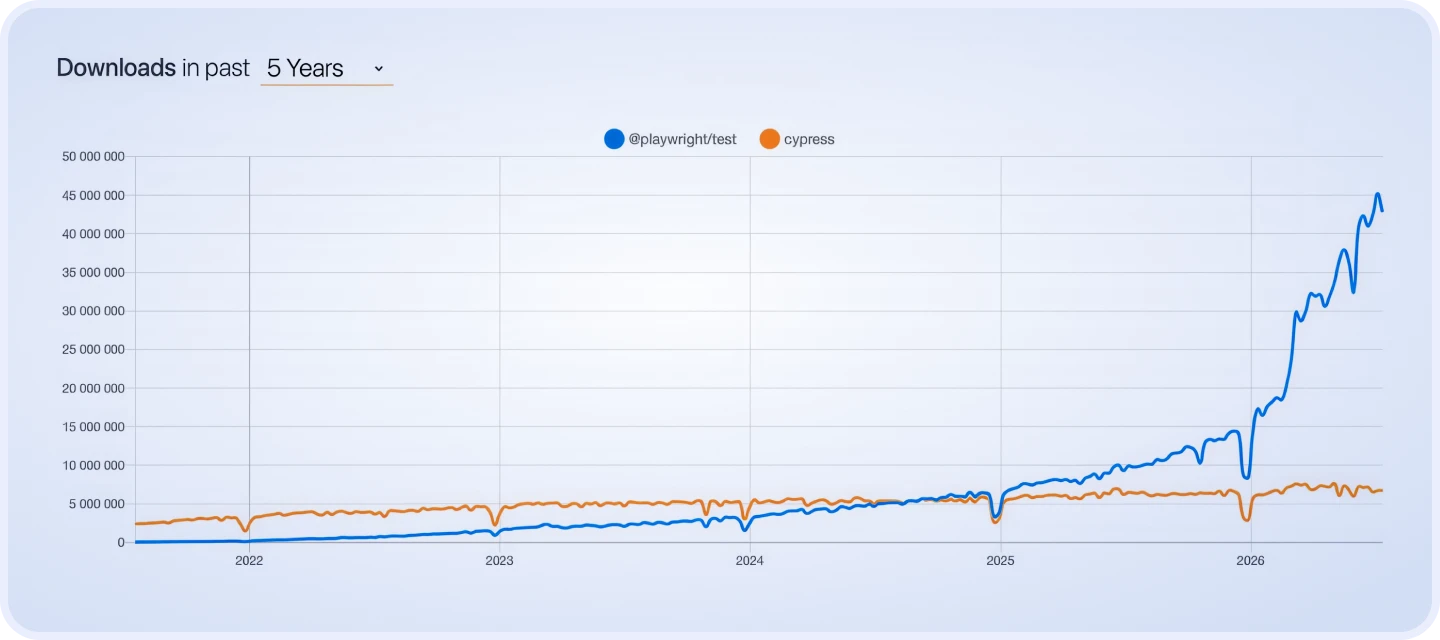
As of 2024, the engineering community has voted using download numbers and has placed Playwright above Cypress. The gap continues to get wider.
This is a guide to show you the best way to make the switch!
Need help with the migration?
Why teams are migrating from Cypress to Playwright
To understand why Playwright has become the preferred framework for new projects and migrations alike, you need to look at the architectural decisions Cypress made in its early years, and how those decisions create friction at scale.
Cypress runs inside the browser, which gave it early advantages: fast feedback, intuitive debugging, and easy setup. But that same in-browser execution model also imposes hard limits:
Single-tab execution only. Tests that span multiple tabs or windows require workarounds that break test isolation.
No true cross-browser support. Cypress supports Chromium-based browsers and has limited Firefox support. WebKit (Safari) is not supported — a genuine gap for teams building consumer applications.
Parallel execution is a paid feature. Running tests in parallel requires Cypress Cloud. Teams with large suites absorb that cost or accept slow CI times.
Command chaining instead of async/await. Cypress uses a custom command queue that looks synchronous but isn't. This trips up new team members and makes certain test patterns awkward to express.
Flakiness in CI environments. Timing-dependent tests that pass locally often fail in headless CI runs because Cypress lacks fine-grained control over element visibility and network state.
Playwright was built to solve these problems directly. Developed by the same Microsoft team that created Puppeteer, it uses a browser driver model that operates outside the browser process, giving it cross-browser control, multi-context isolation, and native async/await throughout.
Browser support
Chromium, partial Firefox
Chromium, Firefox, WebKit
Parallel execution
Paid (Cypress Cloud)
Built-in, free
Test isolation
Shared state, single tab
Independent browser contexts
Async model
Command queue (custom)
Native async/await
Network interception
cy.intercept() — basic
page.route() — advanced, flexible
Language support
JavaScript only
JS, TS, Python, C#, Java
Debugging tools
Time Travel, DevTools GUI
Trace Viewer, Inspector, CLI
Flakiness handling
Manual waits required
Auto-wait built-in
Mobile emulation
Limited
Full device emulation (iOS/Android)
Cross-origin testing
Blocked by architecture
Fully supported
Multi-tab support
Workarounds only
First-class feature
Should you migrate? A Decision framework
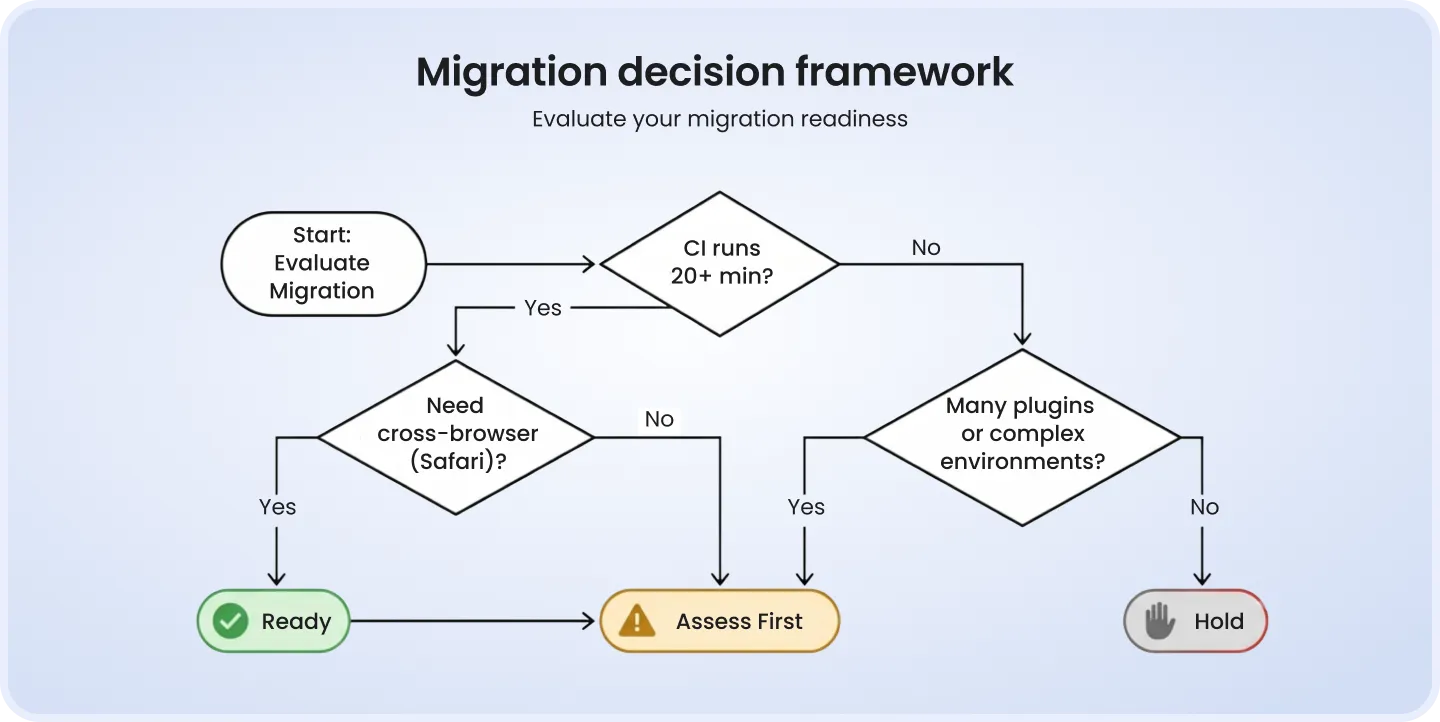
The honest answer is: it depends on your suite, your test automation engineers, and your product roadmap. Here's how to think through it.
Signs your team is ready to migrate
Your CI test runs are taking 20+ minutes on a suite that should be faster
You've hit the limit of what Cypress Cloud parallelization can do cost-effectively
You need cross-browser coverage, including Safari/WebKit
Tests are flaky in CI at a rate that's causing real productivity loss
Your application includes multi-tab flows, cross-origin interactions, or complex auth scenarios
You're building a new testing layer from scratch (greenfield Playwright > greenfield Cypress today)
Your team already writes TypeScript and wants native type safety in tests
Reasons to hold off
Your Cypress suite is small (<100 tests) and stable — migration effort won't pay off quickly
Your team has deep Cypress expertise and no cross-browser or parallelism pain
You have no engineering capacity allocated to the migration — a rushed migration creates more flakiness, not less
You're in a feature-freeze or delivery crunch — migration is an investment, not a quick fix
Ready
100+ tests, CI pain, cross-browser need, TS team
Begin incremental migration now
Assess first
50—100 tests, occasional flakiness, Cypress-only pain
Pilot Playwright on 1 feature area first
Hold
<50 tests, stable CI, no cross-browser need
Revisit in 6—12 months or on next major refactor
Skip the trial and error — our engineers have done this before.
Before you migrate: Planning and preparation
The teams that struggle with migration are almost always the ones that start writing Playwright code before they've finished auditing their Cypress suite. Preparation isn't bureaucracy — it's what keeps migration from becoming a months-long headache.
Step 1: Audit your existing Cypress suite
Walk through your test suite and catalogue:
Custom commands — anything in cypress/support/commands.js. These will all need to be refactored.
Third-party plugins — cypress-axe, cypress-real-events, cypress-file-upload, etc. Check Playwright equivalents before starting.
Fixtures and test data — the fixtures/ folder structure will need to be replicated.
Shared utilities — auth setup, API helpers, environment config.
Step 2: Categorise tests by migration complexity
Straightforward
Basic UI flows, no custom commands, simple assertions
1—2 hours per spec file
Moderate
POM classes, shared auth, fixtures, basic network mocking
3—5 hours per spec file
Complex
Custom commands, iframes, shadow DOM, multi-tab, cross-origin
1—2 days per spec file
Step 3: Choose a migration strategy
Incremental migration is the right approach for almost all teams. Migrating everything at once ('big bang') means you lose CI coverage during the transition and create a long period of test debt. With an incremental approach, you run Playwright for new and migrated tests, keep Cypress for legacy tests, and deprecate Cypress coverage progressively.
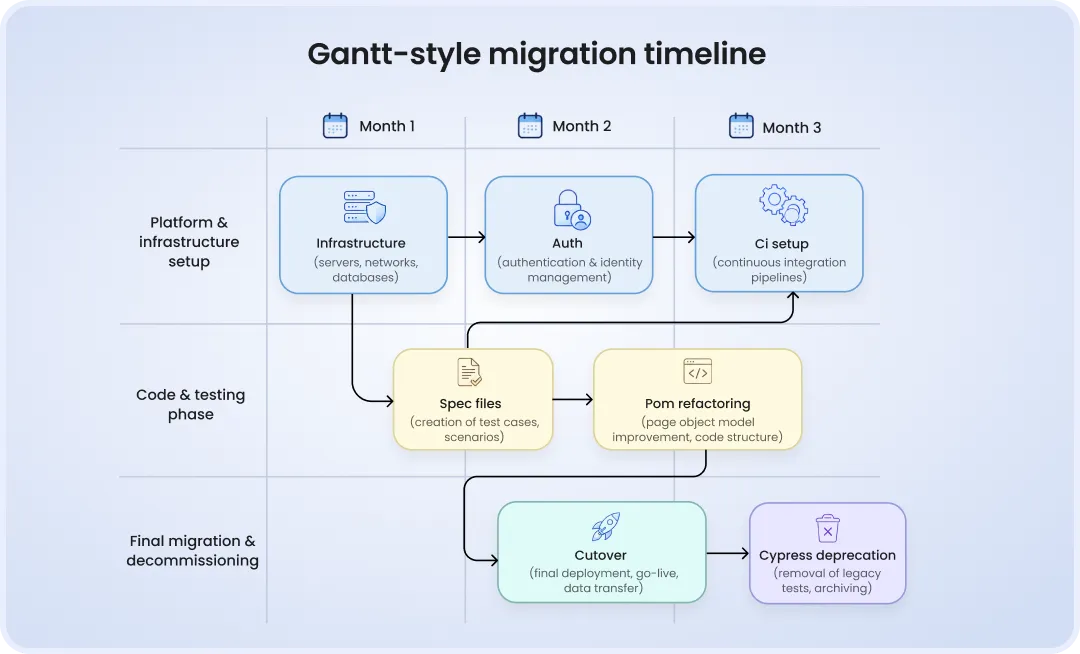
A realistic timeline for a team with 200—400 Cypress tests: 3 months total, with the first month being the highest intensity (infrastructure setup, core utilities, auth flows, CI integration).
Setting up Playwright in your project
Playwright's CLI scaffolds everything you need to get started. Run this in the root of your project:
npm init playwright@latest
The CLI will ask which browsers to install, whether to use TypeScript (yes — strongly recommended), where to put your test files, and whether to add a GitHub Actions workflow. After setup, your project gains:
playwright.config.ts   # Main configuration
tests/                 # Your spec files go here
tests-examples/        # Sample tests (can be deleted)
.github/workflows/     # CI workflow (if selected)
playwright.config.ts — key settings to configure
import { defineConfig, devices } from '@playwright/test';

export default defineConfig({
  testDir: './tests',
  fullyParallel: true, // Run tests in parallel by default
  retries: process.env.CI ? 2 : 0, // Retry on CI only
  workers: process.env.CI ? 4 : undefined,
  reporter: 'html', // Built-in HTML report
  use: {
    baseURL: 'http://localhost:3000',
    trace: 'on-first-retry', // Capture trace on failure
    screenshot: 'only-on-failure',
    video: 'retain-on-failure',
  },
  projects: [
    { name: 'chromium', use: { ...devices['Desktop Chrome'] } },
    { name: 'firefox', use: { ...devices['Desktop Firefox'] } },
    { name: 'webkit', use: { ...devices['Desktop Safari'] } },
  ],
});
Migrating your tests: Command and syntax mapping
This is where the actual migration work happens. The good news: Playwright's test structure closely mirrors Cypress's, so the mental model transfers. The differences are mostly in syntax, async handling, and how you interact with the DOM.
Navigation and basic actions
cy.visit('/login')
await page.goto('/login')
Playwright uses baseURL from config
cy.get('#btn').click()
await page.locator('#btn').click()
Or use role/text selectors
cy.get('input').type('text')
await page.locator('input')
.fill('text')
fill() clears then types
cy.get('input').clear()
await page.locator('input')
.clear()
Direct equivalent
cy.get('a').contains('Sign in')
await page.getByText('Sign in')
Playwright prefers semantic selectors
cy.get('[data-cy=btn]')
await page.getByTestId('btn')
Set testIdAttribute in config if needed
cy.reload()
await page.reload()
Direct equivalent
cy.go('back')
await page.goBack()
Direct equivalent
cy.wait(1000)
await page.waitForTimeout(1000)
Avoid in both — use auto-wait instead
Assertions
cy.get('#title')
.should('be.visible')
await expect(locator)
.toBeVisible()
Auto-waits for element
cy.get('#title')
.should('have.text', 'Hi')
await expect(locator)
.toHaveText('Hi')
Supports regex
cy.url().should('include', '/dashboard')
await expect(page)
.toHaveURL(/dashboard/)
Page-level assertion
cy.get('input')
.should('have.value', 'abc')
await expect(locator)
.toHaveValue('abc')
cy.get('li')
.should('have.length', 5)
await expect(locator)
.toHaveCount(5)
cy.get('#msg')
.should('not.exist')
await expect(locator).not
.toBeVisible()
Or toHaveCount(0)
cy.title().should('eq', 'Home')
await expect(page)
.toHaveTitle('Home')
Async/await — the most important conceptual shift
One of the most confusing things about migrating to Cypress has to do with the way that Cypress utilizes a command queue to execute commands. When commands are executed in Cypress, they appear to be executed synchronously; however, in actuality they are executed asynchronously.
Playwright uses the native JavaScript async/await syntax throughout the Playwright library and allows your Playwright tests to look exactly like the code you write in other parts of your application that use async/await.
Here's the same login test in both frameworks:
// CYPRESS
it('should log in successfully', () => {
  cy.visit('/login');
  cy.get('#username').type('admin@example.com');
  cy.get('#password').type('password123');
  cy.get('[data-cy=login-btn]').click();
  cy.url().should('include', '/dashboard');
  cy.get('h1').should('contain', 'Welcome');
});
// PLAYWRIGHT
test('should log in successfully', async ({ page }) => {
  await page.goto('/login');
  await page.getByLabel('Email').fill('admin@example.com');
  await page.getByLabel('Password').fill('password123');
  await page.getByTestId('login-btn').click();
  await expect(page).toHaveURL(/dashboard/);
  await expect(page.getByRole('heading', { level: 1 })).toContainText('Welcome');
});
Note the shift toward semantic selectors (getByLabel, getByRole, getByTestId) rather than CSS selectors. Playwright's recommendation is to prefer selectors that reflect what a user sees — this makes tests more resilient to DOM changes.
Network interception and mocking
// CYPRESS
cy.intercept('GET', '/api/users', { fixture: 'users.json' }).as('getUsers');
cy.wait('@getUsers');

// PLAYWRIGHT
await page.route('**/api/users', async route => {
  const json = [{ id: 1, name: 'Alice' }, { id: 2, name: 'Bob' }];
  await route.fulfill({ json });
});
// No need to explicitly wait — Playwright auto-waits for route to be triggered
Your team builds the product. We'll build the test infrastructure.
Migrating Page Object Model and custom commands
This is the section most migration guides skip — and it's the one that takes the most time. If your Cypress suite has a Page Object Model or shared custom commands, those need to be rebuilt, not just translated line by line.
Migrating Cypress custom commands to Playwright fixtures
Cypress custom commands are defined globally. Playwright uses fixtures — a dependency injection pattern that's more explicit and testable.
// CYPRESS — cypress/support/commands.ts
Cypress.Commands.add('login', (email: string, password: string) => {
  cy.visit('/login');
  cy.get('#email').type(email);
  cy.get('#password').type(password);
  cy.get('[data-cy=submit]').click();
  cy.url().should('include', '/dashboard');
});

// Usage in tests:
cy.login('admin@example.com', 'password123');
// PLAYWRIGHT — tests/fixtures/auth.fixture.ts
import { test as base, Page } from '@playwright/test';

type AuthFixtures = {
  loginAs: (email: string, password: string) => Promise<void>;
};

export const test = base.extend<AuthFixtures>({
  loginAs: async ({ page }, use) => {
    await use(async (email: string, password: string) => {
      await page.goto('/login');
      await page.getByLabel('Email').fill(email);
      await page.getByLabel('Password').fill(password);
      await page.getByRole('button', { name: 'Sign in' }).click();
      await expect(page).toHaveURL(/dashboard/);
    });
  },
});

// Usage in tests:
import { test } from '../fixtures/auth.fixture';

test('admin can view reports', async ({ page, loginAs }) => {
  await loginAs('admin@example.com', 'password123');
  // ... rest of test
});
Migrating a Page Object class
Cypress Page Objects often call cy.* directly inside their methods. Playwright POMs receive the page object in their constructor and use it explicitly — a cleaner, more testable pattern.
// CYPRESS — cypress/pages/LoginPage.ts
export class LoginPage {
  visit() {
    cy.visit('/login');
  }
  fillEmail(email: string) {
    cy.get('#email').type(email);
  }
  fillPassword(password: string) {
    cy.get('#password').type(password);
  }
  submit() {
    cy.get('[data-cy=submit]').click();
  }
}
// PLAYWRIGHT — pages/LoginPage.ts
import { Page, Locator, expect } from '@playwright/test';

export class LoginPage {
  readonly page: Page;
  readonly emailInput: Locator;
  readonly passwordInput: Locator;
  readonly submitButton: Locator;

  constructor(page: Page) {
    this.page = page;
    this.emailInput = page.getByLabel('Email');
    this.passwordInput = page.getByLabel('Password');
    this.submitButton = page.getByRole('button', { name: 'Sign in' });
  }

  async goto() {
    await this.page.goto('/login');
  }

  async login(email: string, password: string) {
    await this.emailInput.fill(email);
    await this.passwordInput.fill(password);
    await this.submitButton.click();
    await expect(this.page).toHaveURL(/dashboard/);
  }
}

// Usage in tests:
test('user can log in', async ({ page }) => {
  const loginPage = new LoginPage(page);
  await loginPage.goto();
  await loginPage.login('user@example.com', 'pass');
});
Hint: This is your chance to take care of the technical debt that tends to be accrued in Cypress Page Object Model tests, methods using cy.wait() calls, overly complex command chains, and superfluous utility functions. The asynchronous nature of Playwright makes it necessary to do so.
Running Cypress and Playwright side by side
Most teams cannot freeze delivery to migrate their entire test suite. The practical answer is to run both frameworks simultaneously in CI for the duration of the migration — Playwright picks up new tests and migrated coverage, Cypress handles everything not yet migrated.
Repository structure
project-root/
├── cypress/          # Existing Cypress suite (legacy)
│   ├── e2e/
│   ├── support/
│   └── cypress.config.ts
├── tests/            # New Playwright suite
│   ├── auth/
│   ├── checkout/
│   ├── fixtures/
│   └── pages/
└── playwright.config.ts
CI strategy during migration
Run both test runners in parallel CI jobs — don't block Playwright on Cypress completion.
Maintain a migration tracker — a simple spreadsheet or GitHub project board listing each spec file and its migration status.
Mark Cypress tests as 'pending deprecation' as soon as equivalent Playwright coverage is confirmed.
Set a sunset criterion — a clear rule for when to remove Cypress jobs. A sensible threshold: >90% of critical user journeys covered in Playwright, zero Cypress-only functionality remaining.
A common mistake is letting both suites run indefinitely without a deprecation plan. Set a hard deadline at the start of the migration — 'Cypress jobs are retired by [date]' — and enforce it. Indefinite coexistence becomes permanent coexistence.
Bring us your Cypress suite. We'll bring the Playwright expertise.
Using AI tools to accelerate migration
For suites with hundreds of spec files, manual migration is feasible but slow. AI tools can meaningfully accelerate the mechanical parts of migration — command translation, syntax conversion, and basic POM structure — though they require careful review.
cy2pw — official Playwright converter
The official converter at demo.playwright.dev/cy2pw accepts a Cypress spec file and outputs a Playwright equivalent. It handles most common command mappings accurately. Best used for straightforward spec files with no custom commands. Always review output — it doesn't know your project's POM conventions or fixture setup.
GitHub Copilot / ChatGPT for spec file migration
For single spec files, a well-structured prompt gives good results. Here's a prompt template that works reliably:
You are a test automation engineer. Convert this Cypress test file to Playwright.

Rules:
- Use TypeScript with async/await throughout
- Replace cy.get() with page.getByRole(), getByLabel(), or getByTestId() where possible
- Replace cy.should() with expect() assertions
- Replace cy.intercept() with page.route()
- Do NOT use cy.wait() with time values — use Playwright auto-wait or waitForResponse
- Preserve the test structure and descriptions exactly
- Import test and expect from @playwright/test

Cypress file to convert:
[paste file contents here]
OpenAI API for batch migration
TenantCloud Engineering uses programmatically using OpenAI API for migrating a large suite (4,000 Files/3 Months) by iterating through spec files, converting each file using conversion prompts, then writing them to Playwright folders. The OpenAI API works best after you have implemented Playwright conventions (such as POM structure, fixture setup, import paths) so that the AI has examples to reference.
What AI handles well — and where it falls short
Basic command mapping (visit, click, type, get)
Custom Cypress commands — AI doesn't know what they do
Assertion translation
POM structure and fixture wiring
Async/await conversion
Business logic embedded in test setup
Simple network intercept conversion
Shared authentication and storage state
Renaming and import updates
Test data and fixture file references
CI/CD integration with Playwright
GitHub Actions
# .github/workflows/playwright.yml
name: Playwright Tests
on:
  push:
    branches: [main, develop]
  pull_request:
    branches: [main]
jobs:
  playwright:
    runs-on: ubuntu-latest
    steps:
      - uses: actions/checkout@v4
      - uses: actions/setup-node@v4
        with:
          node-version: 20
      - name: Install dependencies
        run: npm ci
      - name: Install Playwright browsers
        run: npx playwright install --with-deps
      - name: Run Playwright tests
        run: npx playwright test
      - name: Upload test report
        uses: actions/upload-artifact@v4
        if: always() # Upload even on failure
        with:
          name: playwright-report
          path: playwright-report/
          retention-days: 14
Parallel execution with sharding
Playwright's built-in sharding splits your test suite across multiple CI machines without any third-party service:
# Split into 4 shards across 4 CI jobs
npx playwright test --shard=1/4  # Machine 1
npx playwright test --shard=2/4  # Machine 2
npx playwright test --shard=3/4  # Machine 3
npx playwright test --shard=4/4  # Machine 4
This alone can eliminate the need for a Cypress Cloud subscription for teams whose primary use of that service was parallelization.
Debugging in Playwright
Cypress's Time Travel Debugger — the ability to click back through test steps in a visual UI — is one of its most praised features. Playwright doesn't replicate that exact experience, but Trace Viewer provides equivalent (and often more detailed) information.
Trace Viewer
The Trace Viewer is Playwright's most powerful debugging tool. It records a complete timeline of each test run — DOM snapshots, network requests, console logs, and screenshots — and lets you step through the execution after the fact.
Enable tracing in playwright.config.ts:
use: {
  trace: 'on-first-retry', // Captures trace when a test is retried
  // or 'on'              // Always capture (larger files, slower runs)
  // or 'retain-on-failure' // Capture only for failing tests
}
To open the trace after a run:
npx playwright show-trace test-results/path-to-trace.zip
Playwright Inspector — step-through debugging
# Run a specific test in debug mode
npx playwright test login.spec.ts --debug
This opens the Inspector UI, which lets you step through test actions one by one, inspect locators in real time, and pause execution at any point. Equivalent to breakpoint debugging, directly in the browser.
Screenshots and video on failure
When configured with screenshot: 'only-on-failure' and video: 'retain-on-failure' in playwright.config.ts, Playwright automatically captures both on any failing test. These are attached to the HTML report and to CI artifacts. No plugin required — it's part of the framework.
Let our engineers do the migration while yours ship the product.
Measuring migration success
This is where most migration guides end without actually finishing the job. Running Playwright tests isn't success — a measurably faster, more stable, and more maintainable test suite is success. Here's how to measure it.
CI execution time
Compare average run time before and after for equivalent test coverage
40—70% reduction
Flakiness rate
Track pass/fail ratio over 2-week windows pre- and post-migration
<2% flakiness rate
Test coverage
Ensure all critical user journeys present in Cypress are covered in Playwright
100% critical path parity
Maintenance time
Sprint retro: hours per sprint spent debugging/fixing broken tests
Meaningful reduction
Developer satisfaction
Short survey or retro question: 'How painful is writing and maintaining tests?'
Qualitative improvement
And those metrics do carry significance — teams have reported increases in test execution speeds by as much as 3.87 times and CI times by 60—70%. However, the metric that tends to come as a surprise to many teams is the maintenance one. The auto-waiting functionality and visibility checks provided by Playwright solve one entire class of bugs.
Recommendation: Set up your metrics before you begin migrating — don't wait until afterwards. In order to show the effects, you will need metrics beforehand. Grab your latest 30 days' worth of CI build times and flakiness rates from your CI tool.
Frequently asked questions
Is it difficult to migrate from Cypress to Playwright?
The transition process is easier than expected since the test structure is quite similar in both frameworks, meaning your mental model applies here as well. The most complicated part would be understanding how to work with async/await code in JavaScript, the locator API in Playwright, and refactoring custom commands to create fixtures.
How long does migration take?
If your test suite is medium-sized (200-400 tests), you will need two to three months to conduct the transition fully. If the test suite is small (<100 tests), two to four weeks will suffice. The first month will take the most effort — most of the time is spent on the test utilities and the CI configuration rather than on spec files refactoring.
Can Cypress and Playwright coexist in the same project?
Yes, it is. The combination of the two tools at the migration stage is encouraged. It is convenient to run them concurrently, since there are dedicated test files, configurations, and even CI jobs for each one.
Does Playwright actually reduce flaky tests?
Most probably. The automated waiting functionality, isolated browser environments, and retry logic provided by Playwright solve the issue of flakiness most of the time. However, some tests will require particular assertions.
Do I need to pay for Playwright's parallel execution?
Absolutely not. Playwright's parallelization and sharding capabilities have been seamlessly incorporated into the package without requiring any additional fees. One of the most obvious ways Playwright reduces costs relative to Cypress is that parallel testing requires buying a Cypress Cloud license.
Conclusion
Here's what the data shows.
Teams that migrate thoughtfully — not in a rush, not all at once — come out the other side with 60—70% faster CI runs, near-zero flakiness, and test suites they're no longer afraid to touch.
That's not a Playwright achievement. That's an engineering achievement.
Playwright just removes the friction that was in the way.
Not sure where to begin? Our automation engineers at DeviQA have helped many clients migrate from Cypress to Playwright on more than 40 different domains — from audit to full CI. If you'd rather use your engineering skills to develop a product than rebuild your testing framework, we are here to help.
You don't have to figure this out alone — we already did.
About the author
Chief Operating Officer
Anastasiia Sokolinska is the Chief Operating Officer at DeviQA, responsible for operational strategy, delivery performance, and scaling QA services for complex software products.