
Written by: Chief Operating Officer
Anastasiia SokolinskaPosted: 25.06.2026
15 min read
Your Playwright suite takes 45 minutes in CI. You added workers. You added sharding. It's now 32 minutes.
The gap between what Playwright's parallelism can deliver and what most teams actually get comes down to treating workers, fullyParallel, and sharding as one lever when they're three separate ones. Misconfigure any of them and you're not unlocking parallelism, you're redistributing the same bottleneck. Most articles won't tell you which one you've got wrong. This one does.
Playwright 1.57 also shipped a built-in shard weight balancer that almost nobody in the top search results has covered. You'll see exactly how to use it.
Talk to a Playwright engineer about your setup
How Playwright parallelism actually works
Playwright parallel test execution operates across three distinct layers. Understanding how they compose is the prerequisite for configuring any of them correctly — because each layer controls something different, and tuning one without accounting for the others is how you end up with a 32-minute pipeline when the ceiling was always 8.
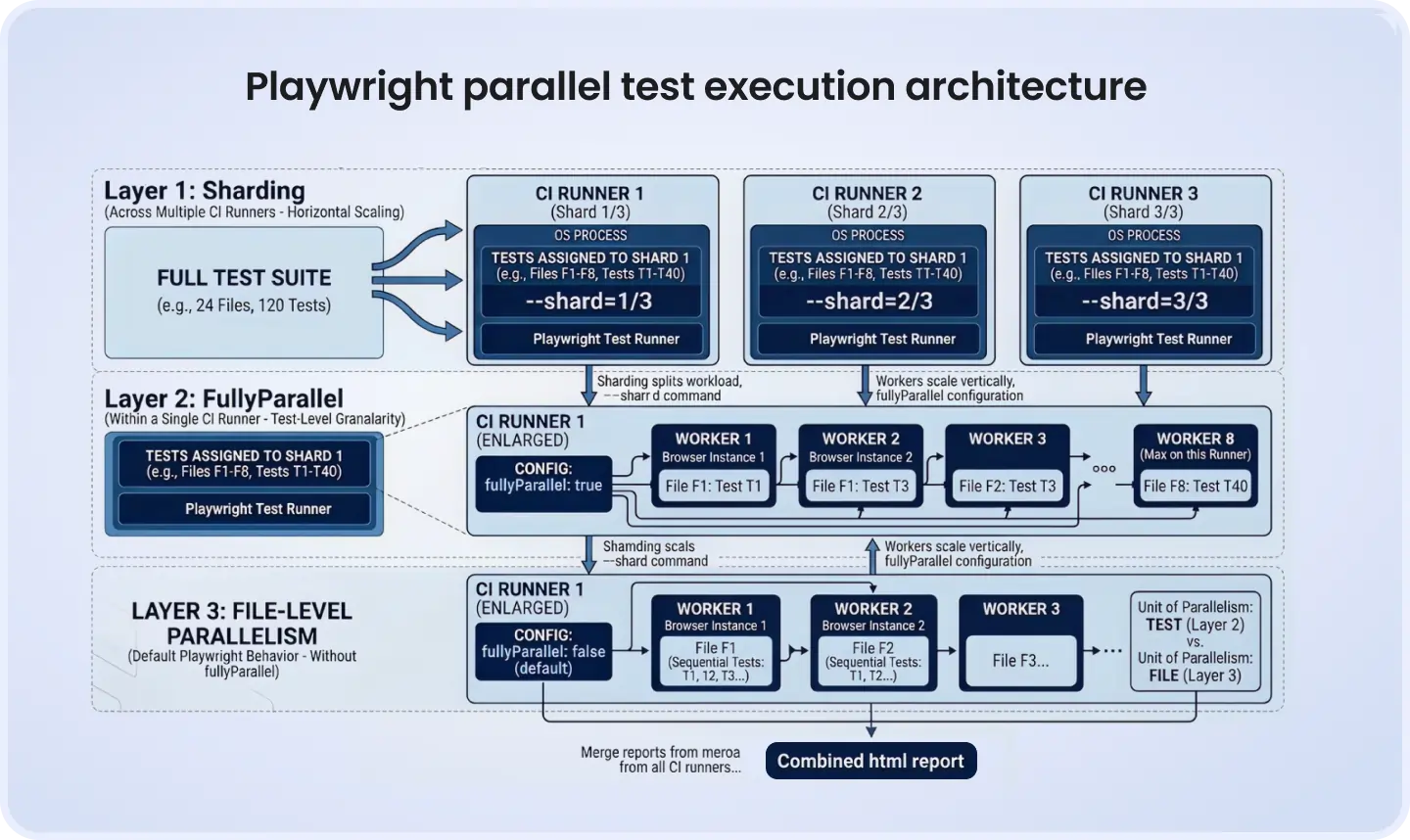
The first layer is file-level parallelism, Playwright's default behavior. Each spec file runs in its own worker process, an actual OS process with its own browser instance, not a thread. Multiple files run in parallel across however many workers you've configured. Tests within a single file run sequentially, in order.
The second layer is test-level parallelism, enabled with fullyParallel: true. Individual tests across all files can be picked up by any available worker regardless of which file they live in. This changes shard distribution fundamentally, and the next two sections explain exactly why that matters.
The third layer is machine-level parallelism via sharding. You split the suite across multiple CI runners, each executing a subset of the total tests. Workers are vertical scaling — more browser processes on one machine. Sharding is horizontal scaling — more machines.
Here's a production-grade playwright.config.ts that sets all three levers for a team running 4 shards with 2 workers each:
import { defineConfig, devices } from '@playwright/test';

export default defineConfig({
  testDir: './tests',
  fullyParallel: true,
  forbidOnly: !!process.env.CI,
  retries: process.env.CI ? 2 : 0,
  workers: process.env.CI ? 2 : undefined,
  reportSlowTests: { max: 5, threshold: 30_000 },
  maxFailures: process.env.CI ? 10 : undefined,
  reporter: process.env.CI
    ? [['blob'], ['line']]
    : [['html', { open: 'never' }]],
  use: {
    baseURL: process.env.BASE_URL ?? 'http://localhost:3000',
    trace: 'on-first-retry',
  },
  projects: [
    {
      name: 'chromium',
      use: { ...devices['Desktop Chrome'] },
    },
  ],
});
With 4 shards × 2 workers, you get 8 parallel browser processes running simultaneously. On a properly isolated 45-minute sequential suite, this configuration brings runtime to under 10 minutes. The word "properly" is doing a lot of work in that sentence — we'll get there.
Workers — vertical scaling with a ceiling
The advice in most articles is "experiment with worker count." Here's a concrete heuristic instead.
Start workers at 50% of available vCPUs on your CI runner. Each Chromium instance consumes 250-400 MB of RAM and takes a non-trivial amount of time to spawn. On a 4-vCPU runner with 8 GB RAM, setting workers: 4 looks reasonable on paper but routinely produces flakier results than workers: 2. The reason is CPU contention during Chromium startup: all workers peak simultaneously, and the scheduler starts making tradeoffs that show up as timing-sensitive test failures.
The signal that you've overshot the worker ceiling is rising flakiness, not slower wall-clock time. Teams miss this because they're watching the wrong metric. If your test suite shows 10% more intermittent failures after increasing workers, reduce them. The wall-clock time difference between workers: 2 and workers: 4 on a 4-vCPU runner is often under a minute. The flakiness cost is not.
The workers: process.env.CI ? 2 : undefined pattern is the right default. Conservative in CI is correct. Locally, undefined lets Playwright use half the logical CPUs on the developer's machine, which is almost always appropriate.
Two config options most teams overlook: reportSlowTests: { max: 5, threshold: 30_000 } surfaces the five slowest tests above 30 seconds after every run. This is how you find the tests holding up wall-clock time before they become a sharding problem. maxFailures: 10 kills the run early when you've pushed a broken build. There's no value in running 380 remaining tests when the deployment is the real problem.
Speak with a Playwright engineer about your test suite
fullyParallel — the most misunderstood option in Playwright
Every article mentions fullyParallel: true. Almost none explain what it actually controls at the shard level.
Without fullyParallel, Playwright's sharding algorithm distributes spec files across shards, not individual tests. If you have 4 shards and one file contains 60 tests while three others contain 5 each, one shard ends up holding all the heavy work. The other three finish in minutes and sit idle.
Here's a concrete before/after using a 12-file suite with uneven test counts:
checkout.spec.ts
60
45s
onboarding.spec.ts
28
30s
billing.spec.ts
22
40s
dashboard.spec.ts
18
25s
api-smoke.spec.ts
15
8s
auth.spec.ts
12
20s
upload.spec.ts
10
35s
reporting.spec.ts
9
20s
search.spec.ts
8
15s
notifications.spec.ts
7
12s
profile.spec.ts
6
15s
settings.spec.ts
5
10s
Without fullyParallel (4 shards, file-level distribution):
Shard 1: checkout.spec.ts → 60 tests × 45s ≈ 45 minutes
Shard 2: onboarding.spec.ts + billing.spec.ts → ≈ 22 minutes
Shard 3: dashboard.spec.ts + api-smoke.spec.ts + auth.spec.ts → ≈ 14 minutes
Shard 4: remaining files → ≈ 9 minutes
Wall-clock time: 45 minutes. Three shards idle while Shard 1 grinds through checkout alone.
With fullyParallel: true (4 shards, test-level distribution):
Tests distribute individually across shards. Each shard handles approximately 50 tests at comparable aggregate duration. Wall-clock time: 12-14 minutes.
Same infrastructure. Same shard count. The only change is one line in playwright.config.ts.
If you can't enable it globally because some files contain stateful sequences that break under parallel execution, use the scoped override:
test.describe('Checkout flow', () => {
  // Enable test-level parallelism within this describe block only
  test.describe.configure({ mode: 'parallel' });

  test('adds item to cart', async ({ page }) => { /* ... */ });
  test('applies discount code', async ({ page }) => { /* ... */ });
  test('completes payment', async ({ page }) => { /* ... */ });
});
This enables test-level parallelism within a single describe block without changing behavior for the rest of the suite. It's the migration path for teams who can't flip fullyParallel globally yet.
Sharding — horizontal scaling for when workers aren't enough
Workers max out at what a single runner can handle. When you've saturated one machine, sharding is the answer.
The basic syntax: npx playwright test --shard=2/4 runs the second of four shards. Playwright's default distribution algorithm splits files across shards sequentially. That default is exactly why shard imbalance happens, and why most teams don't see the speedups they calculated on paper.
Scaling type
Vertical (one machine)
Horizontal (multiple machines)
What it controls
Parallel browser processes per runner
Suite split across CI runners
Config option
workers in playwright.config.ts
--shard=x/y CLI flag
When to use
Runner has spare CPU and RAM
Single runner is saturated
CI cost
Same runner, more parallel processes
Additional runners per shard
Bottleneck signal
Rising flakiness above the ceiling
One shard consistently slower than others
A suite with 4 shards where one holds a 15-minute spec file runs in 15 minutes regardless of the other three finishing in 3 minutes each. You've paid for 4 runners and bought a 15-minute pipeline.
Two fixes for shard imbalance. First: fullyParallel: true as described above. Second: the --shard-weights flag shipped in Playwright 1.57.
With --shard-weights, you assign relative weights to shards based on historical duration data. Playwright's merged HTML report (available since Playwright 1.57-1.58) includes a Speedboard tab showing per-shard execution time and the recommended weight values for the next run. This is a native, free solution to imbalanced shards that requires no paid orchestration tool.
# Shard 1 historically takes 3x longer than shards 2-4
npx playwright test --shard=1/4 --shard-weights=3,1,1,1
Check the Speedboard tab after every significant suite change. It tells you exactly what weights to use next run.
For teams where the shard count itself drifts as the suite grows, hardcoding --shard=x/4 eventually breaks the balance. Generate the count dynamically instead:
# Calculate shards based on target of ~50 tests per shard
TOTAL=$(npx playwright test --list | grep -c 'test\b')
SHARDS=$(( (TOTAL + 49) / 50 ))
npx playwright test --shard=${{ matrix.shardIndex }}/$SHARDS
This keeps shard sizing proportional as the suite evolves, without manual config updates after every sprint that adds tests.
GitHub Actions YAML — the complete working configuration
The three pieces competitors consistently get wrong: browser binary caching (which saves 30-90 seconds per shard on cold runners), building the app artifact once and sharing it across shard jobs, and a correct merge-reports downstream job. Here's the complete, copy-pasteable workflow:
name: Playwright Tests
on:
  push:
    branches: [main]
  pull_request:
    branches: [main]

jobs:
  build:
    name: Build application
    runs-on: ubuntu-latest
    steps:
      - uses: actions/checkout@v4
      - uses: actions/setup-node@v4
        with:
          node-version: 20
      - run: npm ci
      - run: npm run build
      - uses: actions/upload-artifact@v4
        with:
          name: app-build
          path: dist/
          retention-days: 1

  test:
    name: "Shard ${{ matrix.shardIndex }} / ${{ matrix.shardTotal }}"
    needs: build
    runs-on: ubuntu-latest
    strategy:
      fail-fast: false
      matrix:
        shardIndex: [1, 2, 3, 4]
        shardTotal: [4]
    steps:
      - uses: actions/checkout@v4
      - uses: actions/setup-node@v4
        with:
          node-version: 20
      - name: Cache Playwright browsers
        uses: actions/cache@v4
        id: playwright-cache
        with:
          path: ~/.cache/ms-playwright
          key: playwright-${{ runner.os }}-${{ hashFiles('package-lock.json') }}
      - name: Download app build
        uses: actions/download-artifact@v4
        with:
          name: app-build
          path: dist/
      - run: npm ci
      - name: Install Playwright browsers
        if: steps.playwright-cache.outputs.cache-hit != 'true'
        run: npx playwright install --with-deps chromium
      - name: Install browser system dependencies
        if: steps.playwright-cache.outputs.cache-hit == 'true'
        run: npx playwright install-deps chromium
      - name: Run Playwright tests
        run: >
          npx playwright test
          --shard=${{ matrix.shardIndex }}/${{ matrix.shardTotal }}
      - name: Upload blob report
        if: always()
        uses: actions/upload-artifact@v4
        with:
          name: blob-report-${{ matrix.shardIndex }}
          path: blob-report/
          retention-days: 1

  merge-reports:
    name: Merge shard reports
    needs: test
    if: always()
    runs-on: ubuntu-latest
    steps:
      - uses: actions/checkout@v4
      - uses: actions/setup-node@v4
        with:
          node-version: 20
      - run: npm ci
      - name: Download all blob reports
        uses: actions/download-artifact@v4
        with:
          path: all-blob-reports
          pattern: blob-report-*
          merge-multiple: true
      - name: Merge into HTML report
        run: npx playwright merge-reports --reporter html ./all-blob-reports
      - name: Upload HTML report
        uses: actions/upload-artifact@v4
        with:
          name: html-report--attempt-${{ github.run_attempt }}
          path: playwright-report/
          retention-days: 14
fail-fast: false is non-negotiable. Without it, a single failing shard cancels the remaining jobs before they upload their blob reports, and the merge-reports job has nothing to work with. The blob reporter in playwright.config.ts paired with npx playwright merge-reports produces a single unified HTML report with the Speedboard tab. That tab is where you read the --shard-weights values for the next run.
The separate build job prevents each shard from running a redundant build. On a project with a 3-minute build time and 4 shards, that's 12 minutes of CI cost eliminated per workflow run.
Test data isolation — the real reason parallel tests break
Here's where teams actually lose time. The workers aren't misconfigured. The sharding is fine. The tests break intermittently because they share state: the same database user, the same seeded email address, the same test account ID created by a beforeAll hook that runs across multiple workers simultaneously.
This is what a QA lead typically encounters after parallelizing an inherited 400-test suite: 40% of tests start failing intermittently, and the first instinct is to reduce workers. The right move is to fix the data architecture.
The test isolation fix is a worker-scoped DB user pattern. Each worker gets its own isolated user account, created at worker startup and torn down when the worker exits:
import { test as base } from '@playwright/test';

interface DbUser {
  id: string;
  email: string;
  password: string;
}

export const test = base.extend<{}, { dbUser: DbUser }>({
  dbUser: [
    async ({}, use, workerInfo) => {
      const email = `worker-${workerInfo.workerIndex}@test.example.com`;
      const password = 'TestPass123!';

      // Replace with your actual DB seeding layer
      const user = await db.users.upsert({
        where: { email },
        create: { email, password: await hashPassword(password) },
        update: { password: await hashPassword(password) },
      });

      await use({ id: user.id, email, password });

      // Cleanup runs once per worker, not per test
      await db.users.cleanupTestData(user.id);
    },
    { scope: 'worker' },
  ],
});

// Usage in any test file
test('user can update billing details', async ({ page, dbUser }) => {
  await page.goto('/login');
  await page.fill('[name="email"]', dbUser.email);
  await page.fill('[name="password"]', dbUser.password);
  await page.click('[type="submit"]');
  // worker-specific user, no contention with other workers
});
The { scope: 'worker' } option is what matters. Playwright creates one fixture instance per worker process, not per test. Each worker operates on its own user record throughout its lifetime, with no cross-worker contention on shared rows.
For tests that don't need a persistent user, a timestamp-based unique identifier avoids the fixture overhead:
const uniqueEmail = `test-${Date.now()}-${Math.random().toString(36).slice(2)}@example.com`;
For UI-only tests, page fixture already provides complete browser context isolation. Each test gets a fresh context with isolated cookies, localStorage, and session storage. If your tests don't share DB state, the default page fixture is all the isolation you need.
When a real database is too expensive to isolate per worker, page.route() removes the dependency entirely for tests that only care about UI behavior:
test('dashboard shows correct user stats', async ({ page }) => {
  await page.route('**/api/user/stats', (route) =>
    route.fulfill({
      status: 200,
      contentType: 'application/json',
      body: JSON.stringify({ logins: 42, lastSeen: '2025-01-15' }),
    })
  );
  await page.goto('/dashboard');
  await expect(page.getByText('42 logins')).toBeVisible();
});
The pattern to identify which tests in an inherited suite have data contention: run the suite twice with --repeat-each=1 --workers=4 and compare results. Any test that fails only under parallelism is a data isolation candidate.
Get a Playwright engineer to look at your setup
When not to parallelize — and how to sequence what can't be isolated
Some tests genuinely require ordered execution. A multi-step onboarding flow where Step 2 depends on state created by Step 1 can't be parallelized without architectural changes. test.describe.configure({ mode: 'serial' }) is the correct tool:
test.describe('Account onboarding sequence', () => {
  test.describe.configure({ mode: 'serial' });

  test('step 1: create account', async ({ page }) => { /* ... */ });
  test('step 2: verify email', async ({ page }) => { /* ... */ });
  test('step 3: complete billing setup', async ({ page }) => { /* ... */ });
});
Serial mode is a code smell. It's an acceptable short-term fix on an inherited suite, but it signals that those tests need a refactor. The right long-term fix is making each test self-contained by seeding required state in a beforeEach or extracting setup into a fixture.
workers: 1 is the last resort. Use it for database migration scripts, single-tenant sandbox environments, or any scenario where global state genuinely cannot be isolated per worker. Don't apply it to a 400-test regression suite and consider the problem solved — it trades a parallelism problem for a pipeline speed problem.
Measuring whether your parallelization is actually working
Most teams configure workers and sharding, watch the CI timer drop by some amount, and move on. That's how you leave 30% of the available speedup behind.
Here's a 4-step diagnostic to confirm your configuration is actually delivering:
Check reportSlowTests output after each run. If the same test appears in the top 5 consistently, it's your bottleneck. A single 8-minute test on a shard caps that shard's runtime regardless of the other tests finishing in 2 minutes.
Open the Speedboard tab in the merged HTML report (Playwright 1.57+). It shows per-shard duration and flags imbalance. If Shard 1 ran for 18 minutes and Shard 3 ran for 4 minutes, the weight distribution is wrong. The Speedboard recommends the --shard-weights values to use on the next run.
Calculate theoretical vs. actual speedup. Theoretical maximum with 4 shards × 2 workers: 8× speedup. If your 45-minute suite is now 12 minutes instead of 5-6 minutes, the gap is real. The causes are shard imbalance, test isolation overhead, or CI infrastructure (browser spawn time, runner queue time). Each has a different fix.
Watch flakiness rate alongside wall-clock time. Flakiness increasing while time decreases means you've over-allocated workers or you have unresolved data contention. Wall-clock time increasing while flakiness holds steady usually means runner resource exhaustion.
The signal that your configuration is correct: flakiness rate matches or improves on your sequential baseline, and wall-clock time approaches (total_suite_time / (shards × workers)) within roughly 20% overhead for spawn and setup time. That 20% is normal. If the overhead is 60%, you have a shard imbalance or isolation problem worth diagnosing before adding more infrastructure.
Conclusion
The teams that get Playwright parallelism right aren't using a different tool. They're using three levers deliberately instead of one lever hopefully. Workers set the vertical ceiling. fullyParallel: true determines whether your shards balance evenly. Sharding multiplies both across infrastructure. Get all three right and a 45-minute suite becomes an 8-minute one. Get one wrong and the other two can't compensate.
If your CI pipeline is still the bottleneck, talk to a DeviQA Playwright engineer about your configuration — we'll tell you in the first conversation exactly where the time is going.
Book 30 minutes with a Playwright engineer
About the author
Chief Operating Officer
Anastasiia Sokolinska is the Chief Operating Officer at DeviQA, responsible for operational strategy, delivery performance, and scaling QA services for complex software products.