
Written by: Senior QA Engineer
Mykhailo RalduhinUpdated: 12.10.2026
20 min read
Individual services can return the correct responses, unit tests can pass, and the product can still fail when a customer tries to complete a real task.
A checkout may break between the payment gateway and order service. A user may authenticate successfully but receive the wrong permissions. A booking may appear confirmed while inventory remains unchanged.
End-to-end (E2E) testing is a software testing method that validates a complete user workflow across the application’s interfaces, services, databases, integrations, and other dependencies. It checks whether the assembled system produces the expected business outcome under realistic conditions.
The challenge is widespread. In TestRail’s 2025 survey, 33% of QA teams named end-to-end testing across integrated systems as a major challenge, making it the most frequently reported testing challenge. Another 32% struggled with developing automated tests.
What is end-to-end testing?
End-to-end testing verifies an application from the beginning of a user journey to its final result.
Instead of checking one function, endpoint, or interface in isolation, an E2E test follows actions and data through the complete workflow. Depending on the product, this may include:
Web or mobile interface
Authentication provider
API gateway
Backend services
Database
Message queue
Payment processor
Email or notification service
CRM or analytics platform
Third-party business system
Consider a customer buying a product online. The complete flow may look like this:
Customer → product page → cart → checkout → payment gateway → order service → inventory database → confirmation email → order history
Every component could pass its individual tests while the purchase still fails. The payment provider might approve the transaction, for example, but the order service may not process its callback.
From the customer’s perspective, it does not matter which component failed. The purchase did not work. This user-level perspective is what distinguishes E2E testing from lower-level testing.
What does E2E mean?
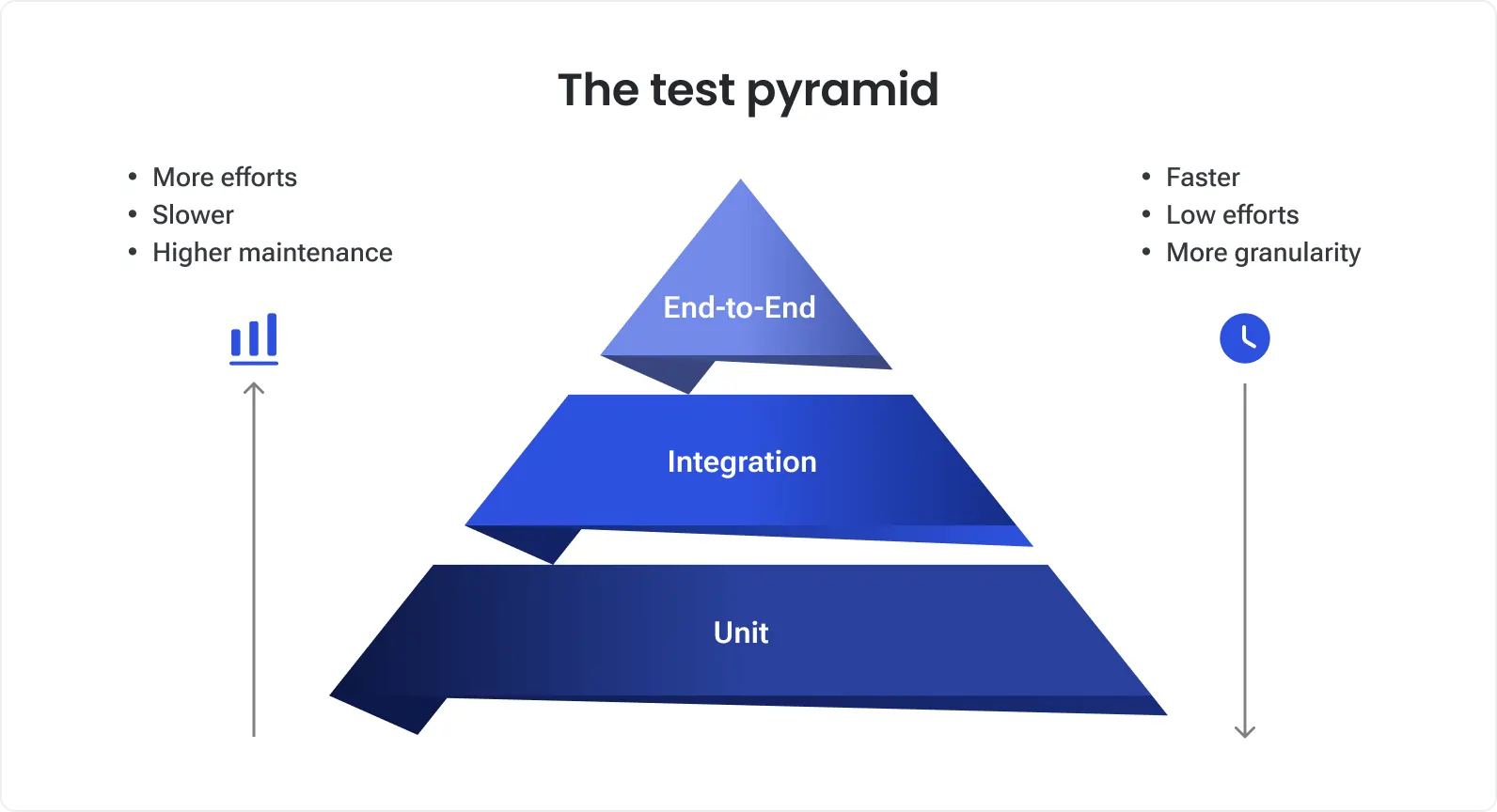
E2E is an abbreviation for “end to end.” In software testing, it means checking a process across all relevant stages rather than testing only one part of the system.
The starting and ending points depend on the workflow:
Registration form → activated account
Checkout → confirmed order
Invoice creation → completed payment
Appointment request → calendar confirmation
File upload → processed report
Administrator action → updated user permissions
An E2E test does not need to cover the entire product in one enormous scenario. Each test should cover one meaningful workflow from its entry point to an observable business result.
Why is end-to-end testing important?
Modern systems often fail at the boundaries between components.
A Microsoft Azure study published at USENIX ATC 2023 analyzed 2,051 high-impact incidents across 468 cloud services and found that:
More than 75% of incidents involved multiple contributing factors.
More than 50% involved at least four factors.
Each incident involved approximately 3.6 contributing factors on average.
Dependencies contributed to 37% of the incidents.
These findings do not mean that E2E testing can prevent every production incident. The researchers specifically note that incidents involving several interacting conditions are difficult to anticipate. However, the study illustrates why testing components only in isolation leaves an important gap.
E2E testing validates business outcomes
A successful API response does not necessarily mean that the user achieved their goal.
For an online purchase, E2E testing may confirm that:
Payment was authorized.
The order was created.
The correct amount was recorded.
Inventory was updated.
The customer saw a confirmation.
The order appeared in the account.
A confirmation notification was sent.
The test connects technical behavior with an outcome that matters to the customer and the business.
E2E testing finds cross-system failures
Contract and integration tests validate known interfaces. E2E testing checks whether those interfaces, configurations, credentials, queues, and data transformations work together inside a realistic workflow.
It can uncover:
Incorrect environment configuration
Missing roles or permissions
Invalid service credentials
Data lost between services
Incorrect asynchronous processing
Third-party integration failures
Browser-to-backend communication problems
Inconsistent data across systems
E2E testing supports faster releases
Delivery speed increases the need for efficient release validation. In a 2026 SmartBear survey of 273 testing and quality decision-makers:
60% said their organizations had experienced quality problems because development moved faster than testing.
64% were concerned that applications were not tested across all deployment environments.
68% expected faster AI-assisted development to create additional testing bottlenecks.
A focused E2E suite can serve as a release gate for the workflows that would cause the greatest damage if they failed.
It should not repeat every unit or API test. Its purpose is to confirm that essential journeys still work after the product has been assembled and deployed.
End-to-end testing example: Online checkout
Suppose an eCommerce company needs to verify that a registered customer can buy a product with a credit card.
Preconditions
The customer account is active.
The product is available.
The payment-provider sandbox is accessible.
A valid test card is available.
Email delivery is redirected to a controlled test inbox.
Sample E2E test case
1
Customer signs in
A valid session is created and the correct account opens
2
Customer selects a product
Current product information and price are displayed
3
Customer adds the item to the cart
Correct product, quantity, and price appear
4
Customer applies a valid discount
Discount and order total are recalculated
5
Customer enters delivery details
Available shipping options are returned
6
Customer submits card details
Transaction is sent to the payment provider
7
Provider authorizes the payment
Payment status changes to authorized
8
Order service processes the transaction
A unique order is created with the correct status
9
Inventory service processes the purchase
Available stock is reduced
10
Notification service sends confirmation
Customer receives the correct message
11
Customer opens order history
The new order and payment status are displayed
The test should verify resulting data, not only the final screen. A confirmation banner is insufficient if the database contains an incomplete order or the payment was captured twice.
Negative E2E example
A negative scenario can use a declined test card and verify that:
The order is not marked as paid.
Inventory is not permanently reduced.
The customer sees a useful error.
A duplicate order is not created.
The customer can select another payment method.
Detailed card combinations, field validations, and calculation boundaries should remain at the API, unit, or component level. The E2E suite needs representative journeys rather than every possible input.
E2E testing vs other types of testing
Focus
One function or class
Interaction between selected components
Complete application
Complete user journey across systems
Business acceptance
Scope
Narrow
Component boundary
Defined product or system
Product and relevant dependencies
User and business requirements
Dependencies
Usually mocked
Limited or controlled
May be controlled
Realistic where practical
Production-like business environment
Speed
Very fast
Fast to moderate
Moderate
Usually slower
Varies
Typical owner
Developers
Developers and QA
QA engineers
QA, SDETs, developers
Product owners and business users
Best suited to
Logic and edge cases
Contracts and data exchange
Functional requirements
Cross-system workflows
Confirming business readiness
E2E testing vs integration testing
Integration testing checks a particular boundary. For example, it can verify that the order service sends the correct request to the payment service.
E2E testing checks whether the customer can complete the entire purchase and receive the correct result.
A product needs both. Integration tests provide faster and more precise feedback, while E2E tests confirm that the assembled workflow works from the user’s perspective. See our detailed guide to integration testing and end-to-end testing.
E2E testing vs system testing
System testing validates the complete application against its requirements. External dependencies may be controlled or simulated.
E2E testing follows a business process through the product and relevant connected systems. Its boundary is determined by the workflow rather than by the application alone.
E2E testing vs UAT
User acceptance testing determines whether the product satisfies business needs and is ready for use. Business stakeholders or representative users often participate.
E2E testing checks whether the underlying technical workflow functions across the system.
An automated E2E test may verify that a refund updates the payment, inventory, and order status. UAT determines whether the refund process meets the organization’s operational requirements.
Types of end-to-end testing
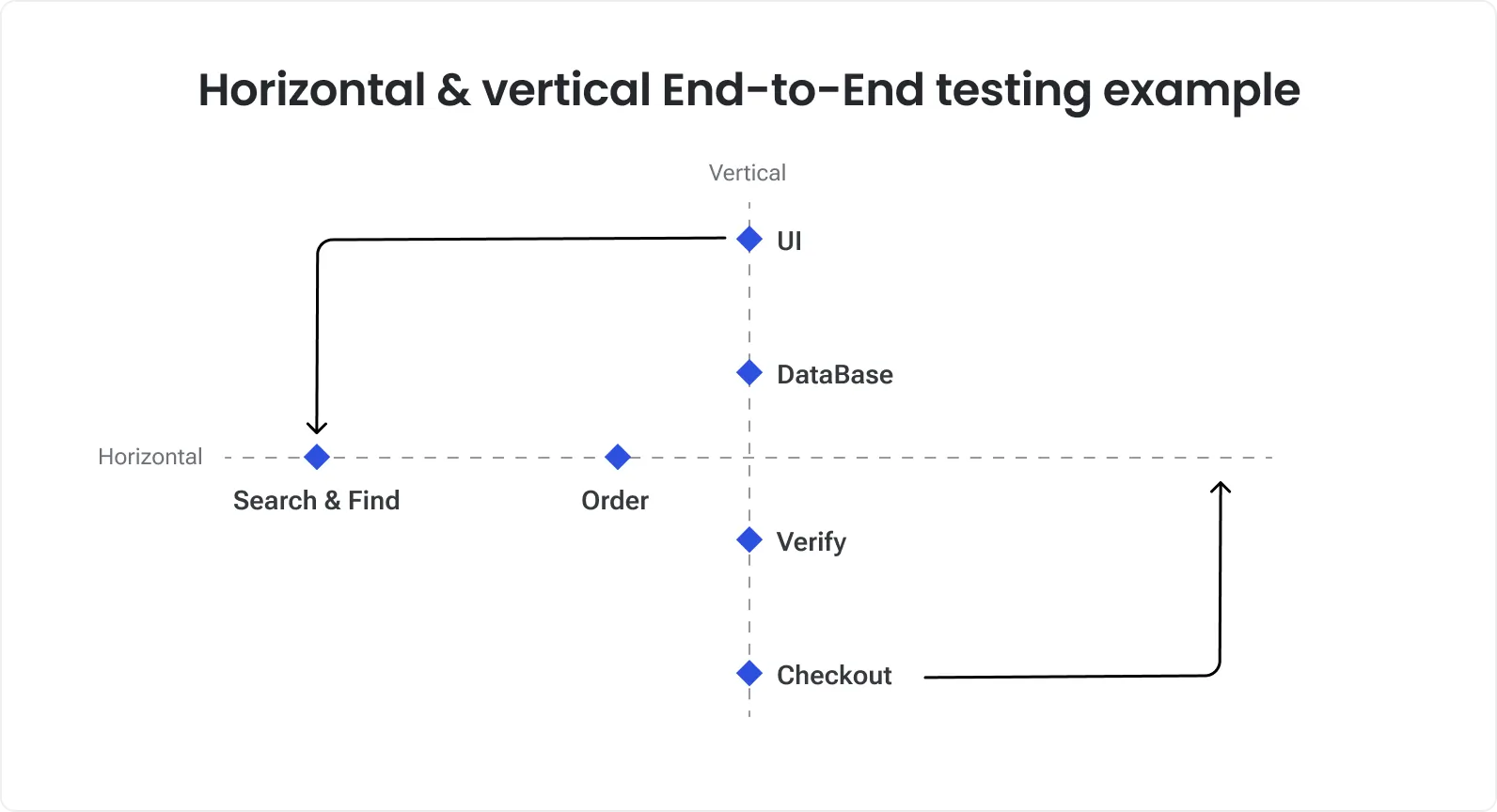
Horizontal E2E testing
Horizontal testing follows a user journey across several services, applications, or business systems.
Examples include:
Registration across the website, identity provider, CRM, and email service
Purchase across the storefront, payment gateway, inventory, and fulfillment system
Employee onboarding across HR, payroll, identity, and access-management platforms
Booking across availability, payment, calendar, and notification services
This is the most common form of E2E testing.
Vertical E2E testing
Vertical testing follows one feature through the application’s technical layers.
A login scenario may validate that:
The interface accepts the credentials.
The frontend sends the correct request.
The authentication service verifies the user.
The identity provider returns the correct account.
A secure token or session is created.
The user is redirected to an authorized area.
The correct permissions are applied.
Vertical testing is useful when a feature crosses several technical layers but does not require a long business workflow.
Cross-platform E2E testing
A critical journey may also need to work across browsers, devices, operating systems, or mobile platforms.
Running every E2E scenario on every configuration is rarely practical. A risk-based matrix usually includes:
Broad coverage on the primary configuration
Critical smoke tests on secondary configurations
Wider visual and compatibility checks at lower levels
How to perform end-to-end testing
Step 1: Identify critical journeys
Start with workflows affecting:
Revenue
Customer access
Sensitive information
Regulatory obligations
Core product value
High-volume operations
Frequently reported production issues
Production incidents, analytics, and support tickets are often better sources than a generic list of features.
Step 2: Map the workflow
Document every relevant part of the journey:
Starting point
User roles
Interface
APIs
Services
Databases
Queues
External providers
Notifications
Final state
This map helps the team determine which dependencies should be real, mocked, or virtualized.
Step 3: Define the expected business outcome
A test should describe an outcome rather than a collection of clicks.
Weak objective:
Check the payment page.
Stronger objective:
Confirm that a registered customer can pay for an available product and receive an order with the correct amount, inventory update, and confirmation message.
Step 4: Prepare the environment
The environment should reproduce the production behavior relevant to the workflow.
It may require:
Production-like service configuration
Representative browsers and devices
Provider sandboxes
Realistic authentication rules
Correct feature flags
Active background workers
Centralized logs and traces
Controlled notification delivery
Environment availability remains a significant challenge. In the German-language Software Testing in Practice and Research survey conducted in 2024, 63% of respondents considered providing suitable environments for non-functional testing a major challenge.
Step 5: Prepare test data
Each test should begin with a known state.
Avoid shared accounts and records that other tests can modify. Use:
Unique data for each run
Controlled fixtures
API-based setup
Synthetic datasets
Automated cleanup
Masked production-like data where permitted
Capgemini’s World Quality Report 2025–26 found that 60% of organizations struggle with secure and scalable test data. The same report states that synthetic-data use increased from 14% in 2024 to an average of 25% in 2025.
Step 6: Design the test case
A useful E2E test case should contain:
Business objective
Preconditions
User roles
Test data
Participating systems
Execution steps
Expected intermediate outcomes
Expected final state
Cleanup rules
Evidence to collect after failure
Our dedicated guide explains how to build E2E test cases in more detail.
Step 7: Execute and collect evidence
Automated E2E tests should capture:
Screenshots or video
Browser console
Network requests and responses
Application and service logs
Trace or correlation ID
Test-data identifiers
Environment and build version
Execution time
Retry history
An E2E test has limited diagnostic value if it reports only that the last page did not appear.
Step 8: Maintain the suite
Review the suite as the product changes:
Remove outdated scenarios.
Consolidate duplicates.
Move detailed checks to lower test levels.
Repair or remove flaky tests.
Update test data and integrations.
Add coverage for new critical workflows.
Tests should remain because they protect a current risk, not because they were expensive to create.
Manual vs automated E2E testing
Manual
New, exploratory, or unstable workflows
Human judgment and flexible investigation
Slow and difficult to repeat
Automated
Stable workflows executed frequently
Repeatability, CI/CD integration, parallel execution
Initial development and maintenance cost
Hybrid
Most production systems
Combines regression automation with exploration
Requires clear scope and ownership
Automation has not eliminated manual testing. SmartBear’s 2026 study found that 87% of participating organizations had automated at least 21% of application testing, while 92% still performed manual testing.
TestRail’s 2025 report found that respondents currently automated an average of 40% of tests but wanted to reach 63% in the following year.
The automation gap becomes larger at higher test levels. In the 2024 Software Testing in Practice and Research survey, three-quarters of respondents had automated at least 75% of unit tests, but only around one-third had reached that level of automation for higher test levels.
Automate an E2E scenario when it is:
Business-critical
Stable enough to repeat
Executed frequently
Expensive to test manually
Supported by predictable data
Suitable for deterministic assertions
Keep it manual when human interpretation is essential or the workflow changes too frequently to justify maintenance.
E2E testing tools
Playwright
Web E2E automation
TypeScript/JavaScript, Python, Java, .NET
Modern cross-browser applications
Cypress
Web E2E and component testing
JavaScript, TypeScript
Frontend-heavy web products
Selenium
Browser automation
Java, Python, C#, JavaScript, Ruby and others
Mature ecosystems and Selenium Grid
Appium
Mobile automation
Multiple languages
Native, hybrid, and mobile web applications
Espresso
Android UI testing
Kotlin, Java
Native Android applications
XCUITest
iOS UI testing
Swift, Objective-C
Native iOS applications
Detox
Mobile E2E automation
JavaScript, TypeScript
React Native products
Maestro
Mobile workflow automation
YAML
Readable Android and iOS scenarios
Postman/Newman
API workflow testing
JavaScript extensions
Multi-request API flows
REST Assured
API testing
Java
Java-based service validation
No single testing framework covers the entire workflow. A mature E2E stack often combines UI automation, API clients, data utilities, CI/CD, service virtualization, browser or device infrastructure, and observability tools.
See our comparison of end-to-end testing tools and frameworks for a dedicated tool review.
Common E2E testing challenges
Flaky tests
Timing, concurrency, shared data, unstable dependencies
Wait for observable state and isolate test data
Slow execution
Long workflows and repeated UI setup
Use APIs for setup, parallelize, separate smoke and regression
Difficult diagnosis
Failure can originate in any system
Capture logs, traces, network data, and identifiers
Environment drift
Test and production configurations differ
Use infrastructure as code and configuration monitoring
Third-party instability
Provider sandboxes are unavailable or inconsistent
Combine contract tests, virtualization, and selected sandbox tests
Data collisions
Parallel tests reuse users or records
Generate unique data and automate cleanup
High maintenance
Tests depend on volatile UI details
Use stable selectors and business-level abstractions
A 2023 review in the Journal of Systems and Software analyzed 200 academic and industry publications focused on flaky testing: 109 academic studies and 91 practitioner sources. It identified test-order dependencies, concurrency, randomness, network behavior, and reliance on external resources as recurring causes of flakiness.
Retries should collect evidence rather than conceal instability. Every quarantined test should have a reason, owner, and repair deadline.
E2E testing metrics
Critical-journey coverage
Whether important workflows are protected
Flake rate
How often results change without a relevant product change
Median and P95 runtime
Whether feedback is slowing as the suite grows
Failure-triage time
How quickly the team identifies the failed component
Quarantined test count and age
Whether unreliable tests are being repaired
Defect escape rate
Production defects affecting covered journeys
Rerun rate
Dependence on retries to obtain passing builds
Release-blocking false positives
Delays caused by tests rather than product defects
Regression time saved
Manual testing effort avoided through automation
According to TestRail’s 2025 report, 70% of teams track test pass/fail rates and 60% track defects found in production. Only 43% track the number of automated tests created, and 42% track automation execution.
Pass rate and production defects should be evaluated together. If the suite remains green while supposedly covered workflows keep failing in production, the scenarios or assertions need to change.
E2E testing in DeviQA projects
Payment platform: More than 250 successful releases
Tipalti’s accounts-payable platform supports international payments, multiple currencies, tax requirements, fraud controls, APIs, databases, and external integrations.
Testing a payment therefore involves much more than confirming that a button works. The complete workflow may include onboarding a payee, verifying tax information, applying permissions, processing a payment, updating its status, and exposing the result in reporting systems.
The published Tipalti case study reports:
More than 250 successful releases
More than 1,500 released features
Over 7,500 test cases
More than 5,000 blocker, critical, and major defects detected
Support for more than five integrations
A two-day regression cycle
Approximately 25 releases per year
The QA process combined E2E scenarios with sanity, API, database, regression, and performance testing. E2E coverage connected those layers around complete financial workflows rather than replacing them.
Booking platform: 3,200 automation scripts across six applications
Xola’s booking platform connects reservations, payments, schedules, inventory, customer management, and seller websites.
According to the published Xola case study, the project achieved:
More than 3,200 automation scripts
Over 8,300 automated checks
Regression automation across six applications
Six CI pipelines
More than 70 parallel execution threads
Approximately two hours for broad automated regression
One or two production releases per day
Reduction of one pre-release automation build from approximately one hour to 20 minutes
The implementation used independent tests, API-based data preparation, parallel execution, and structured reports.
The practical lesson is that a large E2E suite becomes useful only when its data, execution architecture, diagnostics, and CI integration are designed together.
E2E testing checklist
Before introducing or expanding E2E testing, confirm that the team has:
Identified critical user journeys
Mapped participating systems and dependencies
Defined observable business outcomes
Separated E2E scope from lower-level coverage
Prepared a suitable test environment
Selected a strategy for external services
Created isolated test data
Automated setup and cleanup
Added stable selectors and synchronization
Integrated appropriate tests into CI/CD
Enabled parallel execution where useful
Added logs, screenshots, traces, and network evidence
Assigned ownership for failures and flaky tests
Defined suite-health metrics
Scheduled regular coverage reviews
Use E2E testing to verify outcomes
End-to-end testing answers a question that isolated tests cannot fully resolve: Can a user complete an important task through the assembled product?
Its strength is breadth. Its weakness is also breadth – more dependencies mean slower execution, more difficult diagnosis, and higher maintenance costs.
Use E2E testing for critical workflows and cross-system risks. Keep detailed rules at faster levels, control test data, collect diagnostic evidence, and remove scenarios that no longer protect a meaningful outcome.
If you need to design an E2E strategy or stabilize an unreliable suite, DeviQA’s end-to-end testing services can help turn critical user journeys into dependable release checks.
A QA partner for every stage
Frequently asked questions
What is end-to-end testing in simple terms?
End-to-end testing checks whether a complete user process works across all relevant parts of the system.
For example, it can confirm that a customer places an order, completes payment, receives confirmation, and sees the order in their account.
What is an end-to-end testing example?
A common example is an online purchase. The test signs in, selects a product, adds it to the cart, applies a discount, completes payment, verifies the order, checks inventory, and confirms that a notification was sent.
Other examples include employee onboarding, subscription upgrades, invoice approval, appointment scheduling, and password recovery.
Can an API test be an E2E test?
Yes. E2E testing does not always require a graphical interface.
If the product’s user is another system, an API request may be the real starting point. The test can follow that request through services and databases and verify the final business result.
Is E2E testing functional or non-functional?
E2E testing is primarily functional because it validates business behavior.
A complete workflow may also be used as part of performance, security, accessibility, or compatibility testing, but those activities require additional tools and assertions.
How many E2E tests should a product have?
There is no universal number or percentage.
The suite should cover distinct critical journeys without duplicating detailed checks from lower levels. Its value should be measured through risk coverage, reliability, execution time, and escaped defects—not raw test count.
Should E2E tests run in production?
A small number of controlled synthetic journeys may run in production if they do not affect real users, payments, inventory, analytics, or regulated data.
Most detailed E2E testing should run in a safe production-like environment.
About the author
Senior QA engineer
Mykhailo Ralduhin is a Senior QA Engineer at DeviQA, specializing in building stable, well-structured testing processes for complex software products.