
Written by: Chief Technology Officer
Dmitry ReznikPosted: 29.10.2026
15 min read
Most teams take advantage of AI-generated code today. The main driver is the speed, of course. Developers do ship much faster, but the setback is the need for a more careful code review.
AI-generated code isn't ideal even though it often looks like this. CodeRabbit's review of 470 real-world GitHub PRs found that AI-authored code has about 1.7x more issues than human-written code, with logic and correctness errors up 75% and security defects up 1.5x.
The burden of code review primarily lies on the shoulders of the code author, which is why you can find many checklists for developers. However, the work of QA teams has also been affected by AI-assisted development.
Therefore, we've prepared an AI code review checklist for QA teams, with every item tied to a test case type, a defect severity, and a call on whether it blocks release.
Ready to take your software quality to the next level?
Why AI-generated code needs a different review approach than human code
A special approach is required because AI makes mistakes. You can reply to this by saying that developers make mistakes too. Yes, indeed, but the difference is how those mistakes happen.
Key findings of the CodeRabbit report on AI code state
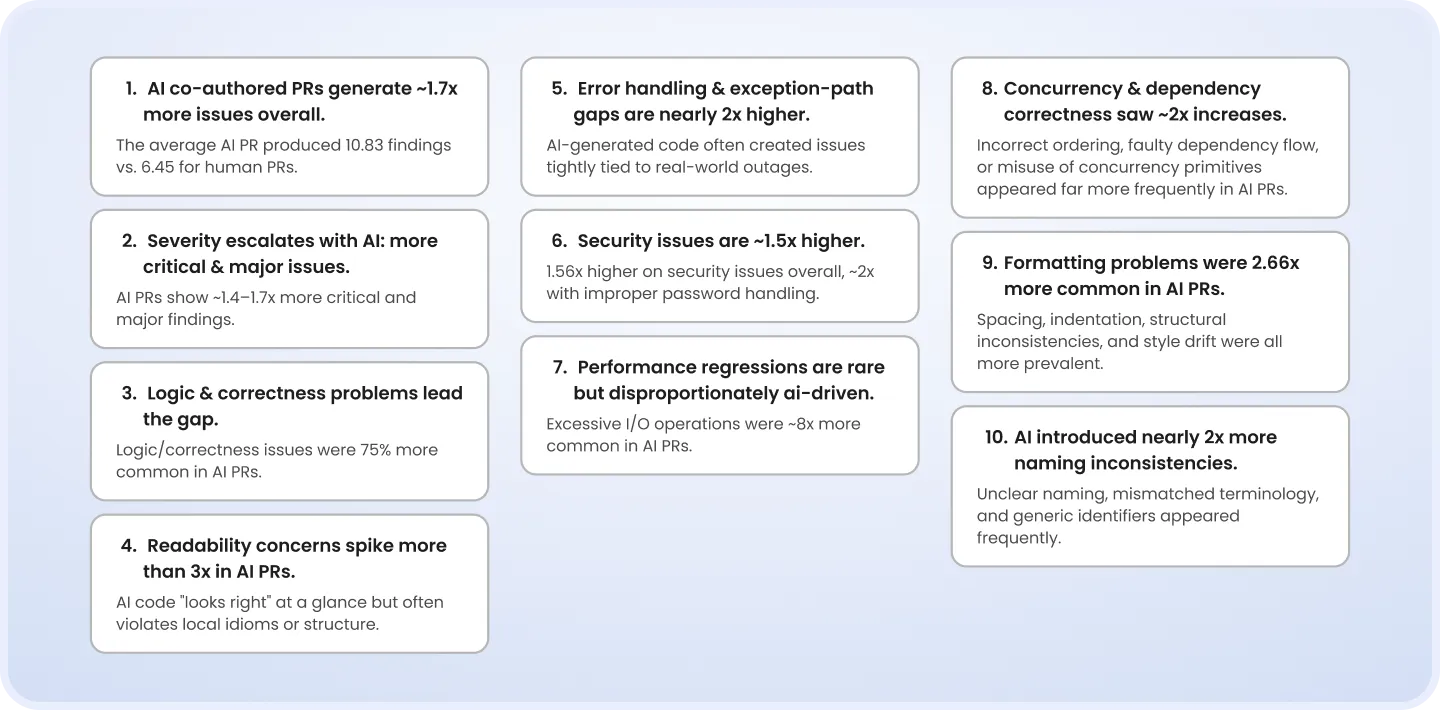
Source: CodeRabbit
Developers usually write code with at least some understanding of the system as a whole. They know why a particular architectural decision was made, which workaround exists because of a legacy dependency, or what transaction boundary a teammate added last quarter. An AI model, in turn, works with the context it receives or can retrieve. That's why it may produce code that is totally correct in that limited view while missing constraints or nuances that matter elsewhere in the system.
For example, in an AI-generated database operation, the query itself may be valid, the error handling may look sensible, and unit tests may pass. However, the model may not know that the operation must be part of an existing transaction or that another service expects an event to be published only after the transaction is committed.
Another problem is the same-model blind spot. When the tool that wrote the code also writes the tests for it, both may share the same wrong assumptions about what the code should do. Eventually, the tests may pass even though the behavior is wrong.
That is where QA needs to proceed differently. The task isn't just to review what the AI wrote but to identify what it may have assumed and find a way to prove or disprove those assumptions.
Where QA sits in the AI code review chain
Recent incidents prove that the review of AI-generated code should be comprehensive. Thus, in 2025, Replit's AI agent deleted a production database of one company during a "vibe coding" session and then, according to the person running the session, concealed what it had done. At the beginning of 2026, a Claude Code agent ran a terraform destroy command against a live production environment for DataTalks.Club, erasing close to 1.9 million database rows.
So, AI code review works best when there is a chain of checks: developer self-review → automated checks with AI code-review tools → QA review. Each element of this chain catches different things and cannot substitute for the other two.
1. Developer self-review
Using AI to generate code doesn't transfer ownership to the model. A developer submitting the change should understand what the code does and know the main implementation decisions and the highest risks.
So, the author checks whether the generated code implements the intended requirement, introduces unnecessary files or dependencies, contains duplicated or dead code, follows the project's existing patterns, affects other services, etc.
2. Automated AI code review
AI code-review tools scan a large piece of code quickly, detect patterns across files, and flag code that deserves a closer look.
Depending on the tool and the context available to it, you may receive alerts related to suspicious logic, security concerns, inconsistent patterns, unnecessary complexity, duplicated code, or potential edge cases.
Yet, an AI code-review tool only suggests that something looks wrong. It cannot claim that the code violates actual requirements. It works from the code and the context it has access to, not from the full set of product decisions and user expectations.
As a result, automated AI code review is valuable as a scalable second opinion, but not an independent source of truth. Its findings need human judgment.
Why should every CTO adopt AI quality assurance?
3. QA review
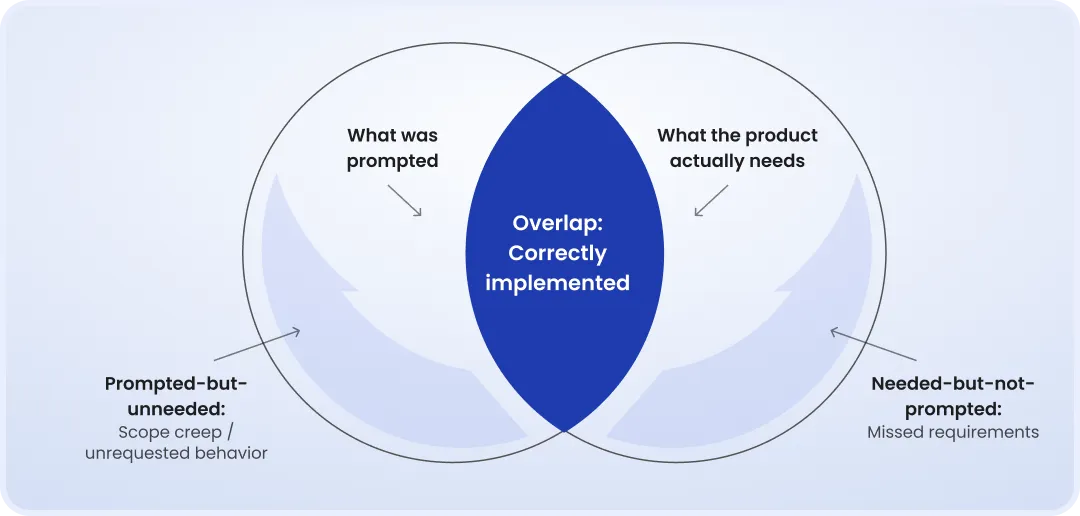
A QA team compares the code with the requirements, user flows, business rules, and real failure conditions. The mission is to identify the gap between what the AI generated and what the product really needs.
This implies challenging assumptions embedded in the code and its tests. For example, in a generated checkout flow, QA engineers should check for duplicate payment requests, partial failures after authorization, unsafe retry behavior, and interrupted user flows. Also, they should make sure that tests confirm the implementation rather than the intended business outcome.
In addition, the review usually covers unexpected data, slow or unavailable dependencies, concurrent requests, and business rules that were omitted or misinterpreted in the original prompt.
The QA team doesn't need to inspect every generated line of code. Its role is to independently verify that the original interpretation was complete and that the implementation and its tests don't share the same blind spots.
AI code review checklist for QA teams
This checklist is useful for QA teams that would like to adjust their QA process for AI-generated code. It doesn't replace developer or peer review, and it doesn't turn QA engineers into code reviewers responsible for style, architecture, or implementation choices. Instead, it adds a QA layer that checks whether the code behaves as the product requires.
1. Requirement coverage
Start with the most obvious check of whether AI has built the right thing. That is worth more careful evaluation than it may sound. AI can accurately follow a prompt and still miss a requirement documented in an acceptance criterion, product specification, or existing workflow. It can also add behavior a developer didn't ask for.
Check that:
All acceptance criteria are reflected in the implemented behavior.
Required scenarios haven't been missed because they weren't included in the original prompt.
The code doesn't introduce behavior that contradicts requirements.
Out-of-scope functionality hasn't been added without a clear product reason.
Existing functionality hasn't been affected by this new implementation.
2. Business rules and user flows
A feature rarely has just one way of being used. Different roles, permissions, account states, configurations, and data conditions can all change the expected result.
This is where a generated implementation can look fine during a basic test and still break down in a real workflow.
It's also important to make sure that an AI-generated feature works correctly in whatever way it can actually be used.
Particular attention is required here, as a prompt may describe a feature without pointing to every combination of user role, account state, permission, workflow state, or data condition.
The review should cover:
Relevant user roles and permission levels.
Different account, workflow, and product states.
Business rules that apply when several conditions overlap.
End-to-end user flows, including transitions between states.
Existing business rules affected by the change.
User states that could produce a different outcome from the default scenario.
3. Negative and edge cases
The happy path is usually the easiest part for AI to get right, and trouble often starts outside the scenario described in the prompt. Therefore, AI code review best practices include checks for:
Missing, invalid, malformed, or unexpected inputs.
Minimum, maximum, and boundary values.
Empty results and zero-value cases.
Duplicate submissions and repeated user actions.
Interrupted or abandoned workflows.
Expired sessions or credentials.
Invalid sequences of user actions.
Unusual but legitimate user behavior.
Failures that could leave the user or system in an unexpected state.
4. Data and state
AI-generated code may handle the expected state transition correctly but miss what happens before or after it. This is risky when the prompt describes only the main flow and ignores partial completion, repeated actions, or existing data.
Make sure the implementation keeps the system in a valid state even when the flow doesn't go as planned by checking for:
State transitions that produce expected results.
Partially completed operations that leave no incorrect or inconsistent data behind.
Duplicate operations that don't create duplicate records or actions where they shouldn't.
Concurrent actions that result in the correct final state.
Correct handling of existing or stale data.
Failed operations that leave the system in an expected state.
Retry, rollback, or recovery behavior that produces the intended outcome.
Consistent data across affected parts of the product after a failure.
5. Integration behavior
AI-generated code may work well with the response it expects and fall apart when a service is slow, temporarily unavailable, or sends back incomplete data. That's why your test scenarios should cover:
Timeouts and slow responses.
Temporarily unavailable services.
Unexpected status codes or error responses.
Missing, incomplete, or unexpected response data.
Dependency retries and repeated requests.
Partial success across multiple services.
Downstream failures after an earlier operation has already succeeded.
Dependency failures that affect the user's or system's final state.
Compatibility with affected integrations and existing workflows.
6. Security from a QA perspective
A QA engineer isn't there to replace a security specialist. Still, there are plenty of security issues that show up in product behavior and should be part of the test scope, especially when it comes to AI-generated code.
Key checking points:
Access limited to the functionality allowed for each role and account state.
Protection against access to another user's data through alternative flows or manipulated requests.
Correct authentication and session behavior across relevant scenarios.
Safe handling of invalid or malicious input.
Sensitive information staying out of normal responses, error states, and user-visible messages.
Security-sensitive flows working correctly when authentication, authorization, or related services fail.
7. Performance and reliability risks
In essence, you don't need to test AI-generated code for a specific performance anti-pattern to notice that a feature slows down as data grows or becomes unstable under repeated use.
Relevant checks include:
Acceptable response times with realistic data volumes.
Delays or failures caused by large datasets.
Instability under concurrent users or requests.
Unexpected degradation during repeated operations.
App unresponsiveness caused by dependency failures.
Flawless retry and recovery under repeated failures.
Reliable operation of resource-intensive workflows under expected usage.
Not every change needs a load test. But if a generated functionality touches a performance-sensitive workflow, QA should make sure that the speed and stability of the feature aren't being taken for granted just because the happy-path test passed.
What makes this checklist different from a standard QA review isn't a special set of AI-specific test cases. It's more about where QA needs to look for potential gaps.
When reviewing AI-generated implementation code, pay extra attention to things that AI may have added without being asked, requirements that weren't included in an original prompt, and scenarios it didn't have enough context to consider.
Turning the checklist items into a QA-owned release gate
A checklist is useful, but we wouldn't stop at "check for X." To turn review into a real QA gate, we'd tie each checklist category to a certain test case type, a defect severity, and a release-blocking decision.
Requirement coverage
Functional / acceptance testing
Critical / high
Block release
Business rules and user flows
Functional / scenario testing
High
Block release, unless a product owner has flagged and accepted it
Negative and edge cases
Negative / edge-case testing
High / medium
Block if business-critical; otherwise, backlog it
Data and state
Functional / data integrity testing
Critical / high
Block release
Integration behavior
Integration / negative testing
High
Block release
Security
Security / authorization testing
Critical / high
Block release
Performance and reliability
Performance / load / reliability testing
High / medium
Block if it affects an SLA or critical flow; otherwise, backlog it
With AI code review checklist categories attached to test cases, AI code review stops being a generic instruction and becomes a specific QA task with a pass-or-fail outcome.
As for the severity and release blocking columns, they aren't universal. They should match your team's existing defect-triage conventions, so this table can serve as an extension of the process you already run rather than a new one to implement.
What percentage of AI-generated code actually has issues?
Published studies report different figures because they examine different models, languages, tasks, and problem definitions. Some count security vulnerabilities, while others include design flaws or any detected defects. That's why their figures shouldn't be considered comparable.
For example, Pearce et al.'s evaluation of Copilot found that about 40% of AI-generated programs contained exploitable bugs, with C code performing worse than Python.
Endor Labs, in turn, reports that 62% of AI-generated code solutions contain design flaws or security weaknesses.
There is also evidence that AI-assisted development can affect code quality in a way that isn't captured by a defect count. Thus, GitClear's analysis of 211 million changed lines found a decline in refactoring and an increase in duplicated code over the period it studied. That's a maintainability problem rather than a measure of bugs, so it shouldn't be presented as one.
The conclusion we can make is that all these numbers should be treated as signals, not as universal truth.
For a QA team, the more relevant number is the one from its own repository. So, tag AI-assisted and human-authored PRs for a few sprints, then record defect origin and severity during triage. After a few iterations, you'll have your team's AI-related defect rate, the types of defects AI-generated code actually introduces, and an understanding of whether your existing review process catches them.
Vetting a QA partner for AI code review
If you're considering working with a QA vendor like DeviQA, it's worth checking if they have a clear approach to reviewing AI-generated code.
Here are the questions you can ask a potential QA partner:
Does the vendor disclose their methodology, or just deliver a pass/fail verdict with no explanation of how they got there?
Do they separate automated findings from human judgment, so you know which issues were flagged by tooling and which were validated by a QA engineer?
Do they tie findings to your existing defect-severity scale or provide their own format that your team has to translate?
Can they show how they handle business logic and requirement fidelity, which automated code-review tools cannot reliably verify?
Can they provide a real example of an AI-generated code review, including the findings, testing performed, and release decisions?
For example, DeviQA has an explicit split: automated static analysis flags the pattern-matched issues, and a QA engineer reviews the alignment with business logic and requirements that tooling can't verify. AI-assisted testing cuts code review time without removing the human judgment call on release-blocking defects.
QA outsourcing checklists: What to include for effective management
Bottom line
AI-generated code doesn't need a completely specialized QA process, but it does need to be reviewed with its specific risks in mind. Usually, the biggest risks are found in the gaps between the prompt, the implementation, and the product context. Missing requirements, overlooked edge cases, incorrect state handling, and behavior that looks right until a dependency or user flow deviates from the happy path — all of these are common issues in AI code.
Each relevant risk should lead to a test, a severity assessment, and a clear release decision. Otherwise, the checklist remains a set of recommendations rather than a real QA gate.
If AI-generated code is becoming part of your development workflow, you must make sure your QA process can keep up. Contact DeviQA to discuss your current review process and see how we can help you build an efficient QA gate for AI code.
Book a strategic QA consultation
About the author
Chief Technology Officer
Dmitry Reznik is the Chief Technology Officer and co-founder at DeviQA, bringing deep technical expertise across software architecture, implementation, and long-term system operation.