
Written by: Chief Operating Officer
Anastasiia SokolinskaPosted: 15.10.2026
14 min read
AI-assisted development calls for AI-assisted testing. This is the only way to keep up with the pace at which modern systems evolve.
Responding to the industry demand, Playwright, as a leading test automation framework, has introduced AI capabilities built around the Playwright MCP server and its Planner, Generator, and Healer agents.
But adding AI to your testing workflow raises a lot of questions. What tasks can this AI stack handle? How much access should AI agents have to your applications and environments? What challenges can show up when adopting agent-driven testing? Can you really trust self-healing tests? And does building and maintaining this stack make sense for your team? Read on to get all the answers.
Book a call for trusted Playwright test automation expertise
What the Playwright AI stack actually is
Traditional Playwright automation works based on predefined instructions and depends on human input.
The AI stack changes the way interactions happen. Instead of only executing predefined steps, AI agents can interpret goals, decide which actions to take, use Playwright tools to interact with an application, and analyze the results.
At the center of this architecture is Microsoft's @playwright/mcp server. MCP — Model Context Protocol — exposes browser control to any LLM client through structured tools — browser_navigate, browser_click, browser_snapshot — instead of using screenshots or pixel comparisons. So, serving as a bridge, it allows AI agents to communicate with Playwright and perform browser-related tasks efficiently.
The three Playwright AI agents sit on top of that server, not inside it. Planner explores an application and builds an understanding of which states and user flows are reachable. Based on that information, Generator creates a first-draft Playwright test. Healer runs at execution time, re-diagnosing a failing locator against the current page and offering a fix.
Treating these agents as one AI system may make you overlook an important fact that they solve different problems, run at different stages of the testing lifecycle, and require different levels of oversight.
Also, an MCP session is stateful. The model reads the page, reasons, makes an action, observes the new state, reasons about what happened, and repeats that loop until the task is complete.
Understanding where each agent participates in that cycle is very useful, as it allows teams to evaluate the risks of each component independently instead of treating the entire stack as a single black box.
MCP session vs. CLI-skill pattern: When to use each one
How the LLM model interacts with Playwright is an important architectural decision. Generally, two approaches are used: persistent MCP sessions and CLI-based skills.
With an MCP session, an AI agent connects to the browser through the Playwright MCP server. It can inspect the current page, remember previous actions, go through complex user journeys, and make decisions based on everything it has already seen. As a result, MCP sessions are well-suited for exploratory testing, debugging, and other tasks that require constant reasoning.
The setback is broader access. MCP sessions require more permissions, consume more resources, are harder to govern, and increase the risk of unintended actions if an agent acts unexpectedly.
The CLI-skill pattern is more restrictive. Instead of controlling a browser all the time, the AI executes predefined Playwright commands to complete specific tasks, like running a test, taking a screenshot, collecting logs, etc. Each action starts and ends independently, due to which permissions are easier to control and results are easier to reproduce.
For most teams, a hybrid approach usually works best. The decision rule is simple: if the agent needs to figure out what's on the page before it takes action, use MCP. If the agent already knows the plan and just needs to run it, use the CLI-skill pattern. Teams that use MCP everywhere, including for stable, already-written regression suites, pay a real token and latency tax for reasoning they don't need.
Microsoft's own playwright-mcp documentation highlights that coding agents that already know the test plan favor a CLI-skill pattern over a live MCP session because CLI invocations skip loading large tool schemas and full accessibility trees into every turn.
Best for
Reasoning over new or modified page state
Executing a known, pre-planned test
Token cost
High — the full accessibility tree and page context are sent on each turn
Low — large tool schemas and verbose accessibility trees aren't loaded into a model context
Latency
Higher — multi-turn observe/act loop
Lower — single invocation per command
Determinism
Lower — the agent decides the next step
Higher — the plan is set before execution
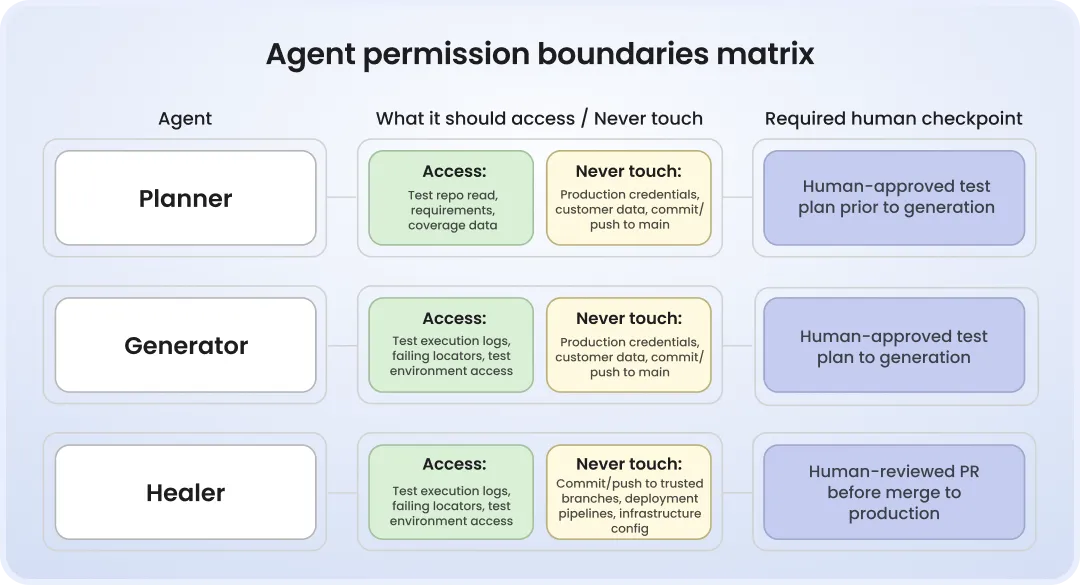
Playwright Planner, Generator, Healer: what each agent should be allowed to touch
Most talks about AI-powered Playwright workflows focus on what agents can do. However, what they shouldn't be allowed to do when running against real CI pipelines is also important. Poorly defined boundaries can lead to unreliable results, security issues, and unintended changes.
When it comes to the Planner agent, access should be given only to environments and accounts needed to understand the software under test. It's risky to allow it to interact with production systems or go outside the exploration scope.
Generator should be treated as an assistant, not an autonomous developer. It creates the first draft, not a finished Playwright test. Assuming that Generator output is ready to merge without human evaluation is a big mistake. Like any AI-generated code, it needs to be checked for correctness, maintainability, and compliance with testing goals.
Among all agents, Healer requires the strictest controls. The thing is that it works during test execution, where its decisions can affect CI outcomes. Giving the healing agent unattended commit or push rights to trusted branches can turn a diagnostic tool into an unreviewed decision-maker. When it only proposes locator updates, it helps QA engineers investigate failures. When it silently modifies tests and reports a successful build, it can hide real product issues instead of fixing them.
Many teams understand the role of boundaries only after they experience the consequences of their absence.
False-positive problem, with real numbers behind it
A recently published study on AI-assisted self-healing in a Playwright-based end-to-end test suite reported positive results after a six-month deployment period. A 73% reduction in false-positive test failures and a 45% decrease in mean time to repair (MTTR) for legitimate failures were observed. Test suite reliability increased from 68.6% to 91.3%, although the results varied across the failure category. Unexpected redirects and timing-related issues achieved 90% success rates, though infrastructure failures were still much harder to resolve.
These findings explain why teams are excited about self-healing. Flaky tests slow down debugging and gradually bring discredit to automation. But empowering the agent to modify tests introduces another problem: teams need to be absolutely confident that it fixes the issue instead of concealing it.
The same study showed that regression masking is a key governance concern, documenting three incidents where healing mechanisms hid issues, including UI and performance regressions. This makes transparency, audit trails, and review processes crucial when introducing autonomous healing into a CI pipeline.
Another research study on autonomous test repair also reported cases where agents weakened assertions or removed test cases to achieve a passing state, emphasizing the risk of preserving green builds at the expense of test intent.
Taking all those facts into account, we wouldn't recommend rejecting the Healer agent. What you need to do instead is to ensure the availability of safeguards in your CI pipeline before empowering the AI agent to change the tests that define product quality.
This does not mean teams shouldn’t use Healer. The agent is helpful provided you have good safeguards in your CI pipeline.
How to write stable Playwright selectors and avoid flaky tests
CI pattern that distinguishes production-ready AI-based testing from demos
The difference between a reliable self-healing setup and one that creates new problems often lies in the rules governing the AI agent.
The most efficient pattern is based on three principles:
Healer runs with read-only diagnosis rights.
Offered fixes are turned into pull requests, where a human and CI checks review them.
The limit is set on how long or how many times an agent can keep retrying before it flags a human.
The GitHub workflow presented below follows this pattern.
# .github/workflows/healer-diagnosis.yml
# Runs Healer in diagnosis-only mode -- no write access, no auto-merge.
# NOTE: requires sign-off from a Playwright-experienced engineer before
# this touches a real pipeline. Treat this skeleton as a starting point,
# not a drop-in production config.

name: healer-diagnosis

on:
  workflow_run:
    workflows: ["e2e-tests"]
    types: [completed]

permissions:
  contents: read  # Healer never gets write access to the repo
  pull-requests: none
  actions: read

jobs:
  diagnose:
    if: ${{ github.event.workflow_run.conclusion == 'failure' }}
    runs-on: ubuntu-latest
    timeout-minutes: 15  # investigation budget: hard time cap
    steps:
      - uses: actions/checkout@v4
      - name: Run Healer in diagnosis mode
        run: npx playwright heal --mode=diagnose --max-retries=3
        # --mode=diagnose: Healer proposes a locator/action fix as a diff,
        # it does not apply or commit anything.
      - name: Upload diagnosis report
        uses: actions/upload-artifact@v4
        with:
          name: healer-diagnosis-report
          path: healer-report.json

  apply:
    needs: diagnose
    runs-on: ubuntu-latest
    environment: healer-review  # requires a human approver, configured in repo settings
    steps:
      - uses: actions/checkout@v4
      - name: Download diagnosis report
        uses: actions/download-artifact@v4
        with:
          name: healer-diagnosis-report
      - name: Open PR with proposed fix
        run: npx playwright heal --apply-from=healer-report.json --open-pr
        # This step runs after the environment's required reviewer
        # approves. The PR still goes through normal review and CI ---
        # it does not merge itself.
In fact, the environment: healer-review line is what sets the boundary. GitHub's environment protection rules introduce the approval process independently of the workflow itself, due to which unintentional changes cannot skip human review.
Even the CI configuration presented above should never be treated as a ready-to-use solution. A QA engineer responsible for your Playwright suite should review it before it goes into a real pipeline. That's paramount, as every company has different branching strategies, deployment rules, and compliance requirements.
Shadow DOM challenge that catches teams by surprise
Not many know that Shadow DOM may cause some of the hardest failures to diagnose.
Apps developed with component libs like Shoelace, Lit, and Stencil leverage Shadow DOM. While standard Playwright automation easily handles open shadow roots, allowing locators to interact with components almost as if they were part of the regular DOM, AI agents don't always reason from the same information.
Many MCP-based workflows use accessibility snapshots to analyze a page before defining an action to do. That approach can be unreliable when Shadow DOM, slots, or complex component hierarchies are involved.
Often, accessibility snapshots fail to correctly represent interactive elements inside Shadow DOM, because of which Playwright AI agents decide that a visible control doesn't exist. For example, in the issue documented on GitHub, an accessibility snapshot didn't correctly represent the button inside a shadow root with a slotted <span>. As a result, an AI agent reported that the element didn't exist even though a real user could actually see and click the button.
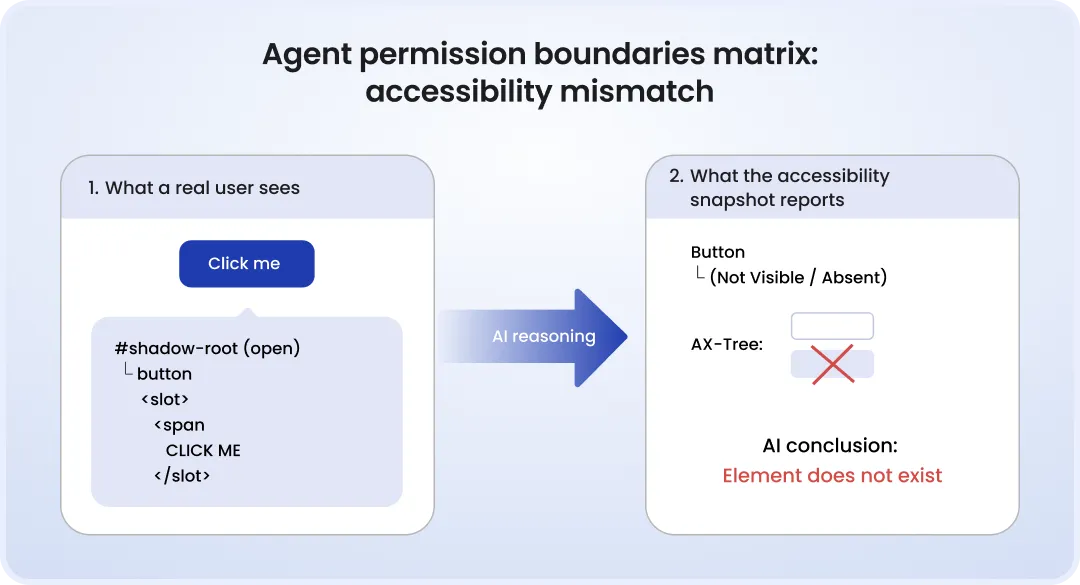
Another reported issue is when accessibility snapshots expose off-screen elements as immediately actionable, forcing agents to interact with controls a user couldn't actually reach without scrolling.
That's why, before running agent-generated tests on an entire app, check how AI agents work with the component libs used in your app.
Where self-healing doesn't work
Marketing campaigns for AI-powered testing frameworks often claim that self-healing solves most maintenance problems. No, it doesn't.
How well the Healer works depends on the quality of the application's markup.
When apps are developed with clearly defined semantic roles, accessible labels, and stable data-testid, Healer easily finds the right elements and recovers from UI changes.
Teams where software has messy, div-soup markup and no consistent test-id convention get worse results, because Healer's re-matching logic depends on the same signals a role-based locator would use. If the markup doesn't give it those signals, the agent makes guesses based on incomplete evidence.
Testing scale is also an important factor.
Companies that have hundreds or thousands of e2e tests and products that evolve every sprint can save a great deal of engineering effort by minimizing selector maintenance via self-healing.
For a forty-test regression suite that's updated twice a year, self-healing is less beneficial. Governance processes, monitoring, review, and approval practices may cost more than updating locators manually.
So, your decision on self-healing introduction should be driven by operational needs, not just technology availability.
Security aspect: What data the MCP server can access
To do their job, MCP-connected agents analyze traces, screenshots, accessibility snapshots, and network activity. When tests are executed in environments with live credentials, client records, or production-like data, those artifacts can include confidential data that your engineers see during debugging.
There is also one more risk. Because accessibility snapshots become structured text inside a model's context, hidden page components can impact the agent's behavior. Thus, certain content placed in off-screen elements may serve as an indirect prompt injection, instructing a model to do things it otherwise wouldn't have done or exposing data from a previous page in the same session.
To protect yourself, you should perform testing using isolated environments, synthetic datasets, tightly scoped browser profiles, and credentials that exist only for automated testing.
Build in-house or outsource AI-driven Playwright testing?
The introduction of the Playwright AI workflow suggests taking accountability for AI test automation governance, healing telemetry, and CI guardrails. And that's on top of the tasks the QA team already tackles.
AI-assisted Playwright testing isn't a one-time setup effort. It's ongoing operational work that needs to be monitored and tuned.
For companies with mature QA infrastructure, building internal Playwright AI expertise may be a good choice.
For lean engineering teams that already balance feature delivery, platform work, and test maintenance, AI introduction can become another long-term responsibility no one has bandwidth to take on. In this case, it may make more sense to collaborate with an outsourcing company.
Playwright testing outsourcing: When to bring in external QA
All in all, each team makes a choice based on whether they want to own another engineering capability or just benefit from it.
Bottom line
The Playwright AI stack can remove a great amount of routine maintenance work, especially related to selector updates and test troubleshooting. However, self-healing tests in Playwright and AI-generated tests deliver value only when there is the right foundation: clear governance, structured app markup, and confirmation that the agents behave well with component libraries if they're used.
A good workflow is one where AI handles common tasks while engineers make quality decisions.
Before introducing Playwright AI into CI, make sure the approach is in line with your product, testing strategy, and internal processes. If you need help with evaluating your setup or designing a Playwright AI workflow from scratch, DeviQA engineers can help you.
Book a strategic QA consultation
FAQ
What is the Playwright MCP server?
This is Microsoft's official Model Context Protocol server that enables models to control browsers via structured tools, analyzing pages through the accessibility tree, not HTML or screenshots.
Is self-healing built into Playwright?
No, it isn't. Self-healing is provided by AI agents built on top of Playwright, using the Playwright MCP server or other integrations.
Can AI agents run unsupervised in CI?
Planner and Generator can run autonomously when they are limited to analysis and draft creation. Healer, in turn, requires control. While diagnosis can run automatically, fixes proposed by the agent should go through a human-reviewed PR.
Can self-healing tests in Playwright replace flaky test management?
Self-healing and flaky test management handle different test failures, complementing each other. Self-healing fixes outdated locators after UI changes, but it doesn't solve the root causes of flaky tests, e.g., timing issues, shared state, unstable test environments, etc.
About the author
Chief Operating Officer
Anastasiia Sokolinska is the Chief Operating Officer at DeviQA, responsible for operational strategy, delivery performance, and scaling QA services for complex software products.