
Written by: Chief Operating Officer
Anastasiia SokolinskaPosted: 09.07.2026
15 min read
Most browser automation articles make the same mistake: they assume you're picking a tool for a blank-slate project. You're probably not. You have a codebase, a CI budget, a team that writes in specific languages, and — maybe — a Puppeteer suite that's been running for two years and has started causing problems you don't want to solve manually.
This article is written for that situation. The goal isn't to declare a winner. It's to give you a clear call for your specific stack — language, browser coverage, scale, and what you're willing to migrate.
Here's how to make that call in under 10 minutes.
Why this comparison still matters in 2026
Playwright vs Puppeteer is not a settled debate. Playwright sits at 82,700+ GitHub stars and 20 million NPM downloads. Puppeteer holds 93,600+ GitHub stars and 4 million weekly NPM downloads. Both tools ship updates regularly. Both run in production at scale.
The "Puppeteer is dead" framing you'll find in some corners of the internet is wrong, and acting on it leads to bad decisions. If your team runs Chrome-only automation scripts for PDF generation, screenshot capture, or stealth scraping — Puppeteer isn't legacy, it's still the right tool. The real question is whether it's still the right tool for you.
What has changed in 2026: Playwright's feature surface has widened considerably, its CI tooling has matured, and it now ships three built-in AI test agents that have no equivalent in Puppeteer. Those factors shift the calculus for product engineering teams building toward scale. But they don't shift it for everyone.
Talk to a DeviQA engineer about your Puppeteer migration
What you're actually choosing between — architecture, not just API
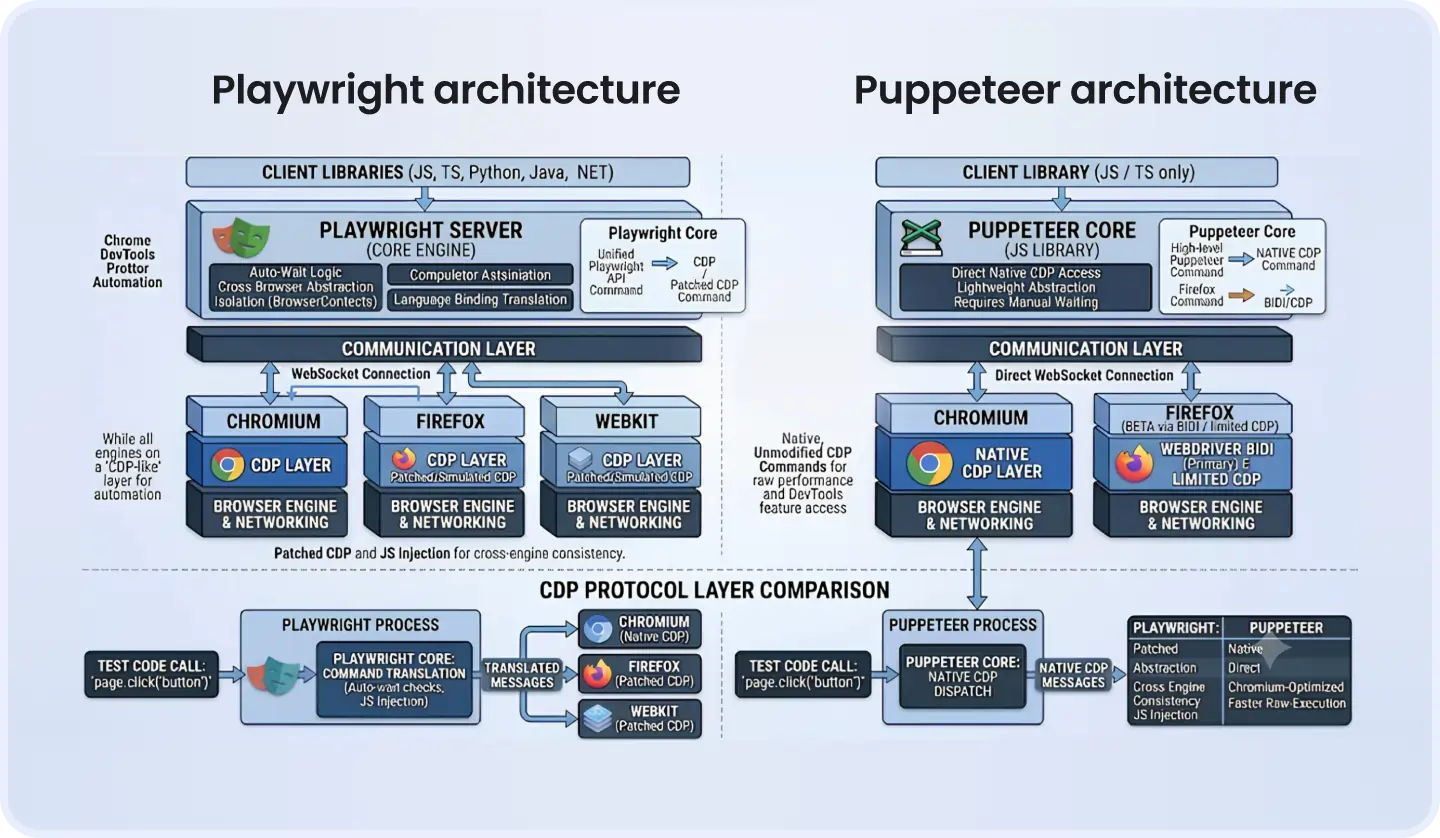
Most comparison articles stop at a feature table. That misses the architectural difference that actually drives every downstream consequence you'll care about: CI resource consumption, parallelism, and flakiness.
Both tools speak Chrome DevTools Protocol (CDP) for Chromium. That's where the similarity ends. Puppeteer uses CDP as its direct wire — it talks to Chromium and only Chromium (with beta-level Firefox support via WebDriver BiDi that doesn't yet reach feature parity with the Chrome implementation). The API surface you get is essentially a JavaScript wrapper around CDP calls.
Playwright takes a different approach. Microsoft engineers built browser-specific patches — CDP for Chromium, a custom protocol layer (historically called Juggler) for Firefox, and a WebKit integration for Safari — then unified all three behind a single consistent API. You write one test. Playwright handles the browser-specific translation.
That architectural choice has three concrete consequences:
First, cross-browser coverage is a first-class feature in Playwright, not an afterthought. Second, Playwright's abstraction layer gives it room to implement behaviors — like auto-waiting — that Puppeteer can't implement as cleanly because it doesn't own the abstraction above CDP. Third, Playwright's browser context model (covered below) becomes possible precisely because it sits above the raw protocol.
Understanding this architecture shapes every decision in the rest of the article.
Feature comparison — the ones that actually matter at scale
Cross-browser support
Puppeteer focuses on Chrome/Chromium. Its Firefox support, added via WebDriver BiDi, is in beta and behind Chrome on feature parity. For the vast majority of Puppeteer users, "multi-browser" means Chrome on different OS configurations.
If your users are on Safari — and in B2B SaaS, mobile Safari usage is often 15–25% of your traffic — Puppeteer is effectively out of the picture. WebKit-based bugs in checkout flows, form submissions, and CSS rendering won't surface in a Chrome-only suite.
Playwright tests against Chromium, Firefox, and WebKit out of the box. That coverage runs through a single API, no conditional logic per browser required.
Language support
Playwright ships official APIs in JavaScript, TypeScript, Python, Java, C#, and .NET — with feature parity across all of them. If your backend team writes Python and wants to own test automation, they work with the full Playwright feature set.
Puppeteer is JavaScript and TypeScript only. The unofficial Python port, Pyppeteer, lags behind Puppeteer releases and receives inconsistent maintenance. For a Python or Java engineering team, that's not a nice-to-have gap — it's a hard blocker.
Auto-waiting and flakiness
Playwright doesn't just "have auto-waiting." It checks five conditions before acting on any element: attached to the DOM, visible, stable (no ongoing animation), enabled, and not obscured by another element. Every action — click, fill, press — waits for all five before proceeding.
Puppeteer requires you to write those waits yourself. waitForSelector(), waitForTimeout(), and various combinations become test maintenance overhead that compounds over time. A suite of 150 Puppeteer tests typically develops 15–20 timing-related flakes within six months — not because the tests are wrong, but because the waits are manually calibrated to the environment they were written in.
That maintenance overhead is the real cost of Puppeteer at scale.
Test runner and built-in tooling
@playwright/test ships with the library. It provides parallel execution, automatic retries, video recording, screenshots on failure, and a Trace Viewer for debugging. You open a .zip file and see a full timeline of what happened — DOM snapshots, network requests, console output, every action.
Puppeteer ships no test runner. To get equivalent behavior, you compose it with Jest or Mocha, configure parallel execution separately, and wire up your own retry and reporting logic. That configuration is manageable — but it's non-trivial, and it's your problem to maintain.
Parallel execution and isolation model
This is where the architectural difference hits your CI budget directly.
Playwright launches one browser process and creates isolated browser contexts for each parallel worker. A browser context is full isolation — separate cookies, storage, authentication state — but it shares the underlying browser process. Fifty workers share one Chromium binary. No state leaks between them.
Puppeteer's default model launches a separate browser instance per test. Fifty parallel tests mean fifty Chromium processes. On GitHub Actions' standard runners (2-core, 7GB RAM), that ceiling hits fast.
Here's what that looks like in code:
Playwright — 50 isolated contexts, one browser process:
// playwright.config.ts

import { defineConfig } from '@playwright/test';

export default defineConfig({

  workers: 50,              // 50 parallel workers

  use: {

    browserName: 'chromium',

  },

});

// In a test file — each test gets its own isolated context automatically

import { test, expect } from '@playwright/test';

test('checkout flow', async ({ page }) => {

  await page.goto('https://app.example.com/checkout');

  await page.getByRole('button', { name: 'Add to cart' }).click();

  await expect(page.getByText('Item added')).toBeVisible();

});
Puppeteer — one browser instance per test, manual orchestration:
// Using jest-puppeteer for parallelism — requires separate config

// jest.config.js

module.exports = {

  preset: 'jest-puppeteer',

  testMatch: ['**/*.test.js'],

};

// Each test file gets its own browser — managed by jest-puppeteer

test('checkout flow', async () => {

  await page.goto('https://app.example.com/checkout');

  await page.click('[data-testid="add-to-cart"]');

  await page.waitForSelector('[data-testid="cart-confirmation"]', { timeout: 5000 });

  const text = await page.$eval('[data-testid="cart-confirmation"]', el => el.textContent);

  expect(text).toContain('Item added');

});
The Puppeteer version needs explicit waits. The Playwright version doesn't. At 50 tests, the difference in resource consumption is material.
Setting up test automation from scratch? Let's review your stack before you commit to a direction you'll want to change in 12 months.
Book a strategic QA consultation
Performance benchmark — when Puppeteer is actually faster
Benchmarks show Playwright averaging 4.5 seconds on navigation-heavy scenarios versus Puppeteer at 4.8 seconds. In absolute terms, that gap is small.
The numbers flip for short, single-page scripts. Puppeteer starts 20–30% faster than Playwright on cold-start, single-script execution because Playwright's initialization overhead — loading the browser server, establishing the context layer — doesn't amortize across enough work to justify itself.
Single script, cold start
~1.8s init + task
~0.9s init + task
Puppeteer
20-test suite, sequential
~38s
~42s
Playwright
100-test suite, parallel (50 workers)
~28s total
~60s+ (resource-constrained)
Playwright
Navigation-heavy E2E (avg per test)
4.5s
4.8s
Playwright
Flake rate, 6-month mature suite
2–4% (auto-wait)
10–18% (manual waits)
Playwright
The table tells you the actual decision: if you're writing standalone scripts you run individually, Puppeteer's startup advantage is real. If you're running a CI test suite of 20 or more tests, Playwright wins on total wall-clock time — and the margin widens as the suite grows.
CI/CD implications — what the choice costs in your pipeline
This is the section most articles skip entirely. "Playwright is better for CI" is repeated everywhere. What it means in practice, concretely, is not.
Docker image size. Playwright requires all three browser binaries — Chromium, Firefox, WebKit. A standard playwright:focal Docker image runs 600MB+. Puppeteer with Chromium only lands closer to 400MB. If you're building and pushing images on every PR, that delta adds up in storage and pull time.
ARM and Apple Silicon. Playwright ships native support for Apple Silicon (M1/M2) and provides ready-to-use Docker images for both architectures. Puppeteer requires manual configuration for Docker ARM environments — a real friction point for teams running local development on M-series Macs and deploying to ARM-based CI runners.
GitHub Actions setup. Here's a working Playwright YAML that installs browsers and runs tests with sharding:
# .github/workflows/playwright.yml

name: Playwright Tests

on:

  push:

    branches: [main, develop]

  pull_request:

jobs:

  test:

    runs-on: ubuntu-latest

    strategy:

      matrix:

        shard: [1, 2, 3, 4]   # Split suite into 4 shards

    steps:

      - uses: actions/checkout@v4

      - uses: actions/setup-node@v4

        with:

          node-version: '20'

      - name: Install dependencies

        run: npm ci

      - name: Install Playwright browsers

        run: npx playwright install --with-deps chromium

      - name: Run Playwright tests (shard ${{ matrix.shard }}/4)

        run: npx playwright test --shard=${{ matrix.shard }}/4

      - name: Upload test results

        uses: actions/upload-artifact@v4

        if: failure()

        with:

          name: playwright-report-shard-${{ matrix.shard }}

          path: playwright-report/
The --shard flag splits your suite across parallel runners natively. A 200-test suite sharded across 4 runners runs 50 tests per runner in parallel. Without sharding, that same suite runs serially on a single runner.
For Puppeteer, you get no native sharding. You achieve equivalent parallelism through Jest's --maxWorkers flag, separate test partitioning scripts, or a third-party test orchestrator. None of those are difficult — but none are zero-config either.
Runner minute math. Take a 200-test suite on GitHub Actions:
Playwright with 4 shards: 4 runners × ~4 minutes each = 16 runner minutes per PR
Puppeteer with Jest parallel (4 workers): 1 runner, serial shards = ~18–22 minutes per PR
At 20 PRs per day, that's 80 runner minutes saved daily — 40 hours of runner time per month. At GitHub's standard pricing, that's a measurable line item at scale.
When Puppeteer is still the right call
Framing Puppeteer as the losing option is the most common mistake in this category of content.
Four situations where Puppeteer genuinely wins:
1. Chrome-only stealth scraping. The puppeteer-extra-plugin-stealth package has years of community hardening against bot detection. Playwright's stealth story (playwright-extra) exists but is less mature, less tested against modern detection fingerprinting. For production scraping pipelines where bot detection is the core technical challenge, Puppeteer's ecosystem is the stronger choice today.
2. Direct CDP access. If your system needs to work directly at the Chrome DevTools Protocol level — intercepting specific protocol events, using experimental CDP domains, or building tooling around Chromium's internals — Puppeteer's thin abstraction layer makes that easier. Playwright's abstraction works against you here.
3. Minimal one-off automation. PDF generation, screenshot capture, single-page data extraction that runs on demand: Playwright's initialization overhead is not justified. Puppeteer spins up faster and is simpler to reason about in a serverless or one-shot context.
4. Large existing Puppeteer codebase with no cross-browser requirement. If you have 300 Puppeteer tests that run reliably, cover Chrome-only workflows, and your team has no Safari or Firefox requirement — the ROI on migration is negative. Don't fix what isn't broken.
When Playwright is the stronger default
Map these directly to your team's situation:
Safari/WebKit coverage. If any part of your QA plan requires WebKit testing — especially for mobile web flows — Playwright is the only realistic option.
Non-JavaScript stack. If your test engineers write Python, Java, or C#, Puppeteer is not a viable option. Pyppeteer lags behind Puppeteer releases and receives inconsistent maintenance. This is a hard blocker, not a preference.
Suites of 50+ tests in CI. Above this threshold, Playwright's context reuse and eliminated retry overhead generate measurable CI savings. Below it, the advantage exists but may not justify a migration.
AI-assisted test generation in your 12-month roadmap. Playwright ships three built-in AI test agents as of late 2025: Planner (explores the application and produces a structured test plan), Generator (transforms the plan into executable Playwright test files), and Healer (detects test failures and automatically patches locators, wait conditions, and assertions). Puppeteer has no equivalent. Beyond its own agents, Playwright's official MCP server comes preconfigured in GitHub Copilot — giving AI agents structured browser access through accessibility tree snapshots rather than pixel-level screenshots. If AI-assisted testing is directionally important to your roadmap, building on Playwright now avoids a forced migration later.
Teams scaling past 100 tests on GitHub Actions. At this scale, Playwright's sharding (--shard), native parallelism, and reduced flake rates have a compounding effect on pipeline reliability. The suite that takes 40 minutes to run becomes the suite no one trusts. Playwright's architecture makes that outcome structurally less likely.
Migrating from Puppeteer to Playwright — is it worth it?
This is the question most engineers actually have, and almost no article addresses it directly.
The technical translation is not a rewrite. The API surface overlaps heavily:
// Puppeteer

const browser = await puppeteer.launch();

const page = await browser.newPage();

await page.goto('https://example.com');

const el = await page.$('#submit-button');

await el.click();

await page.waitForSelector('.confirmation', { timeout: 5000 });

// Playwright equivalent

const browser = await chromium.launch();

const context = await browser.newContext();

const page = await context.newPage();

await page.goto('https://example.com');

await page.locator('#submit-button').click();

// No waitForSelector needed — Playwright waits automatically

await expect(page.locator('.confirmation')).toBeVisible();
Three changes dominate 90% of the translation work: page.$ becomes page.locator(), explicit waits become unnecessary or are replaced with expect() assertions, and browser.newPage() becomes browser.newContext() + context.newPage().
Migration signal checklist — migrate if 3 or more apply:
Your suite flakes more than 8% of test runs
Your team writes in Python, Java, or C#
Safari or Firefox coverage is required or planned within 12 months
Your CI suite takes more than 30 minutes and parallelism is constrained
You're planning to integrate AI test generation tools
Stay on Puppeteer if all three apply:
Chrome-only coverage with no Safari/Firefox requirement in the roadmap
The existing suite is stable (flake rate under 5%)
The team writes JavaScript/TypeScript exclusively and has no migration forcing function
Effort estimate. A 200-test Puppeteer suite, written by experienced JavaScript engineers, takes roughly 3–5 engineering days to translate mechanically. Add 2–3 days for CI pipeline reconfiguration, Docker image updates, and parallel sharding setup. Call it 1.5–2 weeks for a thorough migration including test validation. For teams doing this for the first time, budget two weeks conservatively.
What to migrate first. Start with your highest-value critical user journeys — checkout, authentication, core product workflows. Don't port every test upfront. Run the Playwright suite against those journeys first, validate it's stable, then migrate the remainder in batches.
Decision matrix — pick the right tool for your actual stack
Use this as the final filter before committing to either direction.
The two-axis framework:
Single scripts / minimal automation
Puppeteer ✓
Playwright (only option)
20–50 tests in CI
Either — evaluate flake rate
Playwright ✓
50+ tests, full regression suite
Playwright ✓
Playwright ✓
Secondary checklist:
Answer each question with the answer that applies to your team right now:
What language does your test team write in? → JavaScript/TypeScript: both viable. Python/Java/C#: Playwright only.
How many browsers must your CI suite cover? → Chrome only: both viable. Safari or Firefox: Playwright only.
Do you have an existing Puppeteer codebase? → Yes, stable, Chrome-only: stay. Yes, flaky or expanding browser scope: migrate. No: start with Playwright.
Is AI-assisted test generation on your roadmap in the next 12 months? → Yes: Playwright now. No: factor it in 12 months from now.
Is your CI infrastructure resource-constrained? → Yes (shared runners, tight minute budgets): Playwright's sharding saves money. No: less critical.
If you answered "Playwright" to three or more of those questions, the migration ROI is almost certainly positive.
What Puppeteer gets wrong to frame as legacy — and what that costs you
The tooling decision is consequential in one direction most teams underestimate: path dependency. A team that builds 300 tests on Puppeteer with Chrome-only coverage, then discovers a Safari regression in production six months later, faces a forced migration under time pressure. That's a worse position than choosing deliberately upfront.
The same applies to language: a Python data engineering team that starts with a JavaScript-only Puppeteer test suite, either through a contractor or an inherited codebase, creates a maintenance ownership gap that compounds over time. No one wants to own a JavaScript test suite when the rest of the codebase is Python.
Both of those situations are avoidable with a clear-eyed tooling decision at the start.
The call
Playwright is the right default for most product engineering teams in 2026. Its cross-browser coverage, language support, built-in parallelism, auto-waiting behavior, and AI agent integration make it the stronger long-term foundation for growing engineering teams.
Puppeteer retains a genuine advantage in three areas: Chrome-only stealth scraping, direct CDP protocol work, and minimal standalone scripts where initialization overhead matters. If your situation maps to one of those three, Puppeteer isn't a compromise — it's the correct choice.
Everything else comes down to your stack's language, your browser coverage requirements, and the scale at which you're running tests in CI. The decision matrix above closes the loop.
Migrating to Playwright or evaluating your automation stack? DeviQA's QA engineers have run this assessment across dozens of product engineering teams — from mid-market SaaS with 200-test Puppeteer suites to Python-first teams who needed a path forward. Talk to a DeviQA engineer about your test automation setup and we'll look at yours — no commitment, just a clear picture of where you stand and what it would cost to move.
Book a strategic QA consultation
About the author
Chief Operating Officer
Anastasiia Sokolinska is the Chief Operating Officer at DeviQA, responsible for operational strategy, delivery performance, and scaling QA services for complex software products.