
Written by: Chief Operating Officer
Anastasiia SokolinskaPosted: 22.10.2026
14 min read
Setting up Playwright and Python is a no-brainer. But a lot of efforts are required to build a large test suite and keep it running flawlessly in CI.
You may need to migrate a large Selenium suite, manage a mixed sync and async environment, run hundreds of tests in parallel workers, or handle browser binaries in Docker. All these tasks can be daunting, especially when performed for the first time.
Our guide goes over the full process, from test setup to parallel execution and CI/CD. It also outlines the decisions and technical issues that often show up as a Python-based Playwright suite grows.
Your team builds the product. We'll build the test infrastructure
When Python with Playwright is a smart decision
Playwright users can choose among a few programming languages, though most opt for TS or Python.
As adoption of Python among developers is increasing — 7% up in 2025, with 57.9% of software engineers using it — the number of teams using Playwright with Python is also growing.
The Playwright-Python combination is spot on if a team already has a Python-based testing ecosystem. When pytest is used for backend and API testing, Playwright can be introduced with ease and without implementing a new language or test runner. As a result, shared fixtures, utilities, configuration, reporting, and CI workflows can stay in the same well-known ecosystem.
Also, if you have hundreds of Selenium tests written in Python, no need to switch to TS to adopt Playwright.
Python is a really good option when it fits into the existing environment. And, on the contrary, for frontend-heavy teams that build apps in TypeScript, keeping browser automation in the same language enables software engineers to easily contribute to test suites. It's really more convenient when test code uses the same conventions, tooling, and practices as the app itself.
TS also provides better compile-time type checking, which is very beneficial for more sophisticated test automation solutions when building reusable page objects, custom fixtures, and helper libraries. Yes, it won't prevent every locator problem, but stricter typing can catch certain mistakes before the tests reach the browser.
You have been using pytest and Python-based test infrastructure.
Your team is primarily made up of frontend or TypeScript engineers.
Python is utilized for API, integration, data, or ML testing.
Your developers are supposed to actively contribute to UI testing.
You need to migrate your Python + Selenium suite.
Frontend development is based on Node.js and TS.
Your AQA engineers excel in Python.
Stronger compile-time type checking is paramount for the team's test architecture.
You want browser automation to fit into your existing Python-based ecosystem.
The team prefers to keep using the same tooling and language in frontend code and test code.
Installing Playwright for Python
We've mentioned above that the setup itself is pretty simple, so we'll keep it short.
python -m venv .venv
source .venv/bin/activate
pip install pytest-playwright
playwright install --with-deps
Pytest-playwright automatically pulls in the Playwright Python lib and wires up page, context, and browser fixtures. playwright install --with-deps downloads browser binaries and the needed OS-level libs. You may skip --with-deps locally on a machine that already has dependencies, but you shouldn't ignore it in a fresh Docker image and CI runner. Otherwise, there is a good chance of getting burned here later.
Sync vs. async API — More than merely a syntax decision
Playwright for Python offers both synchronous and asynchronous APIs. Your choice determines how Playwright settles into the rest of your pytest environment.
The sync API is the common option for a conventional pytest suite:
from playwright.sync_api import Page

def test_login(page: Page):
    page.goto("https://example.com")
    page.get_by_label("Email").fill("user@example.com")
    page.get_by_role("button", name="Sign in").click()
There is no event-loop management and no async/await syntax.
The async API, in turn, is used for test environments that already use asyncio:
from playwright.async_api import Page
import pytest

@pytest.mark.asyncio
async def test_login(page: Page):
    await page.goto("https://example.com")
    await page.get_by_label("Email").fill("user@example.com")
    await page.get_by_role("button", name="Sign in").click()
Problems usually show up when pytest-asyncio is added to a synchronous pytest project, introducing another execution model that needs to be configured correctly.
For example, pytest-asyncio supports strict and auto modes. In auto mode, async tests and fixtures are automatically managed by a plugin. In projects that also use synchronous frameworks, incorrect async boundaries can trigger errors like Django's SynchronousOnlyOperation when synchronous ORM code runs inside an async context.
Team background
Pytest-first QA teams
Teams that build on asyncio (FastAPI, aiohttp backends)
Concurrency need
Parallelism across tests via pytest-xdist
Concurrency in one test (multiple pages/contexts at once)
Debugging
Simpler execution and stack traces
More difficult debugging through async/await chains
Existing framework
Better fit for synchronous frameworks (e.g., Django)
Suitable when the test stack already uses async fixtures and utilities
Recommended default
Best suited for conventional Python test suites
Teams with an already-async codebase and async-literate engineers
All in all, the sync API is the better option unless the existing test architecture is based on asyncio. In case async testing is introduced later, both APIs can coexist in the same repository, but you need to keep sync and async Playwright objects separated by test and fixture boundaries.
Where Python Playwright tests get flaky
Playwright's auto-waiting removes many common triggers of UI test flakiness, but Python-based suites can still have problems related to the test environment and fixture setup.
Most "flaky" failures that in reality aren't flaky stem from container-to-binary mismatches. A browser binary version often doesn't match the installed Playwright Python package because a base Docker image was built before a dependency upgrade. The best thing you can do is to put the Playwright version in requirements.txt and rebuild the image on every version upgrade.
Not including system dependencies in the CI base image also results in failures. In this case, the test runs, the browser doesn't start, and the error looks like a timeout rather than a missing library. However, playwright install --with-deps fixes this on Debian-based images. As for slim or Alpine-based images, they need additional manual dependency configuration.
One more source of flakiness is specific to teams using async fixtures with pytest-asyncio. They can run into race conditions around the event-loop lifecycle, fixture setup, and browser context teardown. All of these may result in intermittent errors such as "Target page, context or browser has been closed," which may vanish on retry and be explained by flaky tests rather than fixture-lifecycle problems. To avoid this, keep browser, context, and page lifecycles explicit. Also, carefully choose fixture scopes and make sure async setup and teardown complete before dependent tests or fixtures proceed.
When a test fails occasionally, check the fixture lifecycle before adding waits or retries. A wait_for_timeout() may hide a timing problem, but it won't fix a race condition.
How to write stable Playwright selectors and avoid flaky tests
Key pytest-playwright fixtures and CLI flags to know
The pytest-playwright plugin provides fixtures that handle the browser lifecycle, so you don't need to launch and close a browser manually in every test. The most commonly used fixture is page, which provides a page within an isolated browser context for each test.
from playwright.sync_api import Page

def test_login(page: Page):
    page.goto("https://example.com")
    page.get_by_label("Email").fill("user@example.com")
    page.get_by_role("button", name="Sign in").click()
When you need more control over the test environment, you can also use fixtures such as browser, context, and browser_type.
For day-to-day debugging and CI configuration, a few CLI flags are heavily used. The table below shows the key ones.
--headed
Running a browser with a visible UI
Debugging tests locally
--browser chromium
Selecting the browser to run
Cross-browser testing
--screenshot only-on-failure
Capturing screenshots when tests fail
CI failure investigation
--tracing retain-on-failure
Saving Playwright traces for failed tests
Investigating intermittent or hard-to-reproduce failures
Playwright Python parallel testing with pytest-xdist
pytest-xdist is often treated as a flag: install it, run pytest -n auto, and you're done. However, on a shared CI runner with a real test suite, that's where resource contention usually begins.
The thing is that each pytest-xdist worker is a distinct process. As a result, a session-scoped browser fixture creates one browser instance per worker, not one for the whole run. On a runner with 4 CPU cores and -n auto, that's 4 Chromium instances competing for the same memory and file descriptors. That may be fine for a small suite. Yet, with a few hundred tests on a shared CI runner, browser processes can become the main performance bottleneck.
# conftest.py
import pytest
from playwright.sync_api import sync_playwright

@pytest.fixture(scope="session")
def browser_instance():
    with sync_playwright() as p:
        browser = p.chromium.launch(headless=True)
        yield browser
        browser.close()

@pytest.fixture
def page(browser_instance):
    context = browser_instance.new_context()
    page = context.new_page()
    yield page
    context.close()
This setup creates one browser per worker and a new browser context for each test. The browser is reused to reduce startup overhead, while the context keeps tests isolated from one another. You see, in Playwright, the browser context is the main unit of test isolation.
It's also worth mentioning that pytest-xdist parallelizes tests only within a single CI runner. To spread a large suite across multiple runners, you need sharding that splits the test suite into separate groups, with each CI job running one particular group. The pytest-split plugin can handle this for Python test suites and is used in the GitHub Actions example presented in the next section.
The CI packaging problems unique to Python
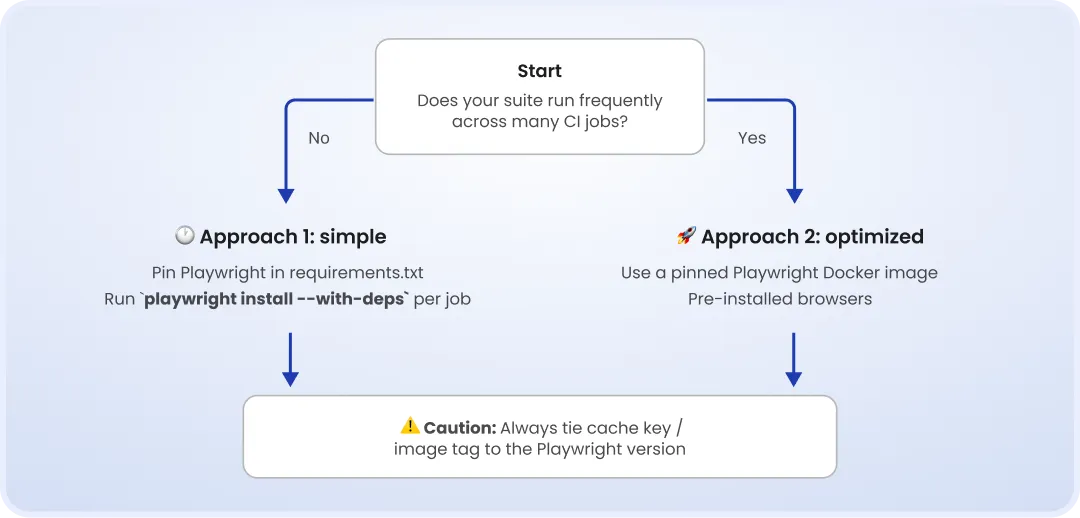
Compared to Node-side Playwright caching in GitHub Actions, the Python setup adds pip dependencies, Playwright browser binaries, and system dependencies, all of which have to be managed together. When they're installed on every cold runner, CI time can quickly increase.
playwright install --with-deps installs both the browser binaries and the required system packages, but it can add several minutes to a cold CI job. Playwright doesn't recommend caching browser binaries by default because restoring a large cache can take as much time as downloading them. If you do cache them, tie the cache key to the Playwright version so a package upgrade cannot reuse incompatible binaries.
In general, there are two approaches:
Keeping the CI setup simple: pin Playwright in
requirements.txtand runplaywright install --with-depsduring the job.Optimizing repeated runs: use a pinned Playwright Docker image with browsers and system dependencies pre-installed.
The second option removes browser and OS dependency installation from the CI job. It's particularly useful for large suites that run across multiple CI jobs, where the installation step repetition adds significant overhead.
Playwright Python CI/CD GitHub Actions example
The following setup keeps the Python dependencies cached while using a pinned Playwright Docker image:
name: Playwright Python tests

on: [push, pull_request]

jobs:
  test:
    runs-on: ubuntu-latest
    container:
      image: mcr.microsoft.com/playwright/python:v1.55.0-noble
    steps:
      - uses: actions/checkout@v4
      - uses: actions/setup-python@v5
        with:
          python-version: "3.12"
          cache: "pip"
      - name: Install Python dependencies
        run: pip install -r requirements.txt
      - name: Run tests
        run: pytest --numprocesses auto --tracing retain-on-failure
      - name: Upload traces on failure
        if: failure()
        uses: actions/upload-artifact@v4
        with:
          name: playwright-traces
          path: test-results/
          retention-days: 7
Keep the Playwright version in the Docker image in line with the version pinned in requirements.txt. When upgrading Playwright, update both versions and rebuild the CI environment. This way, the Python package is prevented from expecting a browser revision that isn't available in the image.
Migrating a Selenium Python suite to Playwright
Not all teams start with Playwright. Some inherit a Selenium suite that has become slow or difficult to maintain.
Migrating from Selenium to Playwright isn't just replacing one set of API calls with another, as an existing suite usually has an abundance of waits, helper methods, page objects, custom fixtures, and workarounds for browser behavior.
The migration effort depends less on the test quantity and more on the amount of Selenium-specific infrastructure built around it.
Some aspects of the migration are pretty straightforward. For example, Selenium's explicit waits, such as WebDriverWait and expected conditions, often become unnecessary because Playwright automatically handles many waiting conditions. Existing locators can also be reviewed and replaced where needed.
The most time-consuming tasks are the following:
restructuring WebDriver fixtures around Playwright's browser, context, and page model
reviewing custom wait and helper libraries
replacing or removing Selenium Grid infrastructure that doesn't directly translate to Playwright
updating CI execution and parallelization
deciding which tests are worth migrating
If you need to migrate Selenium to Playwright Python, the best approach you can take is to migrate a representative group of tests before rewriting the full suite. This gives you an understanding of how much work is required to rewrite locators, remove unnecessary waits, and redesign the fixture architecture.
After that, you can migrate the suite in phases. Start with the highest-value flows, run Selenium and Playwright side by side until the required coverage is available in the new suite, and retire Selenium last.
Migration timelines can vary widely. Test complexity, custom framework code, CI infrastructure, and the quality of the existing suite have a greater impact than the number of tests.
For example, Zenjob shared their migration story, reporting that it took them eight months to migrate a Selenium suite of 100 test cases running across eight parallel Jenkins jobs to Playwright.
How to migrate from Selenium to Playwright. A complete QA guide
When to bring in external Playwright expertise
Not everything can be handled in-house. The important thing is to understand when the problem has grown beyond what the team can fix on its own.
When it comes to Playwright with Python, here are clear signals to engage an expert from the outside:
The suite contains both sync and async tests, but there is no clear ownership of the execution model or fixture architecture.
The number of CI failures is increasing, while retries and additional waits are becoming the default response.
Parallel execution has been added, but worker count, browser lifecycle, and runner capacity have never been designed as a system.
Tests are being migrated from Selenium, but there is no agreed Playwright architecture before the migration scales.
No one on the team is responsible for the test framework itself.
If you spot any of these signals, bringing in someone with Playwright/Python experience to review the architecture can save you from the problems becoming embedded in hundreds of tests.
A second set of eyes on the architecture, not just the test code, usually finds the solution faster than another sprint of patching flaky tests. If that sounds relevant to you, talk to our Playwright/Python engineer about reviewing your test setup.
Book a strategic QA consultation
About the author
Chief Operating Officer
Anastasiia Sokolinska is the Chief Operating Officer at DeviQA, responsible for operational strategy, delivery performance, and scaling QA services for complex software products.