
Written by: Senior AQA Engineer
Ievgen IevdokymovPosted: 23.05.2026
29 min read
Here is a scenario worth pausing on. A visually impaired user opens your neobank app to wire next month's rent. They're using JAWS with Chrome. They pass the password screen, good. They trigger the OTP step. The screen reader announces: "image, unlabeled." There is a countdown timer they can't hear. The session expires. The money doesn't move. The rent is late.
This is not a theoretical edge case. It's a recurring failure pattern in fintech products that have passed standard QA, because accessibility testing wasn't part of the standard.
And if you're thinking that's a niche problem affecting a small user segment, consider this: according to the WHO, over 1.3 billion people globally live with some form of disability. In the US alone, 26% of adults, roughly 61 million people, have a disability that affects their digital experience. Combined, people with disabilities and their immediate networks control more than $13 trillion in disposable income worldwide.
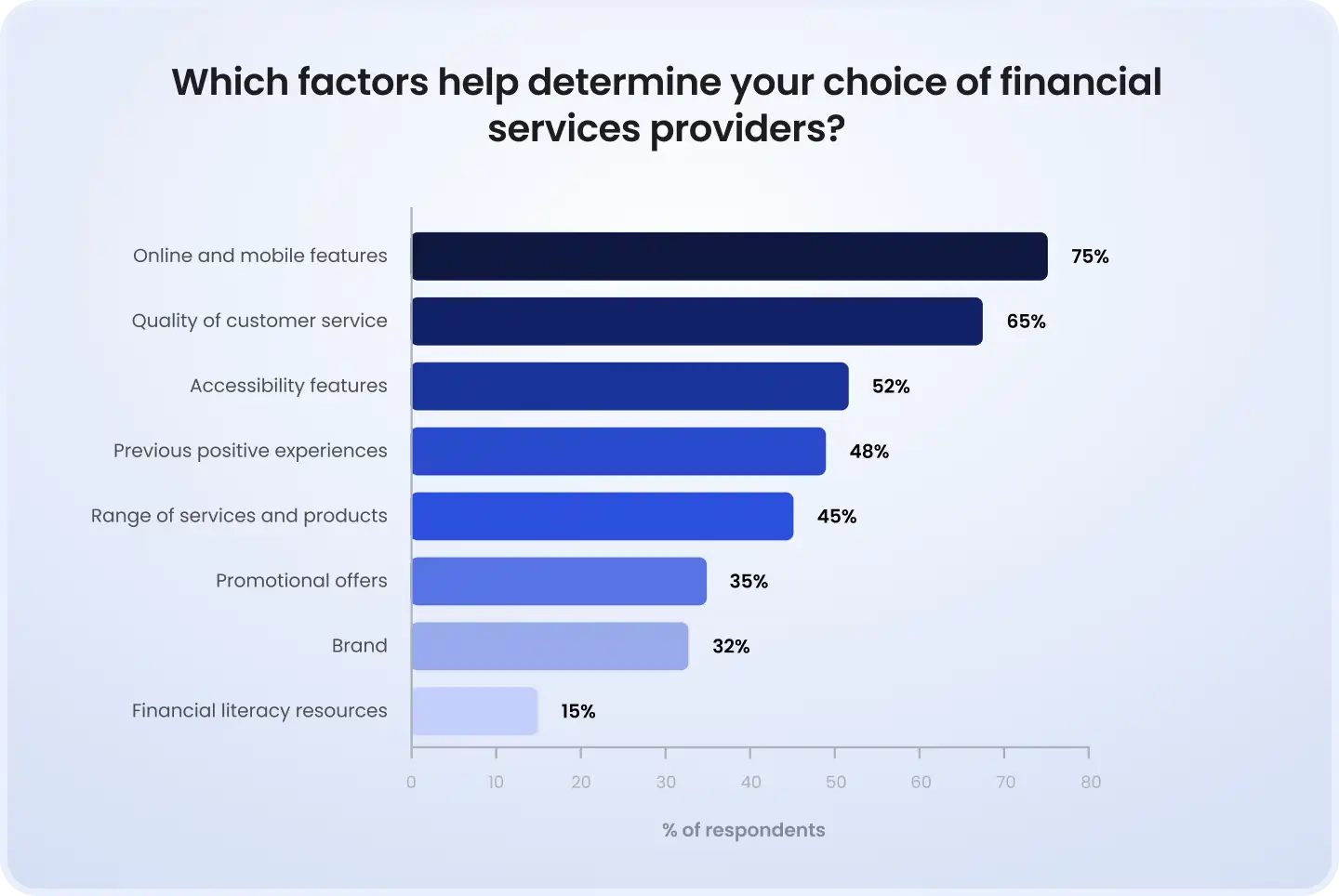
That's not a niche. That's a market segment your product is currently locking out.
This article isn't a compliance checklist. It's a practical, fintech-specific guide for QA leads and CTOs who want to test accessibility the right way, mapped to real financial user journeys, real regulatory obligations, and a testing framework that fits how fintech teams actually work.
Why accessibility is a QA problem, not just a legal one
Let's reframe the way most engineering teams think about this. Accessibility isn't a legal checkbox your compliance team handles once a year. An inaccessible authentication flow is a broken flow. A transaction confirmation modal that traps keyboard users is a critical bug. An error message that a screen reader announces in the wrong order is a UX defect.
If it broke for 100% of users, you'd fix it immediately. The only reason accessibility bugs survive is that they break the experience for a population that often doesn't make it onto your user research panels.
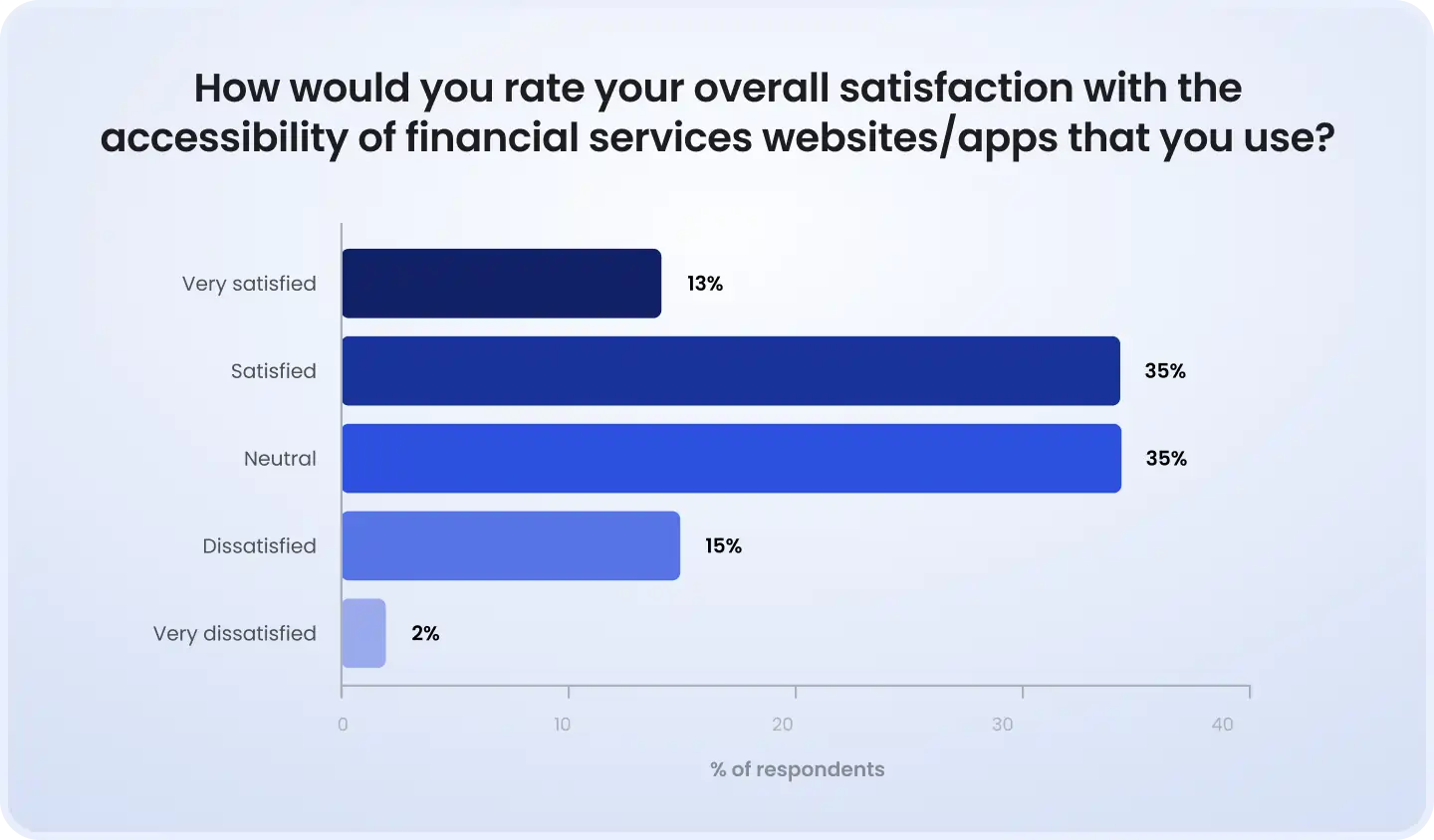
The real cost of shipping inaccessible financial software
The litigation exposure alone should get your attention. ADA-related web accessibility lawsuits in the US surpassed 4,600 in 2023, a number that has grown every year since 2018. Financial services is consistently one of the top three industries targeted. The average cost of defending a single ADA web accessibility lawsuit runs $25,000–$100,000 in legal fees before any settlement. And courts have been unsympathetic to 'we were working on it' defenses.
But the lawsuit is the symptom, not the disease. The real cost is quieter:
Churn you never track: Disabled users who hit an inaccessible KYC flow don't file complaints, they close the app and go to your competitor.
Support overhead: Users who can't complete transactions independently call support. That's a measurable, attributable cost.
Regulatory risk compounding: Post-ADA lawsuits increasingly trigger regulatory investigations, especially for institutions covered by federal banking oversight.
Brand damage in a trust-sensitive category: Financial services run on trust. Accessibility failures in payment flows are the kind of story that travels.
By the numbers: the US disability market represents $490 billion in annual disposable income. Globally, 15% of the world's population has some form of disability. Neobanks like Monzo and Starling, early accessibility leaders, report measurably higher satisfaction scores from elderly and accessibility-dependent users, correlating with lower churn in that demographic. This is revenue, not charity.
Who actually uses assistive technology in financial apps
The disability spectrum in fintech is wider than most product teams model. Your accessibility testing needs to account for all of it:
Blind / low vision
JAWS, NVDA, VoiceOver, TalkBack
Unlabeled form fields, OTP timers, PDF statements
Motor impairment
Keyboard-only, switch access, eye tracking
Modal keyboard traps, drag-to-sign, multi-step loan flows
Cognitive / neurodiverse
No AT, relies on clear UX
Complex risk disclosures, jargon, timeout pressure, dense dashboards
Deaf / hard of hearing
Captions, visual alerts
Video KYC without captions, audio-only 2FA
Elderly users (65+)
Zoom / text resize, simplified nav
Small tap targets in mobile banking, insufficient font scaling, complex nav
Note: The elderly user category deserves special attention in fintech. Adults 65+ are the fastest-growing digital banking segment globally and one of the most underserved by accessibility testing programs.
The regulatory stack. What financial apps are actually required to meet
Most teams treat 'WCAG compliance' as a single item on a compliance checklist. In reality, you're navigating a layered regulatory environment where different standards apply to different parts of your product, user base, and geography. Getting this wrong doesn't just create legal risk, it means your testing program is aimed at the wrong targets.
WCAG 2.1 vs. 2.2. What changed and what it means for your QA scope
WCAG 2.2, published October 2023, introduced nine new success criteria. Three of them land directly in fintech risk zones:
2.4.11 Focus Appearance (AA): Keyboard focus indicators must meet minimum contrast and size requirements. This directly affects trading dashboards and form-heavy onboarding flows where custom UI components often suppress or override browser focus styles.
2.5.7 Dragging Movements (AA): Any action requiring drag must have an alternative. This affects drag-to-confirm payment interfaces and chart manipulation in investment platforms.
2.5.8 Target Size Minimum (AA): Touch targets must be at least 24×24 CSS pixels. Mobile banking UIs with dense transaction lists or small action buttons fail this routinely.
Level AA is the legal baseline for most jurisdictions. Level AAA matters specifically in fintech for cognitive accessibility in legally significant content, loan terms, fee disclosures, investment risk ratings. If a user with dyslexia can't parse your T&Cs, you have an accessibility problem and a potential mis-selling exposure.
ADA Title III + DOJ 2024 Rule
The US Department of Justice's 2024 Title II rule officially codified WCAG 2.1 Level AA as the technical standard for state and local government digital properties, with phased compliance dates running through 2026–2027. While this directly targets government entities, the ripple effect for fintech is significant: any vendor providing digital financial services to government-adjacent organizations, credit unions with government accounts, payment processors serving municipalities, now faces procurement requirements tied to WCAG conformance.
More broadly, ADA Title III still covers private financial institutions. The 2024 DOJ guidance makes clear that regulators and courts expect evidence of real-world usability, not just checklist conformance. That's a meaningful shift for your testing program.
European Accessibility Act, what June 2025 changed
The EAA came into full enforcement on June 28, 2025. It covers all digital financial services offered within the EU, which means any fintech company with EU customers, regardless of where they're headquartered, is now operating under binding accessibility obligations aligned with WCAG 2.2 AA.
The EAA goes further than the ADA in one important way: it specifically targets the user experience of completing financial transactions. It's not enough to make your homepage accessible, the full transaction journey must be conformant. For QA teams, that means testing complete flows, not components in isolation.
Non-compliance risks: national-level fines, mandatory product withdrawal from EU markets, and civil liability to users who suffer harm from inaccessible financial services.
The PCI-DSS / session timeout conflict nobody talks about
This is the tension that breaks most fintech accessibility programs: PCI-DSS requires session timeouts for security. Screen reader users navigate more slowly. These two requirements collide constantly, and most teams resolve it in favor of security, which means accessibility loses.
Specifically: PCI-DSS 8.2.8 requires idle session timeouts of 15 minutes or less for cardholder data environments. A screen reader user completing a complex loan application, reading field labels, navigating error messages, reviewing terms, routinely exceeds 15 minutes of 'idle' navigation. The application resets. The data is lost. The user abandons.
The accessible solution involves separable concerns: differentiate between active screen reader interaction (not idle) and true inactivity, implement clear timeout warnings that screen readers can announce, and allow users to extend sessions without losing form data. None of this violates PCI-DSS, but it requires deliberate accessibility design and testing.
Regulatory quick reference:
WCAG 2.2 AA, current technical baseline for accessibility conformance ADA Title III, applies to all US private financial institutions' digital properties EAA (EU), full enforcement from June 28, 2025; covers all financial services with EU customers Section 508, applies if you sell to US federal government or federally-funded entities VPAT 2.4 International, required documentation format for federal procurement.
High-risk accessibility failure points in financial applications
This is where fintech accessibility diverges from generic web accessibility guidance. The failure modes in financial applications are specific, high-stakes, and often invisible to automated scanners. Let's work through them by user journey.
Authentication and MFA flows
This is ground zero for fintech accessibility failures. MFA is required by regulation (PSD2 SCA in Europe, standard security practice in the US), but the implementations routinely break screen reader navigation:
SMS OTP fields that announce as 'edit text' with no description of the expected input format
Countdown timers that update visually but emit no ARIA live region announcement
Auto-advance between OTP digit fields that break screen reader focus management
CAPTCHA implementations with no accessible audio alternative
Biometric-only login flows with no keyboard-accessible fallback (violates WCAG 1.3.5)
Mini-case #1: The invisible OTP timer
Challenge: A European challenger bank processed 3DS authentication through a custom OTP modal with a 90-second countdown timer.
Failure: NVDA users heard 'edit text' on the OTP input and received no announcement of the countdown. Sessions expired silently. Screen reader users had a ~60% transaction drop-off rate on first attempt, triple the sighted user rate.
Testing gap: Automated axe-core scans passed the OTP field (it had a label attribute). The timer failure was invisible to automation, it required manual NVDA+Firefox testing of the complete 3DS flow.
Fix: Added ARIA live region (aria-live='assertive') to the countdown, announced at 60s, 30s, and 10s remaining. OTP field label updated to include format hint. Fallback 'extend timer' button added and keyboard-accessible.
Outcome: Screen reader transaction drop-off reduced from 60% to 11% post-fix. Support ticket volume for 'payment failed' from accessibility device users dropped 44% in the following quarter.
Multi-step application flows: loans, accounts, KYC
Multi-step onboarding is the most complex accessibility testing scenario in fintech, and the one where your competitors are weakest. The failure patterns compound across steps:
Focus management between steps: When Step 2 loads after Step 1 submission, focus often remains on the now-invisible 'Next' button. Screen reader users hear the previous page's content again. Fix: programmatically move focus to the new step's heading on render.
Error message placement: Inline validation errors often appear visually adjacent to the field but are injected into the DOM in a location a screen reader announces separately and out of order. Users hear 'error: invalid date' with no indication of which field caused it.
KYC document upload: Photo capture flows (driver's license, passport) frequently use camera APIs that have no accessible alternative for users who can't physically position a document. An accessible upload fallback is both a WCAG 1.1.1 requirement and a fraud prevention consideration.
Session timeout mid-application: The PCI-DSS problem hits hardest here. A 20-minute loan application that resets at minute 16 because a screen reader user was reading the terms is a critical accessibility defect.
Mini-case #2: KYC flow that locked out 8% of applicants
Challenge: A US-based digital lender launched a mobile-first KYC flow requiring selfie capture and document photography as mandatory steps.
Failure: Users with motor impairments, low vision, or who were simply using a desktop browser hit a wall: no upload alternative was provided. The flow used a camera-only implementation with no fallback. Applicants who couldn't use the camera flow had zero completion path. WCAG 1.1.1 violation. Potential ADA Title III exposure.
Testing gap: QA tested the camera flow extensively on mobile devices. Desktop testing was treated as 'out of scope.' Accessibility testing wasn't in the test plan at all. No keyboard-only walkthrough was ever performed.
Fix: Added file upload alternative to all document capture steps. Keyboard-navigable fallback path implemented. Alt text added to camera UI guidance images. Screen reader testing added to KYC regression suite.
Outcome: Application completion rate among desktop users increased by 23%. Estimated 8% of previously locked-out applicants now had a viable path through onboarding.
Transaction confirmations and dynamic content
Payment confirmation flows are where accessibility meets security and real-time data, a difficult combination to test well. The specific failure patterns:
ARIA live regions for balance updates: When a transaction confirms and the balance updates dynamically, screen readers only announce the change if the balance container has aria-live='polite'. Without it, a blind user submits a payment and hears nothing, no confirmation, no updated balance. They typically retry, creating duplicate transaction risk.
Modal keyboard traps: Payment confirmation dialogs that don't properly implement focus trapping (keeping focus inside the modal while it's open) OR that don't restore focus to the triggering element on close are a WCAG 2.1 failure (criterion 2.1.2). They're also a security risk if users can bypass confirmation dialogs entirely via keyboard navigation.
axe-core integrated into your Playwright: 3D Secure redirects to bank-hosted authentication pages, pages your team doesn't control. If the issuing bank's authentication page is inaccessible, your transaction fails accessibility testing even if your own product is clean. This is a real fintech-specific testing challenge that requires upstream advocacy.
PDF statements and document downloads, the forgotten failure
PDF accessibility is the most underserved problem in financial services. Account statements, trade confirmations, tax documents, loan agreements, virtually every financial institution generates PDFs that are, in accessibility terms, images with text on them rather than structured, navigable documents.
A tagged PDF allows a screen reader to navigate by heading, read table data in logical order, and identify form fields. An untagged PDF, which describes the vast majority of bank-generated statements, is a flat image. The financial data is literally inaccessible.
Account statements with multi-column transaction tables that screen readers read left-to-right across columns rather than row-by-row
PDFs generated from HTML templates where the reading order doesn't match visual order
Inline PDF viewers in banking portals that have no keyboard-accessible download fallback
Loan documents with form fields that aren't tagged as interactive, the 'sign here' line that screen readers announce as blank space
Mini-case #3: The account statement that read backwards
Challenge: A retail bank generated monthly PDF statements from a legacy reporting system. The visual layout was clean, date, description, debit, credit, balance in columns.
Failure: The PDF reading order followed the visual column layout: screen readers announced all dates first, then all descriptions, then all amounts, completely disconnected from transaction context. A customer checking whether a specific payment had cleared had to mentally correlate three separate announcement sequences. Effectively unusable.
Testing gap: QA had never opened a generated statement in a screen reader. PDF testing wasn't in scope. The issue had existed since the reporting system was deployed, approximately 6 years.
Fix: PDF generation pipeline updated to output tagged PDFs with logical reading order (row-first table structure). Adobe Acrobat's Make Accessible tool used for remediation of legacy documents. NVDA testing added to statement generation regression suite.
Outcome: First accessibility-focused customer satisfaction survey post-fix showed a 31-point NPS improvement among users who identified as having visual impairments. Zero PDF-related ADA complaints in the 12 months following remediation (vs. 3 formal complaints in the prior year).
Cognitive accessibility: The hardest problem in fintech
Cognitive accessibility doesn't get enough QA attention in financial applications, partly because it's harder to test than technical conformance, and partly because the affected users rarely use assistive technology that makes the problem visible in test logs.
But consider what fintech products actually ask cognitively diverse users to do: parse complex interest rate structures, understand amortization schedules, navigate risk disclosure language written for lawyers, and make irreversible decisions under time pressure. That's a brutal UX environment for users with ADHD, dyslexia, anxiety, or early cognitive decline.
Specific WCAG criteria that apply, and that most fintech products fail:
3.3.4 Error Prevention (AA): For pages that cause legal commitments or financial transactions, users must be able to review, correct, or reverse submissions. A fund transfer that can't be cancelled within a window, or a credit application with no review step, fails this criterion.
2.2.1 Timing Adjustable (A): Any time limit must be extendable. This applies to session timeouts, OTP expiry, and offer timers on financial products, all common in fintech.
3.2.2 On Input (A): Changing a form control shouldn't trigger an unexpected context change. Auto-submitting a form when the last OTP digit is entered (common in fintech) fails this if the user doesn't know it will happen.
Building a fintech accessibility testing framework
Let's build this practically. The framework maps accessibility testing to your development lifecycle, which is the only way it actually sticks. Accessibility bolted on at the end of a sprint produces the same result as security bolted on at the end of a sprint: expensive, incomplete remediation and a recurring cycle of the same defects.
Phase 1. Accessibility in design (before code exists)
The cheapest accessibility fix is the one made in Figma. Two things your design review should gate on:
Contrast ratio checks: WCAG 2.1 AA requires 4.5:1 for normal text, 3:1 for large text and UI components. Run this on every new component. The Figma plugins Stark and Able surface violations in the design file before a developer sees the spec. Pay particular attention to fintech UI conventions, light grey placeholder text in form fields, light blue interactive states, low-contrast balance figures on dashboard tiles.
Focus order review: In a Figma prototype, tab order should follow visual reading order. In multi-step financial flows, the sequence matters: if Step 2 header comes before Step 1's confirmation in the design's layer order, keyboard users will navigate to the wrong section. Annotate expected tab order in design handoffs.
Component-level accessibility specs: Your design system should document accessibility requirements per component: which ARIA roles and attributes apply to custom dropdowns, date pickers, data tables, and alert banners. If your component library doesn't have this, build it. The QA team will test against it.
Phase 2. Developer-level checks
Axe-core in CI/CD is your first line of defense, but know exactly what it defends. Axe-core, the engine behind most accessibility automation tools, reliably catches structural and code-level violations: missing alt attributes, invalid ARIA roles, color contrast failures in static content, missing form labels. It catches approximately 30–40% of total WCAG violations.
What it doesn't catch: anything requiring human judgment. Is the alt text on that account icon meaningful? Does the reading order of the dashboard make sense for a screen reader user? Does the error message announcement actually help the user fix the problem? Those require manual testing.
Semantic HTML: Use native HTML elements wherever possible. A
<button>is keyboard-accessible by default. A<div role='button'>requires significantly more ARIA work and is more fragile. In fintech forms especially, loan applications, payment flows, profile updates, semantic HTML is your cheapest accessibility investment.ARIA roles audit: Custom components (date pickers, multi-select filters, rich data tables) are where ARIA errors cluster. An ARIA audit on your component library should be a milestone deliverable, not an afterthought.
Phase 3. QA functional testing
This is the critical layer, the testing that automation genuinely can't replace. The goal here isn't to test individual components; it's to test complete fintech user journeys with real assistive technology.
Your core testing matrix for financial apps:
NVDA
Firefox
Windows
Payments, OTP, multi-step forms
JAWS
Chrome
Windows
Dashboard, statements, account mgmt
VoiceOver
Safari
macOS / iOS
Mobile banking, onboarding, KYC
TalkBack
Chrome
Android
Mobile payments, biometric auth, cards
Don't test components in isolation. Test complete journeys: login → check balance → initiate transfer → confirm → review history. Every transition point between steps is a potential accessibility break.
Keyboard-only navigation: Tab through every financial flow without touching a mouse. Can you complete a wire transfer? Can you navigate away from a confirmation modal? Can you reach the 'cancel' button before a timeout? This test takes 20 minutes and surfaces critical bugs every single time on untested fintech UIs.
Color contrast and reflow: Test at 200% and 400% zoom. Financial dashboards with tightly packed data, balance summaries, transaction lists, investment charts, break badly at high zoom. Content that reflows incorrectly or overlaps at 400% is a WCAG 1.4.10 failure.
Phase 4. Regression and release gating
Accessibility regresses constantly in fast-moving fintech teams. A component library update silently removes a focus style. A new 'urgent' feature ships with unlabeled buttons. A third-party widget update changes ARIA behavior. Without regression testing, your accessibility baseline erodes sprint by sprint.
Define accessibility severity tiers: Critical (blocks screen reader users from completing a transaction) → High (creates significant friction for AT users) → Medium (partial WCAG failure, workaround exists) → Low (cosmetic or minor WCAG deviation). Critical accessibility defects should block release the same way P0 functional defects do.
Automated regression in CI/CD: Axe-core integrated into your Playwright or Cypress test suite runs on every PR. This catches the regressions that sneaked in with an otherwise clean deployment.
Track accessibility debt: Log known accessibility defects in your tracker with WCAG criterion, severity, and affected user journey. Treat remediation as planned technical debt work, not as ad-hoc fixes.
Ready to build your accessibility testing framework?
DeviQA's QA engineers specialize in fintech accessibility audits, from full WCAG 2.2 conformance testing to building accessibility into your CI/CD pipeline. We cover web and mobile, manual and automated, and complete journey testing with real assistive technology. Talk to our team about your product's accessibility baseline.
Book a strategic QA consultation
Automation vs. manual. The decision framework for financial apps
The accessibility testing automation debate gets oversimplified into 'use both.' Here's the actual decision logic for fintech specifically:
What to automate
axe-core / axe DevTools
Missing labels, contrast, invalid ARIA, structural violations
CI/CD gate on every PR
Playwright + axe
Authenticated flow scanning (login-protected banking pages)
Regression suite, nightly runs
Lighthouse
Accessibility score baseline, performance + a11y combined
Sprint review baseline measurement
Pa11y
CLI-based scanning for batch page coverage
Pre-release sweep across all page types
WAVE (browser ext.)
Visual reporting, useful for design review discussions
Design team reviews, stakeholder reporting
What must be tested manually, no exceptions
Automation cannot tell you whether a blind user can successfully complete a bank transfer. It can tell you that all the buttons have labels. These are different questions. The following must always be tested manually in financial applications:
Complete journeys with real screen readers: NVDA+Firefox through your full payment flow. VoiceOver on iPhone through your mobile onboarding. Not spot-checks, end-to-end.
Focus management across dynamic content: Step transitions, modal opens/closes, error message injections, dynamic balance updates. These require a tester who can observe exactly what a screen reader announces and when.
Third-party widgets and embedded content: Your payment SDK. Your live chat. Your embedded document viewer. Your 3DS redirect page. Automation doesn't follow third-party iframes. A manual tester does.
Cognitive accessibility walkthroughs: Have a tester read your loan application terms, fee disclosure, and investment risk warning without prior knowledge of the product. Time it. Note what confuses them. That's your cognitive accessibility baseline.
Error recovery flows: What does a screen reader user hear when they enter an invalid account number? When their card is declined? When the session times out? These are the moments that determine whether your product is usable or not.
The 30–40% rule, understanding automation's ceiling
This number, that automated tools catch only 30–40% of WCAG violations, comes from multiple independent studies including research from the University of Illinois and WebAIM's ongoing annual analysis. In fintech, the proportion of automation-invisible failures is arguably higher, because so much of fintech UX depends on dynamic state: real-time balance updates, multi-step flow state, third-party authentication, and session management.
The practical implication: If your accessibility testing program consists entirely of automated scanning, you have between 60 and 70 percent of your WCAG violation surface untested. In a regulated financial product, that's not an acceptable posture.
Mobile accessibility testing for financial apps
Mobile is where most fintech users actually live, and where accessibility testing coverage is most sparse. The mobile testing matrix for financial apps needs to account for platform-specific AT behavior, not just responsive design.
iOS VoiceOver vs. Android TalkBack, behavioral differences that affect your tests
Navigation model: VoiceOver uses swipe-to-navigate between elements sequentially. TalkBack uses explore-by-touch (drag to hear elements) plus linear swipe navigation. Custom gestures in mobile banking apps, swipe to pay, pinch to zoom charts, need separate accessibility path testing on each platform.
Form filling: VoiceOver has a 'Form Controls' rotor for navigating between interactive elements. If your KYC form doesn't use semantic HTML form elements, this navigation fails. TalkBack's behavior is more forgiving but still requires properly labeled inputs.
Dynamic content: Live region announcements behave differently between platforms. A balance update that announces correctly on iOS VoiceOver may announce twice, or not at all, on Android TalkBack, and vice versa. Test both explicitly.
WCAG 2.5.8 Target Size: The 24×24px minimum is routinely violated in dense mobile banking UIs, transaction item action buttons, sort controls in portfolio views, small 'i' info icons next to fees. Test this specifically with mobile device testing on real hardware, not simulators.
Integrating mobile accessibility into your Appium test suite
Appium with the accessibility ID locator strategy serves double duty: it makes your tests more resilient (accessibility IDs are stable; XPath selectors are not) and simultaneously validates that your app has consistent accessibility identifiers throughout. If an element doesn't have an accessibility ID, your Appium test can't find it, and your screen reader user can't interact with it. The test failure is the accessibility bug.
For deeper mobile accessibility validation, Appium's getPageSource output can be analyzed to verify ARIA-equivalent properties on iOS (accessibilityLabel, accessibilityHint, accessibilityTraits) and Android (contentDescription, importantForAccessibility). Incorporate this into your mobile regression suite for critical journeys.
Measuring accessibility quality, KPIs your team can actually track
If you can't measure it, you can't improve it, and you can't report it to the board when the EAA compliance question comes up. These are the KPIs that give you a realistic picture of your accessibility posture:
% of critical journeys tested with AT
Coverage of highest-risk user flows
100%, no exceptions
Axe-core violation count by severity
Code-level accessibility health
Zero Critical / High on release
Mean time to remediate a11y defects
Process efficiency, team prioritization
Critical: <1 sprint; High: <2 sprints
How often new code breaks existing a11y
Target <5% per sprint via CI/CD gating
% journeys with VPAT evidence
Procurement and compliance readiness
100% for enterprise / gov-adjacent sales
VPAT documentation, when you need it and how QA feeds it
A Voluntary Product Accessibility Template (VPAT) is a structured document that declares your product's conformance against WCAG, Section 508, and EN 301 549 (the European standard). The VPAT 2.4 International Edition covers all three.
If you sell to US federal agencies, state or local governments, publicly funded universities, or large enterprises with Section 508 procurement policies, you need a current VPAT. Many enterprises now require VPATs even for SaaS products that handle employee financial data.
Your QA team feeds the VPAT directly: the test evidence log (what was tested, with which AT, by whom, on which date) becomes the basis for each conformance claim. A VPAT that says 'Supports' without test evidence isn't worth the PDF it's generated on. Courts and procurement officers increasingly expect the receipts.
Need a VPAT for your financial product?
DeviQA's accessibility QA team produces VPAT 2.4 International Edition documentation backed by full manual and automated test evidence, suitable for enterprise procurement, federal contract requirements, and EAA compliance reporting. Contact us to scope your VPAT audit.
Building a sustainable accessibility QA practice in fintech
One-time audits don't work. Fintech products ship continuously. An accessibility baseline established in Q1 has degraded meaningfully by Q4 unless you have processes in place to prevent it.
Shifting left without slowing down
The goal isn't to add accessibility as a separate gate, it's to embed it into existing gates. Practically:
Acceptance criteria: Every user story that touches UI should have an accessibility acceptance criterion. For a payment button: 'The submit button must have a descriptive label that includes the payment amount when populated.' For a balance field: 'The current balance must be announced by screen readers when updated.' These are testable, finite criteria, not vague requirements.
Definition of Done: Add accessibility to your DoD: axe-core passes in CI, keyboard navigation walkthroughs complete, ARIA roles reviewed by QA. Two-line addition. Meaningful impact.
Screen reader literacy in QA: Every QA engineer on a fintech product should be able to operate NVDA and VoiceOver at a basic level. This is not a specialist skill for one person, it's table stakes for testing modern financial software. Budget a day of training per engineer. The ROI is immediate.
When to bring in external accessibility expertise
There are moments when internal capability isn't enough:
Pre-launch audit: Before a major product launch or market expansion (entering the EU, launching a lending product), an external accessibility audit provides an independent baseline and defensible evidence for compliance purposes.
Post-lawsuit or regulatory inquiry: If you've received an ADA demand letter or a regulatory question about accessibility, you need an independent audit from a team that can provide expert testimony if needed.
Annual WCAG conformance assessment: As standards evolve and your product evolves, an annual external assessment keeps your VPAT current and your internal team calibrated.
When evaluating external accessibility QA vendors, ask: What's your manual-to-automated testing ratio for financial applications? Can you show me a test report from a screen reader walkthrough of a payment flow? Do your testers have lived experience with assistive technology?
Let DeviQA's fintech QA team run your accessibility audit.
From a targeted WCAG 2.2 gap analysis to a full accessibility testing program integration, our team has the fintech domain knowledge and assistive technology expertise to find what automated tools miss. We work with neobanks, payment platforms, digital lenders, and enterprise fintech, across web and mobile, US and EU regulatory contexts. Schedule a free consultation to discuss your product's needs.
Book a strategic QA consultation
Quick-start: Your 30-day accessibility testing roadmap
If you're starting from zero, don't try to fix everything at once. Here's a structured sequence that gets you from 'we don't test accessibility' to 'we have a functioning program' in 30 days:
Week 1
Baseline
Run Lighthouse + axe-core on all page types. Install NVDA and do a raw keyboard walkthrough of your three most-used flows. Document every failure. Don't fix yet, understand the scope.
Week 2
Triage & fix critical
Classify defects by severity and user journey. Fix Critical items (those that block screen reader completion of a financial transaction). Integrate axe-core into CI/CD pipeline.
Week 3
Full screen reader walkthroughs of login, onboarding, payment, and statement flows using NVDA+Firefox and VoiceOver+Safari. Test on real mobile devices with TalkBack and VoiceOver.
Week 4
Process & governance
Add accessibility acceptance criteria template to user story process. Update DoD. Schedule quarterly full audit cycle. Assign accessibility champion in QA team.
Final word: Accessibility is a QA discipline
Accessibility in financial applications isn't a design philosophy or a compliance exercise, it's a testable quality attribute, the same as performance and security. It degrades without systematic testing. It can't be fully validated by automation. It requires domain-specific knowledge of how assistive technology interacts with financial UX patterns.
The teams that get this right, the ones running NVDA through their payment flows, testing OTP timers with screen readers, validating PDF statements as tagged documents, aren't just avoiding lawsuits. They're building financial products that work for more people, generate less support overhead, and hold up under regulatory scrutiny.
The 57% of accessibility failures that automation misses? That's where your real risk lives. And that's where manual, journey-level, assistive-technology-based testing earns its keep.
Build the framework. Test the journeys. Fix the gaps. Then test again after the next release, because the work doesn't end at shipping.
About the author
Senior AQA engineer
Ievgen Ievdokymov is a Senior AQA Engineer at DeviQA, focused on building efficient, scalable testing processes for modern software products.