
Written by: Senior AQA Engineer
Ievgen IevdokymovUpdated: 12.10.2026
24 min read
A regression suite is meant to answer a simple question: did the latest change break something that already worked?
The difficulty is repetition. As a product grows, manually checking authentication, payments, permissions, integrations, reports, and other established features after every change becomes slow and inconsistent. Teams either delay releases while regression testing runs or reduce coverage and accept more risk.
Automated regression testing changes that equation – but only when the right scenarios are automated, the suite is integrated into delivery workflows, and someone keeps it healthy. Automating every available test case usually creates an expensive maintenance problem rather than a reliable safety net.
This guide explains what automated regression testing is, when it works, when manual testing is more appropriate, how to build a maintainable suite, which tools to consider, and how to run regression tests effectively in CI/CD.
What is automated regression testing?
Automated regression testing is the repeated execution of scripted tests to verify that code changes have not damaged existing functionality.
A test automation tool performs predefined actions, sends requests, checks system behavior, and compares actual results with expected results. The tests can run after a code commit, during deployment, overnight, before a release, or on demand.
For example, suppose a development team changes the discount calculation in an eCommerce application. Automated regression tests might verify that:
Products can still be added to the cart.
Existing coupons continue to work.
Ineligible discounts are rejected.
Tax and shipping are recalculated correctly.
Checkout produces the correct total.
Payment creates only one order.
Refunds use the amount actually paid.
The change may affect only one service, but the tests protect several connected business workflows.
For a broader explanation of regression scope, techniques, and prioritization, see what regression testing is.
Regression testing vs retesting
Regression testing and retesting are related but answer different questions.
Retesting or confirmation testing
Has a reported defect been fixed?
Verify that a previously failing coupon now applies correctly
Regression testing
Did the fix or another change damage existing behavior?
Check other promotions, cart totals, tax, checkout, and refunds after the coupon fix
Retesting concentrates on a known defect. Regression testing looks for unintended effects elsewhere in the system. In practice, teams often do both: confirm the fix first and then execute a risk-based regression suite.
The distinction is covered in more detail in our guide to the difference between regression and confirmation testing.
Why automate regression testing?
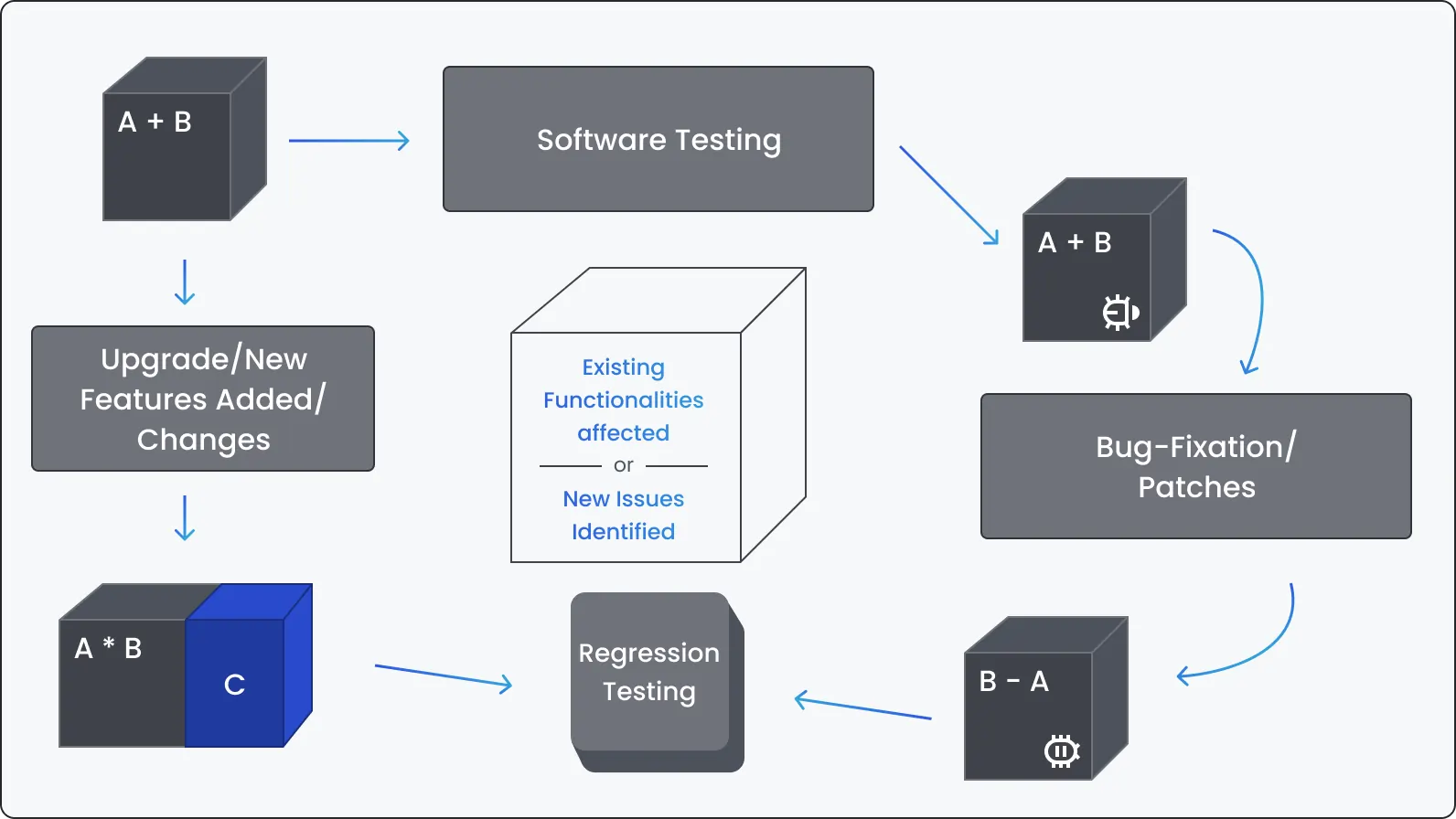
Regression testing is one of the strongest candidates for automation because it combines repeatable actions, stable expected outcomes, and frequent execution.
Faster feedback
A manual suite that takes several days cannot provide useful feedback on every code change. Automated checks can begin as soon as a build is available and run in parallel.
The point is not simply to finish testing sooner. Faster feedback reduces the amount of new work completed before a defect is discovered. Developers can investigate while the relevant change is still fresh.
More frequent execution
A manual regression suite may run only before a major release. Automated tests can run after pull requests, merges, scheduled builds, or deployments.
This increases the chance of finding a regression close to the change that caused it.
Consistent execution
A script repeats the same actions and assertions each time. It does not skip a step because the tester is tired or interprets an expected result differently on the tenth execution.
This consistency depends on test quality. A poorly designed automated test can repeat the wrong check with perfect precision.
Broader configuration coverage
Automation makes it more practical to repeat scenarios across:
Browsers.
Operating systems.
Devices.
Languages.
User roles.
Test data sets.
API versions.
Deployment environments.
Not every combination deserves identical coverage, but automation can handle the most valuable configurations without multiplying manual effort.
Better use of human testing time
Automation can take over repetitive verification while QA engineers focus on exploratory testing, usability, unusual edge cases, new functionality, and poorly understood risks.
Automated regression testing does not remove the need for manual testing. It changes where human attention produces the most value.
Manual vs automated regression testing
Initial effort
Lower
Higher because frameworks, environments, and scripts must be created
Repeated execution
Slow and labor-intensive
Fast and inexpensive once the suite is stable
Consistency
Can vary between testers and runs
Consistent when scripts and environments are reliable
Exploratory value
High
Low; scripts check predefined behavior
Scalability
Limited by available people and time
Can run in parallel across environments
Maintenance
Test documentation must be updated
Code, data, dependencies, and infrastructure must be maintained
Best for
New, unstable, subjective, or rarely repeated scenarios
Stable, repeatable, high-value scenarios
Feedback speed
Usually hours or days
Potentially minutes, depending on suite design
Upfront cost
Relatively low
Can be substantial
Long-term cost
Increases with suite size and execution frequency
Can decrease per run if maintenance remains controlled
Most mature products use both. The decision is not whether all regression testing should be manual or automated, but which checks belong in each layer.
What regression tests should be automated first?
The best first candidates combine four qualities:
High business impact if the feature breaks.
Frequent execution.
Stable behavior and expected results.
A reasonable implementation and maintenance cost.
Typical candidates include:
Authentication and authorization.
Account creation and password recovery.
Critical API contracts.
Payments and billing.
Search and core navigation.
Cart and checkout.
Data creation, editing, and deletion.
Role and permission checks.
Core reporting calculations.
Major integration workflows.
Previously escaped production defects.
Smoke tests required after every deployment.
A useful prioritization matrix looks like this:
High
High
Automate first
High
Low
Automate if failure is costly or difficult to detect
Low
High
Automate when implementation and maintenance are inexpensive
Low
Low
Keep manual, test selectively, or remove from the suite
Test cases should earn their place in an automated suite. A scenario that no longer protects a meaningful risk should be updated or removed.
When automated regression testing works best
Automated regression testing tends to produce the greatest value under the following conditions.
The product is expected to evolve for a long time
Long-lived products provide enough repeated test cycles to justify the initial investment. A regression test written today may protect dozens or hundreds of future releases.
Releases are frequent
Automation becomes more valuable as execution frequency increases. A suite that runs on every pull request, every deployment, and every night has a different return profile from a suite used twice a year.
Core functionality is reasonably stable
The product can continue to evolve, but the underlying workflows and expected outcomes should be clear. Automating a feature that is redesigned every sprint creates excessive maintenance.
The same workflow must be tested with different data
Data-driven tests work well when teams need to repeat the same logic across:
User roles.
Customer types.
Products.
Currencies.
Permissions.
Valid and invalid inputs.
API payloads.
Regional configurations.
Manual regression takes too long
When a regression cycle delays every release, automation can provide a measurable business benefit. The largest gains often come from automating a focused critical suite before attempting broad coverage.
The application supports many configurations
Cross-browser, cross-device, multilingual, and multi-tenant products quickly produce more combinations than a manual team can test consistently.
Results must be collected outside working hours
Automated suites can execute overnight or during low-use infrastructure windows. The team starts the next day with results ready for investigation.
The team has the capacity to maintain automation
Automation works when it has owners, coding standards, review practices, infrastructure, and maintenance time. A large suite without clear ownership gradually becomes slow and untrusted.
When automation is irrelevant — or simply not worth it
Some regression checks are better performed manually. Automation may be inappropriate when the cost of building and maintaining the test is greater than the value of repeating it.
The feature is temporary or rarely used
A one-time migration screen, short-lived campaign, or internal feature scheduled for removal may not justify automation.
Requirements are still changing rapidly
Automating an unstable prototype often means rewriting the tests every few days. Manual testing can provide faster feedback until the behavior settles.
The result requires human judgment
Visual appeal, clarity, emotional response, ease of use, and overall experience cannot be reduced to a reliable pass-or-fail script. Automated accessibility and visual checks can support evaluation, but they do not replace human review.
The scenario is difficult to control
Tests involving physical hardware, external organizations, unusual real-world conditions, or third-party systems without suitable sandboxes may be expensive or unreliable to automate.
The expected result is ambiguous
Automation requires a dependable oracle: a clear way to decide whether the result is correct. If the team cannot define that result, scripting the test will not solve the underlying requirement problem.
The environment is too unstable
If data, services, environments, and builds fail unpredictably, automated results will contain excessive noise. Stabilize the test environment and interfaces before expanding the suite.
The scenario runs less often than it changes
A test executed once every six months but updated after every product change is a poor automation candidate.
The correct decision is economic and technical, not ideological. Automate where repetition creates value; retain human testing where judgment, adaptability, or low execution frequency makes automation inefficient.
How to automate regression testing step by step
1. Establish a reliable manual baseline
Before writing scripts, confirm that critical workflows, expected results, and business rules are understood.
Review:
Existing test cases.
Production incidents.
Defect history.
User analytics.
Architecture and dependencies.
Supported environments.
Release frequency.
Current regression duration.
Automation should encode a considered testing strategy – not reproduce an unstructured manual suite.
2. Define measurable objectives
Choose outcomes that matter to the project. Examples include:
Reduce critical regression from three days to four hours.
Provide pull-request feedback within 15 minutes.
Cover the five highest-risk customer journeys.
Run smoke tests after every deployment.
Support three browsers and two mobile platforms.
Reduce repetitive manual execution by a defined number of hours per release.
“Automate 80% of test cases” is not a sufficient objective. A high percentage can include many low-value tests while leaving critical risks uncovered.
3. Select tests by risk and repeatability
Score potential tests using:
Business impact.
Usage frequency.
Defect history.
Execution frequency.
Stability.
Data complexity.
Automation effort.
Maintenance effort.
Start with a small, dependable suite protecting the most important workflows.
4. Choose the right test level
Not every regression scenario should run through the user interface.
A maintainable suite usually contains:
Unit and component tests for isolated logic.
API and service tests for business rules and integrations.
UI tests for a limited number of critical user journeys.
Contract tests for dependencies between services.
Database checks where data integrity cannot be verified elsewhere.
API tests are typically faster and less fragile than UI tests. If a rule can be verified reliably below the interface, doing so usually provides faster feedback.
5. Select the framework and supporting tools
Evaluate tools against the application rather than popularity alone.
Consider:
Web, mobile, desktop, or API coverage.
Programming languages used by the team.
Browser and device requirements.
CI/CD compatibility.
Parallel execution.
Debugging and reporting.
Test-data support.
Community and vendor support.
Licensing cost.
Availability of engineers who can maintain the solution.
A framework should fit the product’s architecture and the team’s skills for several years, not just make the first demonstration easy.
6. Design the automation architecture
Define how the suite will handle:
Test structure and naming.
Reusable components.
Selectors.
Configuration.
Environments.
Authentication.
Test data.
Secrets.
Reporting.
Screenshots and traces.
Parallel execution.
Retries.
Cleanup.
Tags and test selection.
Avoid hiding too much logic behind abstractions. Reuse is helpful until diagnosing a failed test requires following a chain of ten helper methods.
7. Prepare controlled test data
Automated tests should be able to create, locate, and clean up their data.
Reliable approaches include:
API-based data creation.
Database fixtures where appropriate.
Synthetic data generators.
Isolated accounts.
Unique identifiers.
Environment reset jobs.
Service virtualization for selected dependencies.
Tests should not depend on execution order or on data left behind by previous runs.
8. Implement a small proof of value
Automate several representative scenarios before committing to a large framework rollout. Include at least:
One simple happy path.
One data-heavy test.
One negative scenario.
One integration flow.
One test requiring cleanup.
One test intended for parallel execution.
The purpose is to expose architecture, environment, data, and maintainability problems early.
9. Integrate the suite into delivery workflows
Connect the relevant tests to pull requests, merges, scheduled runs, release pipelines, and post-deployment verification.
A suite that exists only on an automation engineer’s laptop is not part of the development process.
10. Measure, review, and maintain
Review the suite regularly. Remove obsolete tests, investigate flaky behavior, update coverage after feature changes, and track whether the automation is meeting its original objectives.
Regression automation is a software product. It requires code review, architecture decisions, observability, refactoring, and ownership.
Automated regression testing in CI/CD
CI/CD integration determines how quickly automated regression tests influence development decisions.
Running the complete suite on every commit is rarely efficient. A better model uses several layers.
Pull request
Unit, component, API, and selected critical smoke tests
Minutes
Merge to main branch
Broader service and integration regression
Minutes to under an hour
Nightly run
Extended UI, cross-browser, data, and integration coverage
Ready by the next working day
Release candidate
Full risk-based regression and supported configuration checks
Before approval
Post-deployment
Small production-safe smoke suite
Immediately after deployment
Pull-request checks
These tests should be fast, deterministic, and directly relevant to the change. A failure should stop the merge when it indicates a genuine product risk.
If pull-request checks take hours, developers will delay running them or ignore the results.
Scheduled regression
Longer tests can run nightly or on another schedule. This layer may include cross-browser scenarios, lower-priority workflows, large data sets, and tests against slower integrations.
Pre-release regression
Release candidates should be evaluated against defined exit criteria. The pipeline can collect evidence, but release decisions should account for unresolved defects, coverage gaps, performance results, and known risks – not only a green status.
Post-deployment smoke tests
A small suite should verify that the deployed application is available, configured correctly, and connected to essential services. These tests must use production-safe accounts and avoid uncontrolled side effects.
Change-based test selection
Large suites do not always need to execute in full. Tests can be selected using:
Changed files or services.
Dependency maps.
Tags.
Historical failures.
Risk classifications.
Feature flags.
Code ownership.
Change-based selection should supplement – not permanently replace – periodic full regression. Dependency maps and historical data can be incomplete.
Handling failed and flaky tests
A failed test should produce enough evidence to start an investigation:
Error and assertion details.
Relevant logs.
Request and response data.
Screenshot or video where appropriate.
Browser trace.
Build and environment information.
Test-data identifiers.
Do not normalize rerunning every failure until it passes. Automatic retries may help identify intermittent problems, but they can also hide instability.
Quarantined tests need an owner, a reason, and a deadline. Otherwise, quarantine becomes a permanent storage area for tests nobody trusts.
Example from DeviQA practice: reducing regression from two weeks to overnight
A useful example comes from DeviQA’s work with ChargeAfter, a point-of-sale financing platform connecting consumers, retailers, and lenders during checkout.
Before the automation initiative:
Regression testing took approximately two weeks.
API testing was manual.
There were no automated smoke tests.
Tests did not run after developers’ pull requests.
There was no dedicated automation environment or testing pipeline.
Browser-version coverage was limited.
DeviQA built web and API automation from scratch. The resulting solution included:
More than 4,000 automated UI and API tests.
More than 1,000 API automation scripts.
A small API suite that ran after every pull request in about 10 minutes.
Scheduled smoke testing.
Parallel execution across 12 threads.
Multiple environments and browser configurations.
Regression coverage for current Chrome and Safari versions.
Approximately 90% application test coverage.
Regression that had required two weeks was reduced to an overnight run. This was not achieved by converting every manual step into a browser script. The team combined UI and API coverage, introduced parallel execution, created dedicated infrastructure, and placed different test layers at the appropriate points in the delivery pipeline.
Automated regression testing tools
No single tool covers every useful regression layer. A typical stack combines an automation framework, API tools, a test runner, CI/CD infrastructure, reporting, and device or browser services.
Open-source browser automation
TypeScript / JavaScript, Python, Java, .NET; Chromium, Firefox, WebKit
Modern web applications and cross-browser regression
Strong tracing and parallel execution; requires engineering discipline
Web testing framework
JavaScript / TypeScript
Front-end-heavy web products and fast developer feedback
Convenient debugging; confirm suitability for complex multi-context flows
Open-source browser automation
Java, Python, C#, JavaScript, Ruby and others
Mature web automation ecosystems with broad compatibility needs
Flexible but often requires more framework design
Open-source mobile automation
Multiple client languages; iOS and Android
Native, hybrid, and mobile-web regression
Device infrastructure and synchronization require careful setup
API automation library
Java
Service-level regression in Java projects
Best fit for code-based API suites
Postman and Newman
API development and execution
Cross-platform
API exploration, collections, and command-line runs
Large suites need standards for reuse, data, and version control
Commercial automation platform
Web, desktop, and mobile
Teams needing broad application support and record-assisted authoring
Licensing and maintainability should be evaluated early
Commercial automation platform
Web, API, mobile, and desktop
Teams seeking an integrated, lower-code environment
Convenience must be weighed against customization needs
Commercial model-based automation
Enterprise applications and services
Complex enterprise environments and packaged systems
Implementation and licensing can be substantial
Browser and device cloud
Web and mobile
Cross-browser and real-device execution
Control concurrency and usage cost
Jenkins, GitHub Actions, GitLab CI, or Azure Pipelines
CI/CD orchestration
Depends on platform
Triggering, scheduling, and distributing regression runs
These orchestrate tests; they do not replace an automation framework
Tool selection should follow the test strategy. Choosing an expensive platform will not compensate for unclear test scope, unstable data, or an unmaintainable suite.
Automated regression testing best practices
Build a risk-based suite
Do not automate scenarios simply because they exist in a test-management system. Prioritize business-critical workflows, frequently used features, defect-prone components, integrations, and production incidents.
Reassess priorities after major architectural or product changes.
Follow the test pyramid — but adapt it to the product
Keep most checks at fast, low-level layers. Use UI automation for behavior that genuinely requires a browser or device.
The exact balance varies. A backend-heavy platform may rely heavily on API and contract tests, while a graphics-intensive application may need more visual and end-to-end coverage.
Keep tests independent
Each test should create or obtain its own preconditions and clean up when necessary. A failure in one test should not cause a chain of unrelated failures.
Independence also makes parallel execution safer.
Write meaningful assertions
A test that completes a workflow without verifying the business result provides false confidence.
For a purchase, useful assertions may include:
The payment amount.
The order status.
The inventory change.
The confirmation message.
The transaction identifier.
The back-office record.
Do not rely solely on the appearance of a success page.
Use stable selectors and interfaces
For UI tests, prefer intentional testing attributes, accessible roles, and stable component contracts. Avoid selectors tied to styling or fragile DOM structure.
For APIs, validate business behavior and contracts without overfitting tests to irrelevant response formatting.
Treat test data as part of the framework
Define how data is created, isolated, refreshed, and removed. Protect sensitive information and avoid uncontrolled dependencies on shared records.
Many “flaky test” problems are actually test-data problems.
Keep the suite observable
Reports should help engineers understand failures, not just count them.
Capture:
Failed step and assertion.
Application and test logs.
Network activity.
Screenshots or traces.
Environment and version.
Historical behavior.
Relevant test data.
Control flakiness aggressively
Track tests that fail intermittently. Investigate timing assumptions, shared data, environment instability, dependency behavior, and real product race conditions.
A flaky test is not always a test problem. It may be the first visible symptom of an unstable application.
Parallelize with isolation
Parallel execution can dramatically reduce feedback time, but only when tests do not compete for accounts, records, devices, ports, or environment state.
Increase parallelism gradually and monitor whether it introduces false failures or infrastructure bottlenecks.
Use retries carefully
A retry can distinguish a persistent failure from an intermittent one, but the original failure should remain visible. Track retry rates and investigate recurring intermittent behavior.
A test that passes on the third attempt is not equivalent to a test that passed immediately.
Review automation code like production code
Use pull requests, code reviews, linting, version control, reusable patterns, and technical ownership. Test code can become a bottleneck if it is treated as disposable.
Keep the suite lean
More tests do not automatically mean more confidence. Remove duplicates, obsolete checks, low-value scenarios, and tests already covered more effectively at a lower layer.
A smaller suite that produces trusted feedback is more valuable than thousands of tests the team routinely ignores.
Separate product failures from infrastructure failures
Reports should distinguish among:
Application defects.
Automation-code defects.
Test-data failures.
Environment outages.
Third-party failures.
Configuration errors.
This reduces investigation time and makes quality metrics more honest.
Measure outcomes, not only coverage
Track whether automation improves delivery rather than celebrating script counts.
Useful measures include:
Regression execution time.
Feedback time after a change.
Critical-flow coverage.
Escaped regression defects.
Flaky-test rate.
Failure investigation time.
Test maintenance effort.
Percentage of actionable failures.
Execution cost.
Release delays caused by regression testing.
Common automated regression testing challenges
High initial investment
Framework design, infrastructure, data preparation, and scripting require time before savings appear.
Start with one high-value workflow and prove that it can run reliably in the real pipeline. Expand when the technical approach and expected return are clearer.
Excessive maintenance
Automation becomes expensive when tests are tightly coupled to unstable implementation details.
Reduce maintenance through suitable test levels, stable selectors, reusable but understandable components, controlled data, and regular refactoring.
A growing but ineffective suite
Teams often add a test for every feature and defect but rarely remove anything. Execution slows while failure signals become harder to interpret.
Use coverage maps and risk reviews to identify duplicates and low-value tests.
Slow execution
Common causes include too many UI tests, sequential execution, repeated setup, inefficient data preparation, and overloaded environments.
Move appropriate checks to APIs or components, parallelize safely, reuse authentication state where secure, and split the suite by purpose.
Unreliable environments
Automation cannot compensate for unstable deployments, unavailable services, shared data, or inconsistent configuration.
Track environment failures separately and invest in environment health checks.
Poor ownership
If nobody owns broken tests, the suite deteriorates. Assign responsibility for framework health, infrastructure, individual product areas, and failure triage.
Developers should be able to run and understand relevant tests instead of treating automation as a separate QA concern.
False confidence
Automated tests check only what they were designed to check. High pass rates may coexist with missing scenarios, weak assertions, inaccessible interfaces, security problems, or poor usability.
Combine regression automation with exploratory, performance, security, accessibility, and user acceptance testing.
How AI is changing automated regression testing
AI-assisted tools can support:
Change-impact analysis.
Risk-based test selection.
Test-case generation.
Script generation.
Locator maintenance.
Flaky-test detection.
Failure clustering.
Synthetic test-data generation.
Coverage-gap analysis.
These capabilities can reduce repetitive work, but they require human review. A self-healing test that silently changes its target can hide a real regression. AI-generated tests can also produce shallow assertions or duplicate existing coverage.
For a focused discussion of these capabilities and their limitations, read how AI is changing regression testing workflows.
When to consider automated regression testing services
External support can be useful when:
Manual regression delays releases.
The existing suite is slow or flaky.
Automation coverage exists but the team does not trust it.
Tests are not integrated into CI/CD.
The product needs web, mobile, and API coverage.
Internal engineers lack time to design or rebuild the framework.
A legacy suite requires migration.
The team needs measurable improvement rather than additional test scripts.
DeviQA’s automated regression testing services cover strategy, framework development, CI/CD integration, legacy-suite optimization, test maintenance, and ongoing execution across web, mobile, and API products.
A QA partner for every stage
Frequently asked questions
What is automated regression testing?
Automated regression testing uses scripts and testing tools to repeatedly verify that software changes have not broken existing functionality.
Which regression tests should be automated first?
Start with stable, frequently executed, business-critical scenarios. Authentication, payments, permissions, major API contracts, checkout, and core data workflows are common priorities.
Should all regression tests be automated?
No. One-time tests, rapidly changing features, subjective usability checks, and scenarios with a high maintenance cost may be better tested manually.
How often should automated regression tests run?
Fast tests can run on every pull request. Broader service and integration tests can run after merges. Full cross-browser or end-to-end suites may run nightly and before releases. A small smoke suite should run after deployment.
How long should an automated regression suite take?
There is no universal target. Pull-request checks should be fast enough to support development—usually minutes rather than hours. Longer suites can run in parallel at later pipeline stages. The correct target depends on release frequency and business risk.
What is the best tool for automated regression testing?
There is no single best tool. Playwright, Cypress, and Selenium are common for web products; Appium is widely used for mobile automation; REST Assured and Postman can support API testing. The right choice depends on the application, technical stack, team skills, and CI/CD environment.
How do you calculate whether regression automation is worthwhile?
Compare the cost of framework development and maintenance with the manual execution effort avoided across future test cycles. Include release frequency, regression duration, infrastructure, licenses, engineering cost, and the expected life of the product.
Can automated regression testing replace manual QA?
No. Automation is effective for stable, repeatable checks. Human testers are still needed for exploration, usability, new features, ambiguous behavior, and risks not represented in existing scripts.
What makes an automated regression suite reliable?
Reliable suites use controlled data, meaningful assertions, stable interfaces, isolated tests, suitable test levels, clear reporting, active ownership, and disciplined handling of flaky tests.
About the author
Senior AQA engineer
Ievgen Ievdokymov is a Senior AQA Engineer at DeviQA, focused on building efficient, scalable testing processes for modern software products.