

Written by: Senior QA Engineer
Ievgen IevdokymovPosted: 26.03.2026
12 min read
Telehealth apps don’t break on quiet days. They break when traffic spikes and users connect from dozens of different devices at once.
A system that works in a demo can fail fast in real life: calls drop, video freezes, and critical actions stop working on certain phones or browsers. When that happens, care is delayed not by clinicians, but by software.
This article is based on our hands-on QA experience testing telehealth products in real-world conditions. We’ll show how to validate traffic resilience and device compatibility before failures reach patients.
Hidden breakpoints in fast-growing telehealth systems
In the lab, telehealth apps look finished. Tests pass. Dashboards are green. The app behaves on a short list of devices.
But the real world isn’t a lab.
Patients use unstable mobile networks. They turn on accessibility features. They switch devices, browsers, permissions – mid-flow. Traditional QA doesn’t design for that chaos. So blind spots slip through. Not because teams are careless, but because they’re testing the wrong reality.
The failures aren’t dramatic. They’re quiet:
A media upload that spins forever on mobile data.
A screen that freezes when accessibility is enabled.
Permissions that break on one browser–device combination.
Each issue seems small. In healthcare, they aren’t. Together, they mean missed visits, delayed prescriptions, abandoned care. That’s the difference between software that works in theory and software that works for people.
The details matter. Every one of them. And any QA team building a telemedicine product that ignores those details is taking a risk it can’t afford.
QA that protects access to care
Patient volume surges are routine, not rare
Many teams still treat performance failures as rare events, something that happens during a launch or an unexpected growth spike. In telehealth, that assumption is wrong.
Traffic surges are routine. They follow clear, repeatable patterns. Insurer notifications can send thousands of users logging in at once. Public health updates and vaccination campaigns drive sudden bursts of activity. Seasonal flu waves hit every fall and winter. Marketing campaigns add more pressure – Hims&Hers Health, for example, saw a 650% traffic spike after a Super Bowl ad.
These aren’t edge cases. They repeat every month, every season, every campaign cycle.
If a telehealth platform isn’t tested for these conditions, it will fail when patients need it most. That’s why performance testing can’t stop at average load, it has to push systems into real-world extremes.
With extensive telehealth experience, we recommend including the following checks in your load testing strategy:
1. High-concurrency simulations
Telehealth apps often face spikes in patient volumes. Therefore, make sure your platform can handle thousands of simultaneous users joining without crashes or serious slowdowns.
Tools like k6, Locust, or JMeter can simulate realistic join rates and session durations, enabling teams to understand whether autoscaling policies actually trigger before bottlenecks appear.
Importance: High-concurrency testing helps spot bottlenecks in databases, authentication services, or session handling that wouldn’t appear under average load.
2. Stress and spike testing
To be sure of the stability of your platform, it’s vital to check its behavior under extreme load conditions and define its breaking point.
Gradually increase user load beyond the expected peak until response times degrade or services fail. After that, introduce sudden spikes to reproduce real-world bursts.
Importance: Stress and spike testing can prepare teams for unexpected surges and ensure that failures are predictable and manageable.
3. Resilience testing under degraded APIs
In the real world, spikes rarely hit only servers. Often, they affect external dependencies. QA engineers must inject artificial slowness, throttling, error bursts, and timeouts into EHR, scheduling, and payment APIs to observe how the application reacts under real-world stress.
This helps to validate that retries and backoff strategies behave gracefully under stress.
Importance: Telehealth apps rely on numerous external systems, and resilience testing ensures that minor disruptions don’t turn into outages that affect patients.
4. Streaming quality testing
Video is where telehealth app users usually notice failures first. QA teams should simulate real-world mobile networks with fluctuating bandwidth, jitter, and packet loss while monitoring different metrics, including join-to-first-frame latency, packet loss recovery, and TURN server utilization. This way, they can detect issues such as dropped frames, audio desynchronization, or fallback to audio-only calls.
Importance: Poor call quality can delay diagnosis, frustrate patients, and damage trust. Streaming performance testing lets teams spot issues, ensuring a reliable telehealth experience.
5. End-to-end journey testing
Telehealth is more than just video calls. Go beyond media streaming and evaluate real patient workflows under load.
Simulate a complete session where a patient logs in, books an appointment, joins a video consultation, uploads documents, receives a prescription, and logs out – all under concurrent user load.
Importance: End-to-end testing reveals workflow-level bottlenecks, slow database operations, and resource contention that would otherwise remain hidden.
Testing for these surge scenarios isn’t about chasing theoretical extremes. It’s about validating the recurring pressure points that telehealth platforms regularly face in the real world. Without embedding them into the QA process, performance regressions will slip through quietly.
Talk through your telehealth app quality challenges
Lag as a user experience killer
Ensuring that your servers stay up and the app doesn’t crash is important. But availability alone isn’t enough. What patients and clinicians experience in real time is just as critical as whether the backend is technically alive.
Even small delays can feel like failures to telehealth app users. A 2-second lag in video makes a live consultation feel awkward and unreliable. Waiting 3-5 seconds for a form to submit often leads patients to think the app isn’t working. And a 2-second freeze in the interface is enough for users to refresh the page or even quit the session entirely.
Clinical settings magnify the effects of lag. They intensify stress for patients already anxious about their health, and they waste time for clinicians who may have back-to-back sessions. The result is damaged trust, missed information, and, in some cases, abandoned care.
Preventing lag requires more than measuring uptime. In fact, it requires simulating real-world conditions that challenge responsiveness. In the course of testing, pay attention to the following aspects:
Variable network conditions
5G technology improves latency, with delays as low as 1 millisecond, enabling nearly instantaneous real-time telemedicine interactions such as remote surgery and live consultations, which require real-time feedback. But in real life, not all users have access to 5G or even stable 3G.
Test 3G and 4G networks with fluctuating bandwidth and intermittent packet loss. By measuring video join-to-first-frame latency, audio-video synchronization, and form submission times, you can ensure that even under challenging conditions, the session continues smoothly.
Delayed packet delivery and jitter simulation
By injecting both controlled delays (100–300 ms) and jitter into APIs, streaming servers, and third-party integrations, you can see how the system behaves under unstable network conditions.
These tests expose whether fallback mechanisms work as intended, for instance, if the platform smoothly downgrades to audio-only calls when video degrades, or if retry and backoff strategies keep the session alive. Validating packet delay and jitter resilience ensures that small but frequent disruptions don’t snowball into broken doctor-patient interactions.
Client-side performance monitoring
Simulate patient interactions with scripts that track First Input Delay (FID), Time to Interactive (TTI), and dropped animation frames. Often, the first signs of performance issues appear on the device before they reach the server. By correlating client-side freezes with backend metrics, you’ll catch and resolve potential frustrations before they impact real users.
Real-time streaming validation
During high-concurrency load tests, run WebRTC getStats() to track bitrate, jitter, and round-trip time. This helps verify a downgrade from HD to SD video, a switch to audio-only, automated reconnecting, and other fallbacks to ensure continuous, reliable communication, even when networks falter.
Simulation of these high-pressure scenarios can help you ensure that your telehealth platform doesn’t just stay online but remains responsive, reliable, and trustworthy, even when conditions are far from ideal.
Compatibility as a matter of patient safety, not just QA
In telemedicine development, compatibility isn’t just a tech need but an ethical and operational imperative. When a telemedicine app fails across devices, browsers, or OS versions, patients face tech headaches that carry the risk of missed care.
There are a lot of real-world scenarios demonstrating this. Here are a few of them:
A video exam fails on iOS 15 because the app mishandles updated camera permission prompts. The patient can’t join, the clinician’s time is lost, and treatment is delayed.
A Chrome-only UI leaves users on Edge or Firefox unable to launch their session. In other cases, this is an inconvenience, but for a telehealth consultation, it’s a missed diagnosis.
File uploads fail on mid-tier Android devices, where memory limits or outdated WebView components block transmission of medical images, which translates into missing lab results or incomplete intake forms.
While compatibility with devices, browsers, and operating systems is important, healthcare app testing should not stop at this. The WHO-UNICEF Global Report on Assistive Technology (AT) reveals that more than 2.5 billion people need one or more assistive products. This makes it essential to ensure telehealth apps also work flawlessly with screen readers, voice control, and other assistive technologies, particularly for elderly or differently-abled users.
Providers of professional telemedicine QA services take all these aspects into account and come up with well-thought-out test strategies that usually include the following:
Building a device and environment matrix that reflects reality, not just the newest models in a lab.
Covering multiple iOS and Android versions side by side, including those two or three releases behind.
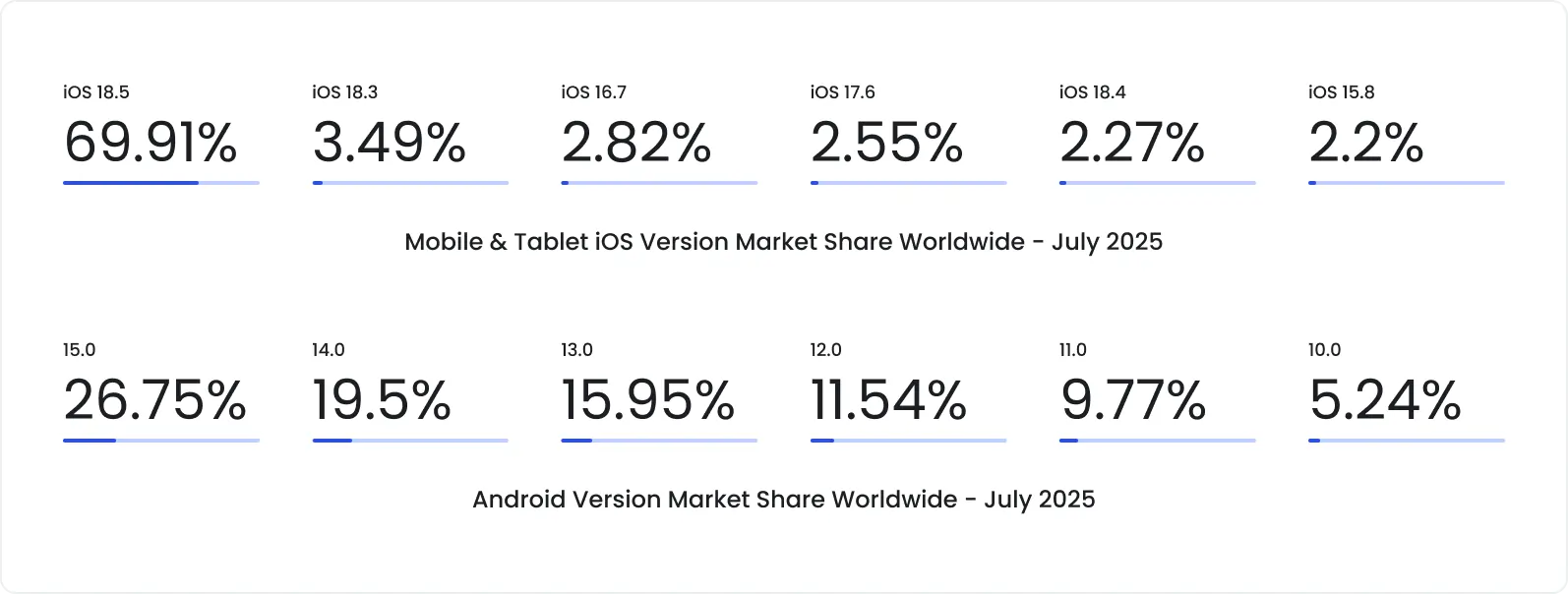
Source: StatCounter
Testing across all major browsers and embedded WebViews, not just Chrome.
Validating camera, microphone, and Bluetooth peripheral flows under OS-specific permission models.
Checking scenarios with assistive tech (screen readers, zoom functions, high-contrast modes) because accessibility in telehealth is not optional.
At DeviQA we always pay particular attention to compatibility. For the Abbott diabetes management platform, we run automated regression tests on more than 20 various devices with different OS, screen resolutions, and browsers. When working on Catalyst, an advanced solution for BCBA therapists, we used our extensive device fleet to test the mobile app on all supported iOS and Android versions, including beta versions. This ensured the flawless work of the app on every popular tablet and phone. The web portal was also tested across all required browsers and resolutions.
We perceive compatibility testing not as a nice-to-have QA checklist item but as the frontline of patient access and clinical reliability. And that’s exactly how we recommend you approach it too.
Telemedicine QA: Case-based Insights
In most industries, a bug is a nuisance. In healthcare, it’s a risk.
One failure can interrupt treatment, waste clinical time, or lock a patient out of care. That’s why QA in telemedicine can’t stop at checking features off a list. It has to account for the real world, unpredictable networks, imperfect devices, human behavior.
Several QA principles define groundbreaking telemedicine solutions:
1. Testing across real usage conditions
Success in a lab doesn’t guarantee success in the field. Software testing and QA services must consider device diversity, fluctuating mobile networks, and browser differences. Reproduction of various actual patient environments reveals hidden defects and prevents failures before they impact care.
For example, in our collaboration with CipherHealth, a provider of an advanced patient engagement solution, we tested across the three latest browser versions and the two latest versions of iOS and Android. This way, we ensured their platform delivered a seamless and reliable experience for patients and providers alike.
2. Incorporating load testing from the start
Systems that support patient monitoring or clinical workflows need to withstand spikes, whether from onboarding thousands of new patients or a sudden surge in clinician access. Waiting until go-live to measure performance is a costly mistake.
3. Mixing automation with manual exploration
The right balance between automated and manual approaches is a golden rule. While automation ensures appropriate test coverage and repeatability, manual checks uncover odd failures like permission prompts, interrupted uploads, or UI freezes that scripts often miss. Working on a mobile wound care solution, we achieved 80% test coverage by mixing manual and automated tests.
4. Prioritizing accessibility and low-end UX by default
Not every patient has a top-of-the-line phone or perfect eyesight. Many patients use older hardware, limited connections, or assistive technologies. A telehealth platform that ignores these scenarios excludes populations who may need telehealth most. Testing must ensure that interfaces remain usable on older devices and for users with accessibility needs.
5. Validating resilience, not just correctness
It’s not enough to validate the work of telemedicine software features. QA has to confirm that workflows recover from lag, degraded APIs, and interrupted streams. Reliability in stress conditions is part of the definition of ‘working’ in healthcare.
Following these principles ensures telemedicine solutions are built not just to function but to endure, which is a critical distinction when patient care depends on them.
Want to move fast without breaking care?
Telehealth is scaling fast. But speed without quality doesn’t just break software. It breaks trust. And in healthcare, trust is everything.
Real-world telehealth QA has to account for a few hard truths:
Traffic spikes aren’t edge cases. They’re routine. Platforms must be tested to stay available under constant, unpredictable load.
Lag kills confidence. Uptime alone isn’t enough – responsiveness defines whether patients stay or abandon care.
Compatibility equals access. If a device, browser, or OS combo fails, a patient may be locked out when it matters most.
Resilience matters as much as correctness. Systems must recover gracefully from dropped connections, degraded APIs, and overloaded services.
Reality is messy. Aging phones, unstable networks, sudden surges, that’s where real failures surface.
The takeaway is simple: QA isn’t optional in telehealth. It’s patient safety. Software testing has to be done like lives depend on it, because they do.
That’s how we approach telemedicine software testing at DeviQA.
If you’re scaling a healthcare platform and want confidence, not guesswork, let’s talk.
Get your telehealth platform reviewed by healthcare QA experts
About the author
Senior AQA engineer
Ievgen Ievdokymov is a Senior AQA Engineer at DeviQA, focused on building efficient, scalable testing processes for modern software products.